Page 1 of 1
Looking for hotkeys, etc.
Posted: Sun Mar 22, 2026 10:39 am
by Rising-Sun
Been looking in the game folders for hotkeys, such as F6 for hexside details, but the others i couldnt find on this forum. Does anyone know where to look or have? Need something like showing rails, roads, etc. Noticed if you hit Y, wasnt sure what that is.
Re: Looking for hotkeys, etc.
Posted: Sun Mar 22, 2026 10:52 am
by btd64
Did you check the manual or the Readme file....GP
Re: Looking for hotkeys, etc.
Posted: Sun Mar 22, 2026 11:52 am
by Rising-Sun
btd64 wrote: Sun Mar 22, 2026 10:52 am
Did you check the manual or the Readme file....GP
Yes i did, only found F6 key in the manual and nothing on the readme file here.
Re: Looking for hotkeys, etc.
Posted: Sun Mar 22, 2026 12:09 pm
by zebrazwo
Rising-Sun wrote: Sun Mar 22, 2026 11:52 am
btd64 wrote: Sun Mar 22, 2026 10:52 am
Did you check the manual or the Readme file....GP
Yes i did, only found F6 key in the manual and nothing on the readme file here.
If you have version 28 installed, go into the manuals folder, find the WITPAE FINAL MANUAL 3-3-24.pdf. Open it. Section 2.2 Hotkeys
Re: Looking for hotkeys, etc.
Posted: Sun Mar 22, 2026 1:00 pm
by Rising-Sun
zebrazwo wrote: Sun Mar 22, 2026 12:09 pm
Rising-Sun wrote: Sun Mar 22, 2026 11:52 am
btd64 wrote: Sun Mar 22, 2026 10:52 am
Did you check the manual or the Readme file....GP
Yes i did, only found F6 key in the manual and nothing on the readme file here.
If you have version 28 installed, go into the manuals folder, find the WITPAE FINAL MANUAL 3-3-24.pdf. Open it. Section 2.2 Hotkeys
Guess i dont have it then. Only thing i see in readme file is how to setup your video, such as -deepColor, etc.
Re: Looking for hotkeys, etc.
Posted: Sun Mar 22, 2026 1:20 pm
by Bo Rearguard
Rising-Sun wrote: Sun Mar 22, 2026 1:00 pm
Guess i dont have it then. Only thing i see in readme file is how to setup your video, such as -deepColor, etc.
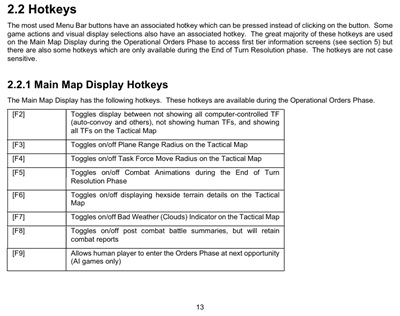
It's not in the readme file. Go to Page 13 of the revised manual in the Manuals Folder. The hot keys list starts there and continues on to Page 14.
- Hotkeys.jpg (42.04 KiB) Viewed 835 times
Re: Looking for hotkeys, etc.
Posted: Sun Mar 22, 2026 7:10 pm
by Rising-Sun
Thanks Bo, i mistaken hitting the wrong key on the keyboard and something odd happened on the map. Y key show something like rail system linked nearby hexes if any, R key did something similar. I think i hit something on the keyboard that will turn off or disabled bad weather and couldnt figured out which and ended up with other keys doing some odd things on the map and options.
Re: Looking for hotkeys, etc.
Posted: Sun Mar 22, 2026 9:11 pm
by BBfanboy
Rising-Sun wrote: Sun Mar 22, 2026 7:10 pm
Thanks Bo, i mistaken hitting the wrong key on the keyboard and something odd happened on the map. Y key show something like rail system linked nearby hexes if any, R key did something similar. I think i hit something on the keyboard that will turn off or disabled bad weather and couldnt figured out which and ended up with other keys doing some odd things on the map and options.
Yes, Y is railroads and R is roads. The railroad lines are considered paths so they sort of show up on the R key display. I think infantry can make 10 miles a day on a path.
Re: Looking for hotkeys, etc.
Posted: Mon Mar 23, 2026 3:52 am
by Rising-Sun
BBfanboy wrote: Sun Mar 22, 2026 9:11 pm
Rising-Sun wrote: Sun Mar 22, 2026 7:10 pm
Thanks Bo, i mistaken hitting the wrong key on the keyboard and something odd happened on the map. Y key show something like rail system linked nearby hexes if any, R key did something similar. I think i hit something on the keyboard that will turn off or disabled bad weather and couldnt figured out which and ended up with other keys doing some odd things on the map and options.
Yes, Y is railroads and R is roads. The railroad lines are considered paths so they sort of show up on the R key display. I think infantry can make 10 miles a day on a path.
Cool thanks for the infos. Been hitting alot of keys showing up alot of popups similar to F functions.
Re: Looking for hotkeys, etc.
Posted: Mon Mar 23, 2026 7:14 am
by Chris21wen
There's more than on post with a list of hotkeys been posted. It is in section 2.2 in the manual, old or new although the old one might not have all.
I'll post it one more time.
2.2 HOTKEYS
War in the Pacific, Admiral’s Edition™ includes several hotkeys:
[F2] Toggles display between not showing all computer-controlled TFs (auto-convoy and others), not showing human TFs, and showing all TFs.
[F3] Toggle Plane Range Radius on/off
[F4] Toggle Task Force Move Radius on/off
[F5] Toggle combat animations on/off
[F6] Toggle hexside terrain detail on/off
[F7] Toggle Bad Weather (Clouds) Indicator on/off
[F8] Toggles combat summaries on/off, but will retain combat reports
[F9] Allow human players to enter the Orders Phase at next opportunity
[A] Bring up the List All Land Based Air Units screen
Bring up the List All Bases screen
[C] Bring up the Combat Report screen
[D] View aircraft, troop and vehicle Database
[E] End the Orders Phase
[F] Save the game
[G] Bring up the List All Ground/Land Based Units screen
[H] Show the Auto Convoy System
Bring up the Intelligence Reports screen
[J] Bring up the Industry screen
[K] Bring up the Weather Report Screen
[L] Bring up the Signal Intelligence reports
[M] View Game Credits
[N] Bring up the List All Naval Air Units screen
[O] Bring up the Operational Report screen
[P] Bring up the Preference and Options screen
[Q] Quit game
[R] Toggles Road networks on/off
[S] Bring up the List All Ships screen
[T] Bring up the List All Task Forces screen
[V] View Ship Database
[W] Display Hex/Hexside Ownership
[Y] Toggle Rail Network on/off
[Z] Display search arcs
[1] Toggles text for terrain in each hex on the Tactical Map
[2] Toggles text for Zone Location in each hex on the Tactical Map
[3] Toggles hex weather forecast
[4] Toggles defined nationality of the land hex
[5] Toggles hex supply path values from selected base as a percentage
[6] Toggles Ship/Sub Patrol zones
[Ctrl] [A] Show the Large Strategic Map
[Ctrl] [J] Toggles the Jump Map on or off in the full screen map mode
[Ctrl] [f] Reduce main message delay one increment
[Ctrl] [s] Increase main message delay one increment
[Ctrl] [p] Pause turn resolution
[?] Center map on Home Bases
[>] Next Task Force with Task Force Display
[.] Next Task Force without Task Force Display (unshifted “>”)
[<] Previous Task Force with Task Force Display
[,] Previous Task Force without Task Force Display (unshifted “<”)
[+] Next Base
[-] Previous Base
[Esc] Speeds up (in PBEM) or skips (vs. AI) the current animation
Re: Looking for hotkeys, etc.
Posted: Mon Mar 23, 2026 12:05 pm
by Rising-Sun
Wow thanks Chris, this is really helpful

good lord, how did i miss that lol.
Re: Looking for hotkeys, etc.
Posted: Mon Mar 23, 2026 3:34 pm
by Skyros
I am in the process of updating my reference spreadsheet to include the information in the new manual. Here is the page with the hot keys.