This is the Keycode Process for PBEM games....GP
3.2.3 Keycode Procedure for PBEM Games
Unlike many other games, War in Spain 1936-39 permits the player to change game rules and even scenario data in single and PBEM games. While changes in playing the AI are immediate, a PBEM game requires the Republican player to obtain and send the Key Code to the Nationalist player. To do an update in scenario data, EXE or game rules, the procedure is almost like the first turn of a PBEM game. In case of scenario data updates, all players must replace the scenario data with the updated files. In this case the game will show a screen message telling the players of a SCN data checksum mismatch until the game gets adapted to the new data. This is normal and can be ignored.
The first thing that both sides should do is update their files, then follow the following procedure:
1. The Nationalist player sends his game to the Republican player. The Nationalist player should NOT issue any orders this turn.
2. The Republican player must place this save file in the "Save folder".
3. The Republican player must load this save file, open the preferences screen, and retrieve the keycode and send it to the Nationalist player. See Below:
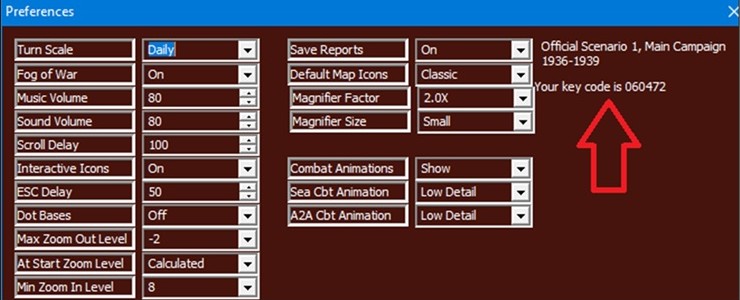
- 007A.jpg (59.67 KiB) Viewed 1988 times
4. The Nationalist player must load his save again and open the preferences screen. There the keycode must be entered and "Update Scenario" is to be clicked. See Below:
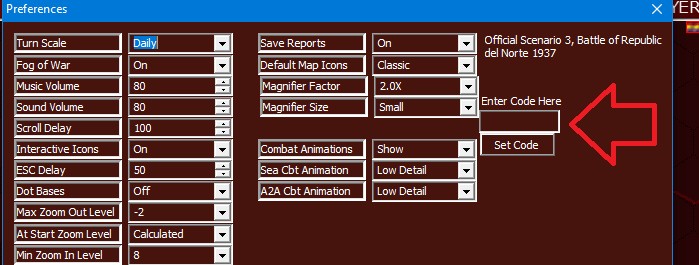
- 007B.jpg (62.15 KiB) Viewed 1988 times
If successful, any warning on SCN data checksum mismatch should no longer appear.
5. The Nationalist player can then issue orders just like with the first turn of a session, save the game, and send this save to the Republican player.
6. The Republican player must place this save in the "Save" folder" as if it was the first game turn received by the Nationalist Player for a PBEM session.
Note: The keycode is generated by turn, and game data, and will differ for each turn. Due to this no orders may be given to any unit during the update process, or this might change the keycode value of the respective saves.
Note: Each player must keep the latest save, from your opponent, in the "Save" folder. The number of saves in the PBEM Import folder do not matter. The game can find the correct next turn among a thousand. The only issue is if the other player sends 2 saves for the next turn (for example revising orders after sending the turn). Then the 1st save needs to be deleted to avoid confusion.
Note: So, remember the main rule: Keep the prior turn safe in the save folder and add the new turn save into the PBEM Import folder.
Trouble Shooting: If you see a “Checksum” warning message, then ensure that all players are using the same game and scenario version. See Section 3.2.3 above for the process to fix the Checksum warning if data, the EXE or game rules need to be updated in your current game.
