Page 1 of 1
CTD when Clicking on Certain Unit(S)
Posted: Tue May 12, 2026 12:58 pm
by Q-Ball
I consistently crash to desktop (CTD) when clicking on these Division-sized units. It only happens with these Division-sized units. At creation I was able to get them formed and moving, but for several turns I am unable to click on them or issue any orders:
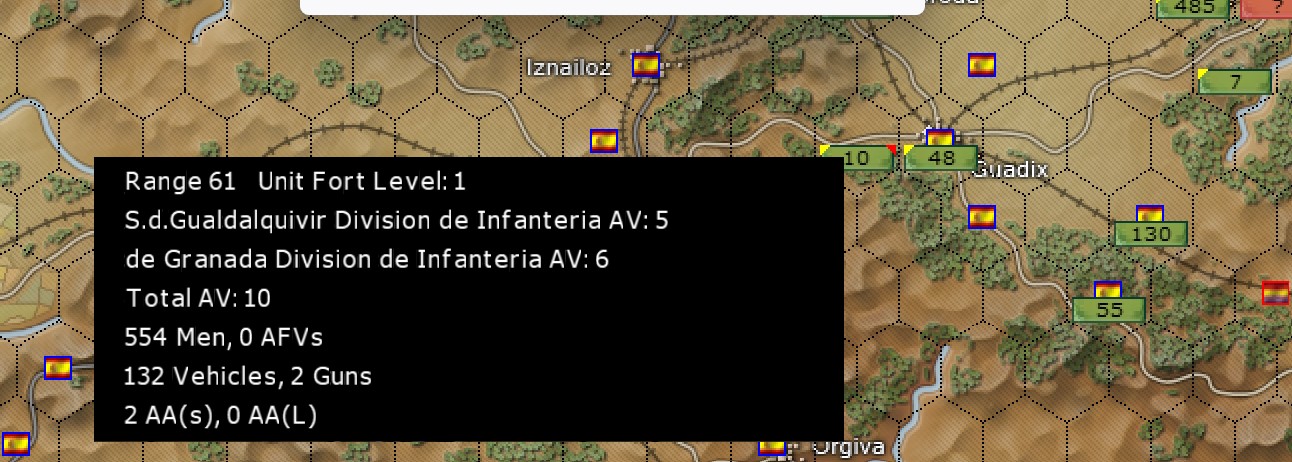
- 1-4.jpg (193.47 KiB) Viewed 753 times
This is a PBEM game, so please let me know how you want files to investigate, or let me know if known issue with pending fix
Re: CTD when Clicking on Certain Unit(S)
Posted: Tue May 12, 2026 4:30 pm
by Q-Ball
After getting those two units separated (by accessing via Unit List), the "S.d.Gualquivir" Division is the unit causing the CTD.....click on that, it's crash-time. The Grenada Division is OK.
Please advise on what you need from me
Re: CTD when Clicking on Certain Unit(S)
Posted: Wed May 13, 2026 7:05 pm
by Alessandro S.
The savegame, please.
That should allow me to get the same crash.
Re: CTD when Clicking on Certain Unit(S)
Posted: Thu May 14, 2026 3:04 pm
by Q-Ball
Alessandro S. wrote: Wed May 13, 2026 7:05 pm
The savegame, please.
That should allow me to get the same crash.
Sent in a PM
Re: CTD when Clicking on Certain Unit(S)
Posted: Thu May 14, 2026 6:57 pm
by Alessandro S.
I got the Save. Thanks!
Re: CTD when Clicking on Certain Unit(S)
Posted: Fri May 15, 2026 9:32 am
by vinnie71
Hi Q-ball
I found a little work around - its the S Gualdalquavir division
- So first right click the division
- then go to the LCU list to the left and chose the division from the list
- give it any orders you want
- right click on any other unit in another hex and then you can exit or play on normally. Don't try to exit from the division itself as you'll crash out of the game,
The problem seems to be connected with any attempt to use the unit symbol on the map itself, If you give it orders as per above it actually behaves like a normal unit.
Hope that helps
Re: CTD when Clicking on Certain Unit(S)
Posted: Fri May 15, 2026 12:06 pm
by Alessandro S.
I was able to confirm it is the side bar. If you turn it off or switch to "full list" you can click the hex with no problem.
Thanks to your save Bill should be able to fix it very quick.