Page 1 of 1
Adding an image to a Forum post
Posted: Wed Jun 24, 2026 6:08 pm
by vettim89
In previous interactions one could add an image to a Forum post by clicking the "Add Image" button at the bottom of the edit screen. That button is no longer there
How does one add an image in the current format?
Thanks as always for the help and the inevitable abuse forthcoming
Re: Adding an image to a Forum post
Posted: Wed Jun 24, 2026 6:15 pm
by Nikel
Attachment, add files. You may then place inline or not.
If the pic is in a link, copy/paste it, select it and then click on insert image.
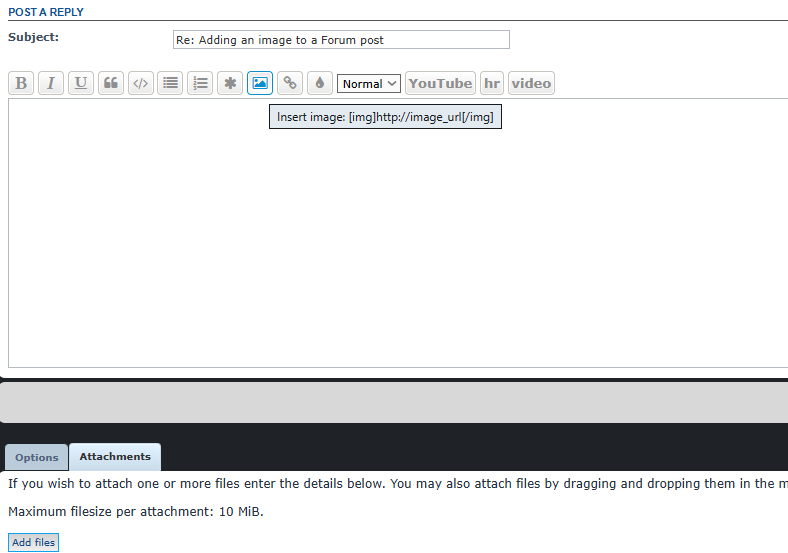
- AI.png (21.19 KiB) Viewed 391 times
Re: Adding an image to a Forum post
Posted: Wed Jun 24, 2026 8:07 pm
by BBfanboy
Or, when you click on "Post Reply", you get this text area and below that are two tabs that say Options and Attachments. Clicking on the Attachments one lets you navigate to where you have the image stored, select it (click and Enter to Open). Ensure the cursor is in the correct place in your reply text box before you click Add Files.
Re: Adding an image to a Forum post
Posted: Wed Jul 22, 2026 1:34 pm
by RangerJoe
I usually have a folder open with the pictures. I select one and drag it over to this writing area and then drop it here. It then adds the picture to the post.
Re: Adding an image to a Forum post
Posted: Wed Jul 22, 2026 11:40 pm
by sandman455
The BEAST!
The stuff of JFB nightmares. . . FWI, you can find a great thread about its capabilities here:
https://forums.matrixgames.com/viewtopic.php?t=217927