Page 1 of 1
[REPLIED] How to Advance a flight plan to the next Waypoint
Posted: Fri Aug 28, 2026 7:14 pm
by serjames
I have a flight of F-18 with a strike loadout. I have identified a new target when I create a mission to target this it creates a flight plan, which is brilliant, but it immediately turns the aircraft around and heads them back to point 2 which is a form-up point.
I've searched the flight plan tool thoroughly and cannot see a way to advance a flight onto the next point or ideally point 4 which seems to be autmatically created as the IP point.
I've also google-searched and searched the forums but there does not seem to be a solution I can see.
How do I make flight plans work for aircraft already airborne ?
Re: How to Advance a flight plan to the next Waypoint
Posted: Fri Aug 28, 2026 7:40 pm
by DWReese
Often, the planes do loops between WP 2 and WP 3 several times before heading off to WP 4. Did you let it play out long enough? I see that some of these planes waste about 20-30 percent of their fuel before actually heading toward WP 4.
Re: How to Advance a flight plan to the next Waypoint
Posted: Fri Aug 28, 2026 8:41 pm
by Nikel
The only way I know is to move the first WPs of the new flightplan near the target.
To avoid the loops, to may set to 0 the hold time.
There may be errors if the WPs are too near each others. Also setting to 0 the hold time.
But it will work.
Perhaps there is another cleaner method.
May you post your scenario?
Re: How to Advance a flight plan to the next Waypoint
Posted: Mon Aug 31, 2026 6:22 am
by Deserere
Hi Nikel
MDSP creator here.
if I got this right you would like to have your aircraft begin the flightplan from WP number 4 and ignore WPs 2 and 3
We do not have a way to do that at the moment. If you can post your scenario we can have a look and see what can be done.
Your case might indeed be a relevant one and something might be made to support this possibility.
Thanks
Re: How to Advance a flight plan to the next Waypoint
Posted: Mon Aug 31, 2026 3:23 pm
by Nikel
Deserere wrote: Mon Aug 31, 2026 6:22 am
Hi Nikel
MDSP creator here.
if I got this right you would like to have your aircraft begin the flightplan from WP number 4 and ignore WPs 2 and 3
We do not have a way to do that at the moment. If you can post your scenario we can have a look and see what can be done.
Your case might indeed be a relevant one and something might be made to support this possibility.
Thanks
Sorry, probably you meant serjames, the author of the thread

I was just suggesting him a workaround, that is to move manually the first WPs near the target. Described in the video.
CMO may display errors if the WPs are too near, did not happen in this case. And also if you set the hold time to 0, happens in the video. You are in a war zone and you want to strike the target fast.
Even with errors, it works.
Attached the simple scenario of the video, before creating the mission and the FP and after.
This simulates the situation he described, when a target in a mission was already hit, and a new target appears. You create a new strike mission for it, but the flightplan generated send you back to WP 2 that is near your base.
The workaround is to move WPs 2, 3 and even 4 near the target.
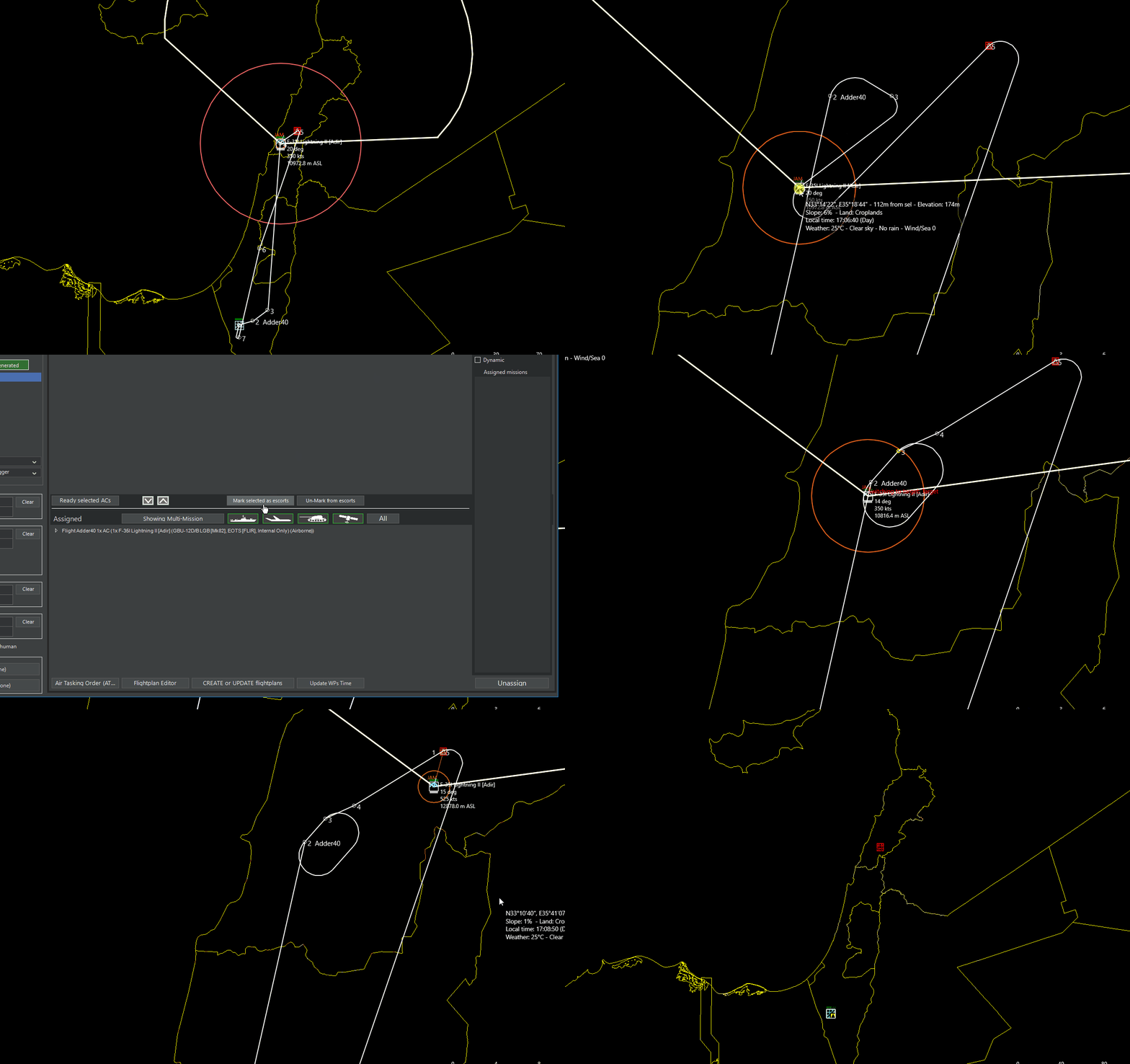
- FwA2.gif (4.99 MiB) Viewed 626 times
Re: [REPLIED] How to Advance a flight plan to the next Waypoint
Posted: Mon Aug 31, 2026 6:16 pm
by TheKeeper
I had same problem. Open flightplan editor and change hold start waypoint to turning point ingress. Sometimes when waypoints are too close it leads to error.
Re: [REPLIED] How to Advance a flight plan to the next Waypoint
Posted: Mon Aug 31, 2026 7:20 pm
by thewood1
That error was put in there because there are issues with turning radius of aircraft and the zone around waypoints being so close that the flight plan was thinking the plane was at two waypoints at once. IIRC, the devs put that in there to keep that from happening.
Re: [REPLIED] How to Advance a flight plan to the next Waypoint
Posted: Tue Sep 01, 2026 9:22 am
by serjames
Thanks for everyone's help. Been a while since I played so was quite amazed at some of the the changes including this planner which is frankly superb if you are launching from your homebase. But it's quite a frustrating mechanic when the aircraft are already up on-station.
You're right, I could grab WP 2 and 3 and manually move them. But that is quite onerous when you have say 12 birds up. Easier if grouped, admittedly. But grabbing the WP and dragging it across the map, for example, from over Fairford Airbase and moving it off the coast of Iceland is quite tricky. I had the FP window open too, so that needs dragging around.. It's just a huge pain and meant I scrapped the whole thing and was just manually assigning targets, which was clunky.
The other issue is around the fact that I don't need a "form-up" and "Hold" feature when I'm already on station. The logic should see the platform is already airborne and move it straight to "WP4" or whatever the logical proper start point would be. This is the way it used to work when you created a targeted strike mission and assigned a platform to it. It used to simply create the next waypoints IP etc, and then the aircraft would turn on course and start prosecuting the mission from it's immediate location.
It's not scenario specific, it's a function of the strike mission, auto-creating a Flight plan tool as far as I can see.
Just needs a button to move the aircraft to the NEXT WP or something like that

(sounds so easy when you say it out loud ;-P )
Re: [REPLIED] How to Advance a flight plan to the next Waypoint
Posted: Tue Sep 01, 2026 1:10 pm
by Nikel
You are right, in the simple scenario above is an easy task.
In a complicated scenario the story may be different.
I agree with you, a FP should be only complete when you start landed in the AB.
If you are already airborne, several previous WPs should not be generated.
Perhaps Deserere will add this feature
Re: [REPLIED] How to Advance a flight plan to the next Waypoint
Posted: Wed Sep 02, 2026 12:00 am
by boogabooga
TheKeeper wrote: Mon Aug 31, 2026 6:16 pm
I had same problem. Open flightplan editor and change hold start waypoint to turning point ingress. Sometimes when waypoints are too close it leads to error.
You can go one step further and delete the two unnecessary waypoints. There is a delete waypoint button. Then waypoint 4 will become waypoint 2, and your planes pick up the route from there.
But, there really should be an option to skip waypoint or go to previous waypoint. The flight sims have had this part right for years and years.
Re: [REPLIED] How to Advance a flight plan to the next Waypoint
Posted: Wed Sep 02, 2026 10:32 am
by serjames
Thanks for your reply. That would be the obvious thing, just delete them. but the Flight Plan editor will not let you delete these first 3 waypoints. Only Change them - I did try... If i change them to simple Ingress points. the aircraft is still heading back to wherever they took off from. Unless I manually move them all.
It's clunky.. ;-P
Re: [REPLIED] How to Advance a flight plan to the next Waypoint
Posted: Thu Sep 03, 2026 1:03 am
by boogabooga
serjames wrote: Wed Sep 02, 2026 10:32 am
Thanks for your reply. That would be the obvious thing, just delete them. but the Flight Plan editor will not let you delete these first 3 waypoints. Only Change them - I did try... If i change them to simple Ingress points. the aircraft is still heading back to wherever they took off from. Unless I manually move them all.
It's clunky.. ;-P
Change them to turning point ingress and THEN delete. It works for me.
Re: [REPLIED] How to Advance a flight plan to the next Waypoint
Posted: Thu Sep 03, 2026 3:46 pm
by Nikel
boogabooga wrote: Thu Sep 03, 2026 1:03 am
Change them to turning point ingress and THEN delete. It works for me.
That works indeed, thanks.
Much simpler than moving the WPs. WP3 will change automatically when WP2 is changed.

- WPCh.gif (4.21 MiB) Viewed 418 times
Re: [REPLIED] How to Advance a flight plan to the next Waypoint
Posted: Fri Sep 04, 2026 9:59 am
by serjames
That worked ! But I'll try again. Thanks
 (sounds so easy when you say it out loud ;-P )