TOAWxml Editor

Post new mods and scenarios here
User avatar
Zovs
Posts: 9276
Joined: Sun Feb 22, 2009 11:02 pm
Location: United States

RE: TOAW XML Editor

Post by Zovs »

ORIGINAL: cathar1244

Important caveat: Anti-personnel (AP) ratings shown below are as entered in the equipment file with an editor that is EXTERNAL to the game. Entering AP values with the game's built-in equipment editor scales the ratings differently and for me, was confusing.

[center][:-] Anyone using the game's built-in equipment editor to alter the AP values is on their own. [:-][/center]

Anyone using the game's built-in equipment editor to alter the AP values is on their own.

Newbie question here, would not using the game's built-in equipment editor be the defacto way to go? Or is there something wrong with it?

No idea just asking.
Image
Beta Tester for: War in the East 1 & 2, WarPlan & WarPlan Pacific, Valor & Victory, Flashpoint Campaigns: Sudden Storm, Computer War In Europe 2
SPWW2 & SPMBT scenario creator
Tester for WDS games
User avatar
76mm
Posts: 4766
Joined: Sun May 02, 2004 4:26 am
Location: Washington, DC

RE: TOAW XML Editor

Post by 76mm »

Whoa, cathar, thanks for the investigations. Could you say which external equipment editor was used? I find it very strange that the results differ depending on which equipment editor you use...what general differences occurred when you used the in-game equipment editor?
User avatar
cathar1244
Posts: 1298
Joined: Sat Sep 05, 2009 2:16 am

RE: TOAW XML Editor

Post by cathar1244 »

Or is there something wrong with it?

I would not say there is anything wrong with it, but working with it as far as making antipersonnel rating changes is confusing IMO because of the way it takes input and displays output. If you look at it and make entries, you'll see what I mean.

For other activity like setting equipment flags, the in-game editor is straightforward to use.

Any changes in it need to be first saved in memory, and the scenario also has to be saved to put the altered version onto a hard disk.

For wide-ranging work in an equipment database, I would use an external editor as a matter of preference.

Cheers
User avatar
cathar1244
Posts: 1298
Joined: Sat Sep 05, 2009 2:16 am

RE: TOAW XML Editor

Post by cathar1244 »

ORIGINAL: 76mm

Whoa, cathar, thanks for the investigations. Could you say which external equipment editor was used? I find it very strange that the results differ depending on which equipment editor you use...what general differences occurred when you used the in-game equipment editor?

Hi 76mm,

"external editor" was just Notepad, editing an equipment file.

The differences result because the AP rating entered into the equipment file is changed by the game for internal calculations.

The AP ratings of equipment that are not fixed wing aircraft are divided by 8. Aircraft AP ratings are divided by 2. The way the in-game editor takes input can lead to confusion, and then it reads back the change, but showing the internally calculated rating (divided by 8 or 2).

There was also something that looked like a bug to me, but I would have to play with it more to see if that is the case.

It is certainly possible to use the in-game editor to change the AP rating, but one has to be aware of what it is looking for in terms of input and what it is presenting in terms of output.

Cheers
User avatar
Zovs
Posts: 9276
Joined: Sun Feb 22, 2009 11:02 pm
Location: United States

RE: TOAW XML Editor

Post by Zovs »

cathar,

Thanks for the explanation.

Several long years ago when I designed my scenarios I just used the default equipment that came with the game, I vaguely recall the bio editor or some such.

For a quick refresher for me, when designing scenarios when/why would you want to deviate from the default?

Just curious to know and understand. I have several of my old scenarios that I have converted to TOAW IV, but I think I need to tweak them before I release them. In one the causalities are horrendous and so I need to research the manual on how to lower that (I believe its with the attrition editor settings).

Thanks for listening and answering newbie-dumb questions lol
Image
Beta Tester for: War in the East 1 & 2, WarPlan & WarPlan Pacific, Valor & Victory, Flashpoint Campaigns: Sudden Storm, Computer War In Europe 2
SPWW2 & SPMBT scenario creator
Tester for WDS games
User avatar
cathar1244
Posts: 1298
Joined: Sat Sep 05, 2009 2:16 am

RE: TOAW XML Editor

Post by cathar1244 »

Zovs, if you used Bio-Ed back in the day, you're hardly a newbie!

For your scens, the default equipment is fine unless you need to model something that is not in the database.

There are different versions of the equipment database floating around that enthusiasts have cranked out.

For what I was discussing above, I needed to alter equipment antipersonnel values to see what the game generated as anti-shipping capability in response.

If you at some point want to make a new piece of equipment, you can always ask in these forums.

Re: casualties. In the editor, go to the deployment editor. Then look under the "edit" menu -- you'll be able to access the "attrition divider" to alter the loss rates. A bunch of other options can be found there as well.

Cheers
User avatar
Zovs
Posts: 9276
Joined: Sun Feb 22, 2009 11:02 pm
Location: United States

RE: TOAW XML Editor

Post by Zovs »

Thanks for the kind words and the tips cathar.
Image
Beta Tester for: War in the East 1 & 2, WarPlan & WarPlan Pacific, Valor & Victory, Flashpoint Campaigns: Sudden Storm, Computer War In Europe 2
SPWW2 & SPMBT scenario creator
Tester for WDS games
User avatar
cathar1244
Posts: 1298
Joined: Sat Sep 05, 2009 2:16 am

RE: TOAW XML Editor

Post by cathar1244 »

sPzAbt653,

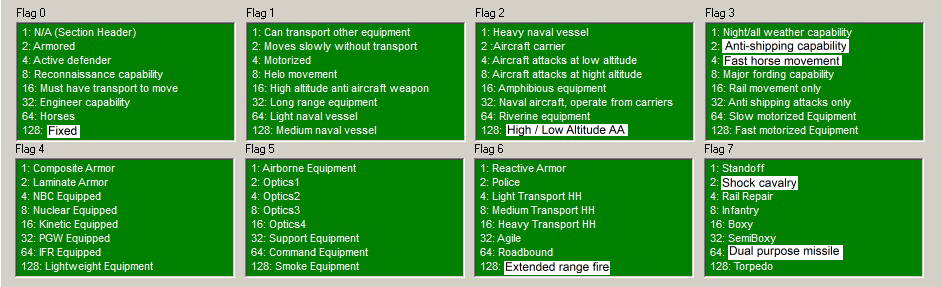
Nice flags graphic. I have taken the liberty of updating it to reflect the meanings as given by the in-game editor. Note some items have updated meanings.

Cheers

Image
User avatar
larryfulkerson
Posts: 42791
Joined: Sat Apr 16, 2005 9:06 pm
Location: Tucson, AZ,usa,sol, milkyway
Contact:

RE: TOAW XML Editor

Post by larryfulkerson »

Hello again my friends. I've come across an example of what I was refering to before. Here I am deploying my units and I've come to one that I want to appear in the game on turn 5 but I'm not real sure where it would be best to put it yet. I need some way to refer to the map somehow. Right now the workaround is to have a Session of the scenario you're working on loaded as a head to head game to find the right hexes. Which works out just fine. I just thought there might be a way somehow that some kind of mini-map kind of thing might make your editing of things go faster yet.

Image
Attachments
temp.jpg
temp.jpg (284.05 KiB) Viewed 173 times
Russia’s 41st Army COLLAPSED in Pokrovsk — 25,000 Soldiers KILLED After a RIDICULOUS Russian Assault
https://www.youtube.com/watch?v=T_CtW3GqPQg
User avatar
sPzAbt653
Posts: 10112
Joined: Thu May 03, 2007 7:11 am
Location: east coast, usa

RE: TOAW XML Editor

Post by sPzAbt653 »

There was also something that looked like a bug to me, but I would have to play with it more to see if that is the case.
I've been using the Eqp Editor since it was implemented and I've never noticed anything wrong, but let us know if you do see something so that we can look into it.
User avatar
sPzAbt653
Posts: 10112
Joined: Thu May 03, 2007 7:11 am
Location: east coast, usa

RE: TOAW XML Editor

Post by sPzAbt653 »

I'm having trouble seeing the red, green and blue entries. Can you maybe try making them bold so they might show up better, and hopefully not be overbearing at the same time.
User avatar
76mm
Posts: 4766
Joined: Sun May 02, 2004 4:26 am
Location: Washington, DC

RE: TOAW XML Editor

Post by 76mm »

ORIGINAL: sPzAbt653
I'm having trouble seeing the red, green and blue entries. Can you maybe try making them bold so they might show up better, and hopefully not be overbearing at the same time.
I tried bold, and found it rather garish. I think there is a semi-bold option, I can take a look at that.
User avatar
sPzAbt653
Posts: 10112
Joined: Thu May 03, 2007 7:11 am
Location: east coast, usa

RE: TOAW XML Editor

Post by sPzAbt653 »

Thanks Tom. Full Disclosure, I can't take the standard black on white windows color scheme so I use a custom one, as seen below. So I admit to being selfish when asking for different visual settings, and understand that you have more important items to tend to [:)]

Image
Attachments
XMLEd4.jpg
XMLEd4.jpg (95.26 KiB) Viewed 173 times
User avatar
76mm
Posts: 4766
Joined: Sun May 02, 2004 4:26 am
Location: Washington, DC

RE: TOAW XML Editor

Post by 76mm »

ORIGINAL: sPzAbt653
So I admit to being selfish when asking for different visual settings, and understand that you have more important items to tend to
No worries; don't think this will be complicated, but I can't promise I'll change if I don't like the new look! [8D]
User avatar
cathar1244
Posts: 1298
Joined: Sat Sep 05, 2009 2:16 am

RE: TOAW XML Editor

Post by cathar1244 »

A bit more on TOAW internal functioning, concerning the antipersonnel rating. I mentioned these two formulae before when discussing auto-generation of the anti-shipping capability:
(for fixed wing aircraft) the anti-ship capability is figured as the square root of (two times the AP rating), rounded down.

and,
Anti-ship capability for artillery, as auto-generated by TOAW.

Once again, with the antipersonnel rating (AP) as entered by an external editor into the equipment file:

Anti-ship capability is the square root of (AP divided by 2), rounded down.

What may not be obvious is that although one formula multiplies by two and the other divides by two, they are both using the same method to generate the anti-shipping capability.

Consider: when entering antipersonnel ratings in the equipment file using an external editor, for equipment that is not fixed wing aircraft, we enter an AP rating that is eight times what the game will display as the AP value. That is, if I want the game to show an AP value of 16 for a 105mm howitzer, I enter a value of 128 in the AP field of the equipment definition:

<ITEM_149>
<NAME>105mm Howitzer</NAME>
<COUNTRY>Common equipment</COUNTRY>
<EQUIP1>25</EQUIP1>
<EQUIP2>165</EQUIP2>
<AT>0</AT>
<AP>128</AP> . . .

But for fixed wing aircraft, the AP rating entered is only doubled from what the game will display as the AP value:

<ITEM_1865>
<NAME>P-40 (late)</NAME>
<COUNTRY>United States - 1941</COUNTRY>
<EQUIP1>256</EQUIP1>
<EQUIP2>187</EQUIP2>
<AT>2</AT>
<AP>6</AP> . . .

(P-40 (late) displays an AP value of 3 in-game, one-half of what is entered into the equipment file).

Back to the two formulae above: the calculation is taking the square root of a quantity and rounding the result down. But the quantity, in terms of units used, is the same for both formulae. This is happening because in the case of artillery (equipment file entry 8 times that used by the game) is DIVIDED BY TWO; that is, the AP value is then four times that used by the game. With fixed wing aircraft (equipment file entry 2 times that used by the game), the AP value is MULTIPLIED BY TWO; that is ... you guessed it ... four times that used by the game. So that "four times the value displayed by the game" for the AP rating is a sort of common ground for the AP ratings of fixed wing aircraft in relationship to the AP ratings of other equipment in the game (for internal calculations done by TOAW).

Lessons therein regarding how much projectile weight goes into a an AP rating of "1" for different equipment, and how air-delivered ordnance is scaled in relationship to that delivered by surface weapons.

Cheers

User avatar
cathar1244
Posts: 1298
Joined: Sat Sep 05, 2009 2:16 am

RE: TOAW XML Editor

Post by cathar1244 »

sPzAbt653, will do. I want to retrace my steps and take some notes. Before I declare something seems buggy, I'll open a thread in this forum with what I'm seeing and ask if anyone else sees what I'm seeing. That way, if it is just misinterpretation on my part, you guys can set me straight.

Cheers
I've been using the Eqp Editor since it was implemented and I've never noticed anything wrong, but let us know if you do see something so that we can look into it.
User avatar
76mm
Posts: 4766
Joined: Sun May 02, 2004 4:26 am
Location: Washington, DC

RE: TOAW XML Editor

Post by 76mm »

cathar, I saw your other thread but wasn't sure that I understood the outcome...so is Bob saying that the changing AP values are a bug, and that in the next patch they will remain unchanged regardless of equipment type?
User avatar
cathar1244
Posts: 1298
Joined: Sat Sep 05, 2009 2:16 am

RE: TOAW XML Editor

Post by cathar1244 »

76mm,

I think what is happening is this.

In the equipment file, AP ratings are given for each piece of equipment. But, internally, the game uses a scaled version of those ratings. For fixed wing aircraft, the internal version is halved; for other equipment, it is divided by 8.

So what I was seeing is that, upon loading the equipment file, the in-game editor displayed the internal value of the AP rating of the Jastreb (internal value is 6, equipment file value is 12, IIRC). But, upon selecting the option to edit that value, the in-game editor's display of the internal value treated the entry as if it was equipment that is NOT a fixed wing aircraft, and was showing the entered value divided by EIGHT and not TWO. So, the entered value of "12" was shown in the edit box (meaning an internal game value of "6"), but when I clicked the checkmark, the in-game editor changed the in-game value to "1" because it treated the entry as an AP value for equipment that is not a fixed wing aircraft.

This is why I said in this thread I found the in-game editor confusing to use as far as AP value entry goes (at least in the case of fixed wing aircraft).

Hopefully what I wrote here is clear. I could show this to you on a PC, in person, in half a minute, but writing it in a message forum ... [X(]

Cheers
ORIGINAL: 76mm

cathar, I saw your other thread but wasn't sure that I understood the outcome...so is Bob saying that the changing AP values are a bug, and that in the next patch they will remain unchanged regardless of equipment type?
User avatar
76mm
Posts: 4766
Joined: Sun May 02, 2004 4:26 am
Location: Washington, DC

RE: TOAW XML Editor

Post by 76mm »

ORIGINAL: cathar1244
But, upon selecting the option to edit that value, the in-game editor's display of the internal value treated the entry as if it was equipment that is NOT a fixed wing aircraft, and was showing the entered value divided by EIGHT and not TWO. So, the entered value of "12" was shown in the edit box (meaning an internal game value of "6"), but when I clicked the checkmark, the in-game editor changed the in-game value to "1" because it treated the entry as an AP value for equipment that is not a fixed wing aircraft.
So I guess this is the bug? What happens when you load the file with the value entered via a third-party into the in-game editor, does it remain unchanged?
User avatar
76mm
Posts: 4766
Joined: Sun May 02, 2004 4:26 am
Location: Washington, DC

RE: TOAW XML Editor

Post by 76mm »

Guys, I hope to release the version allowing for new equipment in the next week or so.

In the meantime, I've started on an Event Editor...there is still a lot I don't understand, but hopefully I'll be able to figure it out.

But here is a mock-up with the functionality that I have in mind; as usual, let me know if you have suggestions:


Image
Attachments
eved1.jpg
eved1.jpg (97.61 KiB) Viewed 173 times
Post Reply

Return to “Mods and Scenarios”