WitPTracker AE News

This new stand alone release based on the legendary War in the Pacific from 2 by 3 Games adds significant improvements and changes to enhance game play, improve realism, and increase historical accuracy. With dozens of new features, new art, and engine improvements, War in the Pacific: Admiral's Edition brings you the most realistic and immersive WWII Pacific Theater wargame ever!

Moderators: wdolson, MOD_War-in-the-Pacific-Admirals-Edition

floydg
Posts: 2071
Joined: Sat Jun 26, 2004 10:08 pm
Location: Middletown, NJ

RE: WitPTracker AE Release 1.1

Post by floydg »

ORIGINAL: Frandoxx

I am hopeless in database understanding. I have the old version of tracker, I am through 5 turns in my game, if I upgrade to the new version, do I lose all the data for the first four turns? In other words will the first turn listed be turn five and the day by day data for turns one through 4 lost? [&:]

If you have the save files from turns 1 through 4, you can reload them (delete the database files, start the program with turn 1's save and then use the multi-turn read to get in the other three turns). If you don't have them any more, you'll need to start from turn 5. Sorry...

Floyd

Delete the trackerdb.* files.
Copy the pwsdll.dll file from the game folder to the WitPTracker folder.
Try running the WitPTracker.bat again.
floydg
Posts: 2071
Joined: Sat Jun 26, 2004 10:08 pm
Location: Middletown, NJ

RE: WitPTracker AE Release 1.1

Post by floydg »

ORIGINAL: Smeulders

ORIGINAL: floydg

ORIGINAL: Smeulders
One thing I've noticed in the device tab, under 'pool history', the LCU's that use the device are listed, but this list is often incomplete, a bit annoying if you're trying to find units that still need a certain device upgrade.

Please give a concrete example and provide a save so I can track down why things are missing.

Floyd

Sent a mail with the safe file attached and 2 examples.

Got it. I'll check it out later tonight.
Delete the trackerdb.* files.
Copy the pwsdll.dll file from the game folder to the WitPTracker folder.
Try running the WitPTracker.bat again.
User avatar
n01487477
Posts: 4764
Joined: Tue Feb 21, 2006 12:00 am

RE: Cabbage crates coming over the briney

Post by n01487477 »

ORIGINAL: floydg
Here is a first pass at adding the additional ship damage information. Any suggestions before I move on to something else...?
Probably better in the Ship Repair section, but priority, repair mode and time till completion - if we have room ?

I've started working on ship conversions and will post screen shots later this week, cause I'm unsure what will work best, but my initial idea is to have a filter for temp conversions (AK cargo to AK-t), then and upgradeTO filter where you pick the class (in another filter) and the table will show the ships that can be converted, the original config and the upgrade config.
Or do ppl think it would be better to have to ship type filters, the first being the original type the second the upgrade type?
Or should this be purely on class ?

I'm planning on hooking another tab on the upgrade screen, or should it be in Ships or Classes for that matter ?
Suggestions needed ...
User avatar
Nomad
Posts: 7273
Joined: Wed Sep 05, 2001 8:00 am
Location: West Yellowstone, Montana

RE: Cabbage crates coming over the briney

Post by Nomad »

When one of you starts working on LCUs, is it possible to show a march destination, distance traveled in hex, and op mode? Also a history of distance traveled each turn. It would be nice to see how many miles you are traveling each turn to be able to plan some. ( China is an Allied nightmare for me - my Japanese opponent is pushing me back everywhere.)
User avatar
n01487477
Posts: 4764
Joined: Tue Feb 21, 2006 12:00 am

RE: Cabbage crates coming over the briney

Post by n01487477 »

When one of you starts working on LCUs, is it possible to show a march destination, distance traveled in hex, and op mode? Also a history of distance traveled each turn. It would be nice to see how many miles you are traveling each turn to be able to plan some. ( China is an Allied nightmare for me - my Japanese opponent is pushing me back everywhere.)

We have the data points for this, and it was missed out last update, but it is on an extensive list and working its way to the top. I defer to Floyd, who is the LCU guru.
floydg
Posts: 2071
Joined: Sat Jun 26, 2004 10:08 pm
Location: Middletown, NJ

RE: Cabbage crates coming over the briney

Post by floydg »

ORIGINAL: n01487477
When one of you starts working on LCUs, is it possible to show a march destination, distance traveled in hex, and op mode? Also a history of distance traveled each turn. It would be nice to see how many miles you are traveling each turn to be able to plan some. ( China is an Allied nightmare for me - my Japanese opponent is pushing me back everywhere.)

We have the data points for this, and it was missed out last update, but it is on an extensive list and working its way to the top. I defer to Floyd, who is the LCU guru.

Yeah, these are on the list. The destination is already in the database, but for some reason, we never displayed it. We do use it for the "reached destination" alert.
Delete the trackerdb.* files.
Copy the pwsdll.dll file from the game folder to the WitPTracker folder.
Try running the WitPTracker.bat again.
floydg
Posts: 2071
Joined: Sat Jun 26, 2004 10:08 pm
Location: Middletown, NJ

RE: Cabbage crates coming over the briney

Post by floydg »

ORIGINAL: n01487477
ORIGINAL: floydg
Here is a first pass at adding the additional ship damage information. Any suggestions before I move on to something else...?
Probably better in the Ship Repair section, but priority, repair mode and time till completion - if we have room ?

I've started working on ship conversions and will post screen shots later this week, cause I'm unsure what will work best, but my initial idea is to have a filter for temp conversions (AK cargo to AK-t), then and upgradeTO filter where you pick the class (in another filter) and the table will show the ships that can be converted, the original config and the upgrade config.
Or do ppl think it would be better to have to ship type filters, the first being the original type the second the upgrade type?
Or should this be purely on class ?

I'm planning on hooking another tab on the upgrade screen, or should it be in Ships or Classes for that matter ?
Suggestions needed ...

Damian: I'd do the conversions as a tab in the upgrades. Maybe by class is best (not sure on that).

Yeah, the repair mode, priority, etc in Ship Repairs (I'll make room... [;)]). But is this really useful, since the game has a view for this already. Is there some "value added" way to view it differently?
Delete the trackerdb.* files.
Copy the pwsdll.dll file from the game folder to the WitPTracker folder.
Try running the WitPTracker.bat again.
User avatar
n01487477
Posts: 4764
Joined: Tue Feb 21, 2006 12:00 am

RE: Cabbage crates coming over the briney

Post by n01487477 »

Yeah, the repair mode, priority, etc in Ship Repairs (I'll make room... ). But is this really useful, since the game has a view for this already. Is there some "value added" way to view it differently?

Yeah, I'm not sure if there is "value added" in showing them either, except maybe the est.repair time. Not to overburden the alerts, but stating when it is back on-line after repairs/stood down/conversion might be more beneficial or not?

Yep, I thought upgrades was the best place, thinking of having duality in filtering, both class and then UpgradeTo ... but I'll see what is optimal.
User avatar
RevRick
Posts: 2615
Joined: Sat Sep 16, 2000 4:00 pm
Location: Thomasville, GA

RE: WitPTracker AE Release 1.1

Post by RevRick »

ORIGINAL: floydg

ORIGINAL: RevRick

Trying to initialized with WitpTracker.bat.
Thanks...
I'm getting this:
C:\Matrix Games\War in the Pacific Admiral's Edition\WitPAE Tracker>java -Xms128
m -Xmx256m -jar "WitPTracker.jar"
Initializing WitP Tracker AE database.
ERROR: Save game file "C:\Matrix Games\War in the Pacific Admiral's Edition\WitP
AE Tracker\wpae003.pws" could not be opened.
ERROR: Problem with save game file. Exiting.

C:\Matrix Games\War in the Pacific Admiral's Edition\WitPAE Tracker>pause
Press any key to continue . . .

I have deleted all trackerdb files time and time again...no joy...

Silly question: is there a wpae003.pws file in the [font="Courier New"]C:\Matrix Games\War in the Pacific Admiral's Edition\WitP
AE Tracker [/font] folder?


Well, I got it figured out! I did the Ray Stevens thing. "It's Me Again, Margaret!" I forgot to change the savemode value to a 1 instead of the zero. Like I said, when it comes to some of that stuff I am a complete Captain Klutz! I would have sworn that I'd done it, but I didn't. Anyway, it's working just fine, and Thank You Very Much!!!
"Action springs not from thought, but from a readiness for responsibility.” ― Dietrich Bonhoeffer
floydg
Posts: 2071
Joined: Sat Jun 26, 2004 10:08 pm
Location: Middletown, NJ

RE: WitPTracker AE Release 1.1

Post by floydg »

ORIGINAL: RevRick
Well, I got it figured out! I did the Ray Stevens thing. "It's Me Again, Margaret!" I forgot to change the savemode value to a 1 instead of the zero. Like I said, when it comes to some of that stuff I am a complete Captain Klutz! I would have sworn that I'd done it, but I didn't. Anyway, it's working just fine, and Thank You Very Much!!!

Great! Enjoy your flood of numbers!
Delete the trackerdb.* files.
Copy the pwsdll.dll file from the game folder to the WitPTracker folder.
Try running the WitPTracker.bat again.
User avatar
n01487477
Posts: 4764
Joined: Tue Feb 21, 2006 12:00 am

RE: WitPTracker AE Release 1.1

Post by n01487477 »

For comment/suggestion ... should really have cargo options too .. I guess


Image
Attachments
Capture.jpg
Capture.jpg (165.36 KiB) Viewed 353 times
User avatar
ny59giants
Posts: 9902
Joined: Mon Jan 10, 2005 12:02 pm

RE: WitPTracker AE Release 1.1

Post by ny59giants »

I would add shipyard requirements and date available as many are not available at game start (12/41).
[center]Image[/center]
User avatar
n01487477
Posts: 4764
Joined: Tue Feb 21, 2006 12:00 am

RE: WitPTracker AE Release 1.1

Post by n01487477 »

I would add shipyard requirements and date available as many are not available at game start (12/41).

Yeah, will do ... It's actually getting more and more complicated the more I look at it. "Convert to Class" and "Convert From Class". Might go back to the drawing board [:@]

--Damian--
[RS]Wedge
Posts: 70
Joined: Sun Dec 04, 2005 7:09 am
Contact:

RE: WitPTracker AE Release 1.1

Post by [RS]Wedge »

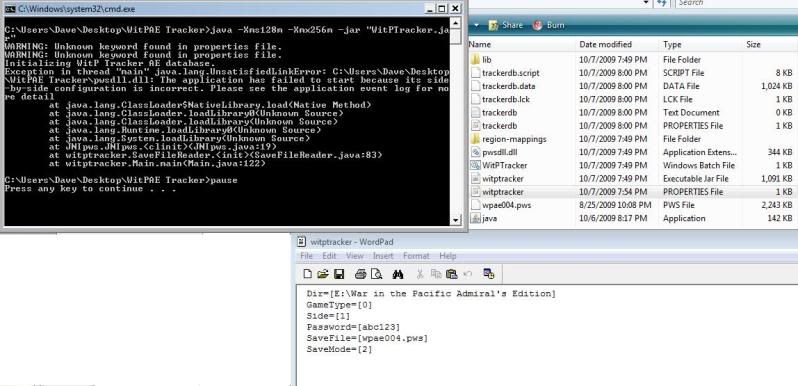
I have used the search function and cannot find the solution to this particular problem. I am new to WitPTracker AE and cannot get it to run. Please see the below screen shot. I am using Windows Vista Ultimate 64bit.
Image
User avatar
n01487477
Posts: 4764
Joined: Tue Feb 21, 2006 12:00 am

RE: WitPTracker AE Release 1.1

Post by n01487477 »

I have used the search function and cannot find the solution to this particular problem. I am new to WitPTracker AE and cannot get it to run. Please see the below screen shot. I am using Windows Vista Ultimate 64bit.

Wedge,
welcome to Tracker, the side by side error is due to a Microsoft update you need to install on your machine (see install page for link). As you are a 64bit user it gets a bit more interesting ... see the top three posts on page 11 of this thread. Using the 64 bit microsoft update doesn't always work and Kull had to use the 32 bit version.

If you try that and still have probs, pm me.

[RS]Wedge
Posts: 70
Joined: Sun Dec 04, 2005 7:09 am
Contact:

RE: WitPTracker AE Release 1.1

Post by [RS]Wedge »

Ok, I uninstalled the 64-bit file and loaded vcredist_x86.exe, and that seemed to work, but before WitPTracker AE opens I still get the two warning lines in the dos window: "WARNING: Unknown keyword found in properties file. WARNING: Unknown keyword found in properties file."

Is this a problem I should be concerned about? Thanks again for the help.
User avatar
n01487477
Posts: 4764
Joined: Tue Feb 21, 2006 12:00 am

RE: WitPTracker AE Release 1.1

Post by n01487477 »

Ok, I uninstalled the 64-bit file and loaded vcredist_x86.exe, and that seemed to work, but before WitPTracker AE opens I still get the two warning lines in the dos window: "WARNING: Unknown keyword found in properties file. WARNING: Unknown keyword found in properties file."

Is this a problem I should be concerned about? Thanks again for the help.

Yeah, it means that the properties file has some formatting problem, did you save in WordPad ? I usually use notepad... I'd unzip just the properties file again from the zip and configure the properties again in notepad ... Although from the screen shot, it looks like you have configured V AI (default)
floydg
Posts: 2071
Joined: Sat Jun 26, 2004 10:08 pm
Location: Middletown, NJ

RE: WitPTracker AE Release 1.1

Post by floydg »

ORIGINAL: [RS]Wedge

Ok, I uninstalled the 64-bit file and loaded vcredist_x86.exe, and that seemed to work, but before WitPTracker AE opens I still get the two warning lines in the dos window: "WARNING: Unknown keyword found in properties file. WARNING: Unknown keyword found in properties file."

Is this a problem I should be concerned about? Thanks again for the help.

The only thing I can think of is that you have some extra blank lines at the end of the file. You should have just one blank line. But otherwise, you can ignore those errors.
Delete the trackerdb.* files.
Copy the pwsdll.dll file from the game folder to the WitPTracker folder.
Try running the WitPTracker.bat again.
[RS]Wedge
Posts: 70
Joined: Sun Dec 04, 2005 7:09 am
Contact:

RE: WitPTracker AE Release 1.1

Post by [RS]Wedge »

That seemed to work. I deleted the properties file, unzipped the properties file, and set it up to open with notepad. It works without any errors, although there is about a 20-30 second delay from time of the dos window opening to WitP Tracker AE window opening.

Thanks again.
floydg
Posts: 2071
Joined: Sat Jun 26, 2004 10:08 pm
Location: Middletown, NJ

RE: WitPTracker AE Release 1.1

Post by floydg »

ORIGINAL: [RS]Wedge

That seemed to work. I deleted the properties file, unzipped the properties file, and set it up to open with notepad. It works without any errors, although there is about a 20-30 second delay from time of the dos window opening to WitP Tracker AE window opening.

Thanks again.

Yeah, that's about right for the time. Just wait until you load in a lot of turns and try to restart the program... I guess I should work on that some time soon... [8|]
Delete the trackerdb.* files.
Copy the pwsdll.dll file from the game folder to the WitPTracker folder.
Try running the WitPTracker.bat again.
Post Reply

Return to “War in the Pacific: Admiral's Edition”