

Unit Depictions on Screen
Moderator: Shannon V. OKeets
-
trees trees
- Posts: 125
- Joined: Tue Jun 06, 2006 8:17 pm
- Location: Manistee, MI
- Contact:
RE: Modding unit bitmaps
weather overlays? cool. it would be pretty neat to watch it snowing on the map.[:)]
-
Zorachus99

- Posts: 789
- Joined: Fri Sep 15, 2000 8:00 am
- Location: Palo Alto, CA
RE: Modding unit bitmaps
I AM SOOO HAPPY.
The freakiest and most interesting units are done!
Huzzah for doing all that counter-work! To think I found it tedious clipping the corners of my counters with a nail-clipper.
Good show Mr O'Keets!
[&o]
The freakiest and most interesting units are done!
Huzzah for doing all that counter-work! To think I found it tedious clipping the corners of my counters with a nail-clipper.
Good show Mr O'Keets!
[&o]
Most men can survive adversity, the true test of a man's character is power. -Abraham Lincoln
-
Shannon V. OKeets
- Posts: 22165
- Joined: Wed May 18, 2005 11:51 pm
- Location: Honolulu, Hawaii
- Contact:
RE: Modding unit bitmaps
ORIGINAL: trees trees
weather overlays? cool. it would be pretty neat to watch it snowing on the map.[:)]
I hadn't thought of donig it as an animation - though perhaps - it shouldn't be that difficult - when I run out of things to work on.[:D]
Steve
Perfection is an elusive goal.
Perfection is an elusive goal.

RE: Modding unit bitmaps
I completely agree [:D]ORIGINAL: Shannon V. OKeetsIt's a little harder than that given the 8 levels of zoom. Other things seem more important.ORIGINAL: FroonpBut maybe there could be some code that says that the number should be shifted some pixels toward the bottom if it is not a number but an asterisk, so that it looks more centered ?Changing the font set is not going to happen either.
RE: Modding unit bitmaps
ORIGINAL: Shannon V. OKeets
It's a little harder than that given the 8 levels of zoom. Other things seem more important.
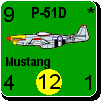
Actually, I question the overall value of 8 distinct levels of zoom. What about levels 8, 4 or 5, and 1, and then optimize the graphics for those 3 levels?
The problem with the gradual scaling of the art is that the detailed unit depictions rapidly degrade as they get smaller, and ultimately don't look very good at all. Giving users fewer options may be viewed as a negative, but at least the product stands up to scrutiny in all supported situations. In my opinion, of course, and I'm sure this has already been considered. [:)]
RE: Modding unit bitmaps
ORIGINAL: Capitaine
ORIGINAL: Shannon V. OKeets
It's a little harder than that given the 8 levels of zoom. Other things seem more important.
Actually, I question the overall value of 8 distinct levels of zoom. What about levels 8, 4 or 5, and 1, and then optimize the graphics for those 3 levels?
The problem with the gradual scaling of the art is that the detailed unit depictions rapidly degrade as they get smaller, and ultimately don't look very good at all. Giving users fewer options may be viewed as a negative, but at least the product stands up to scrutiny in all supported situations. In my opinion, of course, and I'm sure this has already been considered. [:)]
I have to agree 3 distict zoom levels is all most people will use. One up close to see the nitty gritty, one to get a regional view (most used probably) and then a strategic feel of the game. This should even shorten the development time needed on this aspect of the game and allow Mr. OKeets talents to be used on other "more important" things as indicated by Mr. OKeets himself.
Integrity is what you do when nobody is watching.
RE: Modding unit bitmaps
I disagree.ORIGINAL: CapitaineORIGINAL: Shannon V. OKeets
It's a little harder than that given the 8 levels of zoom. Other things seem more important.
Actually, I question the overall value of 8 distinct levels of zoom. What about levels 8, 4 or 5, and 1, and then optimize the graphics for those 3 levels?
The problem with the gradual scaling of the art is that the detailed unit depictions rapidly degrade as they get smaller, and ultimately don't look very good at all. Giving users fewer options may be viewed as a negative, but at least the product stands up to scrutiny in all supported situations. In my opinion, of course, and I'm sure this has already been considered. [:)]
Depending on the size of the monitor and the screen resolution used, people will use close zooms, but different zooms.
I would be disapointed to have only 3 level of zooms.
-
Shannon V. OKeets
- Posts: 22165
- Joined: Wed May 18, 2005 11:51 pm
- Location: Honolulu, Hawaii
- Contact:
RE: Modding unit bitmaps
ORIGINAL: abj9562ORIGINAL: CapitaineActually, I question the overall value of 8 distinct levels of zoom. What about levels 8, 4 or 5, and 1, and then optimize the graphics for those 3 levels?ORIGINAL: Shannon V. OKeets
It's a little harder than that given the 8 levels of zoom. Other things seem more important.
The problem with the gradual scaling of the art is that the detailed unit depictions rapidly degrade as they get smaller, and ultimately don't look very good at all. Giving users fewer options may be viewed as a negative, but at least the product stands up to scrutiny in all supported situations. In my opinion, of course, and I'm sure this has already been considered. [:)]
I have to agree 3 distict zoom levels is all most people will use. One up close to see the nitty gritty, one to get a regional view (most used probably) and then a strategic feel of the game. This should even shorten the development time needed on this aspect of the game and allow Mr. OKeets talents to be used on other "more important" things as indicated by Mr. OKeets himself.
The programming to make 8 levels of zoom work was all done by Chris Marinacci. I merely inherited it - as functioning code. Since it is already there, and working, I see no reason to trash it. When developing graphics I need to be aware of the effect it has on the graphic elements (as you noted). As to the likelihood you only really need 3 levels, I agree. But which 3? As Patrice mentions immediately above, that will depend on your system, and most importantly on the size and resolution of your monitor.
Actually, the different service branches and theaters of operations tend to push you towards using different scales. Land combat in France can be done with higher zoom, while with land combat in Russia or China, zooming out lets you see the entire area of conflict. Air units can participate in combat over a broader area than land units, especially strategic bombers. And the navy moves over wide expanses of ocean. All of this pushes you to using different levels of zoom.
To accommodate the deterioration due to zoomnig out, I am working on simpler graphics for the units (medium and low resoultion) which are designed specifically to address the problem you mention. They will have no text, only numbers, and include silhouettes instead of detailed 24 bit color bitmaps. I just got them from the artist on Wednesday and I'll be working on adding them to the choices the player has off and on over the next couple of weeks.
As I envision it, the player will be able to control the resolution level of the units the same way he controls the zoom level. I'll make the relationship between unit resolution level and zoom level automatic (a toggle that the player can turn on or off). For example, at high zoom levels, such as 5 through 8, high resolution bitmaps will be used; at medium zoom, such as 3 and 4, medium resolution bitmaps will be used; and at low zoom levels, 1 and 2, low resoultion unit counters willl be shown.
This is still in the design stages, but it mostly involves removing stuff from the counter image and making the font size larger, which is not very demanding from the programming point of view. The end result should be quite nice, removing the need to squint at the screen to understand what is going on, or scroll back and forth to see what all the units are doing/can do. Personally, I liked Chris' 8 levels of zoom the moment I saw it, and that was before I had gotten involved in the programming, so my judgment was purely as a World in Flames' player.
Steve
Perfection is an elusive goal.
Perfection is an elusive goal.
RE: Modding unit bitmaps
Thanks for the explanation. Since the code exists we shall leave it in your most capable hands.
Integrity is what you do when nobody is watching.
RE: Modding unit bitmaps
24" wide screen monitor here I come!
-
Shannon V. OKeets
- Posts: 22165
- Joined: Wed May 18, 2005 11:51 pm
- Location: Honolulu, Hawaii
- Contact:
RE: Modding unit bitmaps
I have been working on the medium resolution units and here is a series of screen shots showing the different levels of zoom.
Level 8.

Level 8.
- Attachments
-
- HRes8.jpg (336.4 KiB) Viewed 371 times
Steve
Perfection is an elusive goal.
Perfection is an elusive goal.
-
Shannon V. OKeets
- Posts: 22165
- Joined: Wed May 18, 2005 11:51 pm
- Location: Honolulu, Hawaii
- Contact:
RE: Modding unit bitmaps
The same screen shot at zoom level 7. These are all high resolution unit depictions, obviously.
I tried to include as many different unit types as I could think of.

I tried to include as many different unit types as I could think of.
- Attachments
-
- HRes7.jpg (298.7 KiB) Viewed 372 times
Steve
Perfection is an elusive goal.
Perfection is an elusive goal.
-
Shannon V. OKeets
- Posts: 22165
- Joined: Wed May 18, 2005 11:51 pm
- Location: Honolulu, Hawaii
- Contact:
RE: Modding unit bitmaps
Same screen shot at zoom level 6.
There are 3 different font sizes shown: large for land units, medium for naval, and small for air units. The smaller size fonts are required to fit all the number and other information on the counter. Land units only have 2 of 3 number, so they can use a large font. Air units can have up to 6 numbers plus their graphic image takes up a lot of room.
One of the changes I made today was to increase the font size for the naval units. I was able to do this because I reduced the amount of margin for the circles some of them sit in.

There are 3 different font sizes shown: large for land units, medium for naval, and small for air units. The smaller size fonts are required to fit all the number and other information on the counter. Land units only have 2 of 3 number, so they can use a large font. Air units can have up to 6 numbers plus their graphic image takes up a lot of room.
One of the changes I made today was to increase the font size for the naval units. I was able to do this because I reduced the amount of margin for the circles some of them sit in.
- Attachments
-
- HRes6.jpg (281.55 KiB) Viewed 373 times
Steve
Perfection is an elusive goal.
Perfection is an elusive goal.
-
Shannon V. OKeets
- Posts: 22165
- Joined: Wed May 18, 2005 11:51 pm
- Location: Honolulu, Hawaii
- Contact:
RE: Modding unit bitmaps
Taking it down to zoom level 5.
All the numbers are still clearly legible, though some of the niceties of names and images are beginning to distort heavily.
This is still using high resolution unit depcitions.

All the numbers are still clearly legible, though some of the niceties of names and images are beginning to distort heavily.
This is still using high resolution unit depcitions.
- Attachments
-
- HRes5.jpg (251.6 KiB) Viewed 372 times
Steve
Perfection is an elusive goal.
Perfection is an elusive goal.
-
Shannon V. OKeets
- Posts: 22165
- Joined: Wed May 18, 2005 11:51 pm
- Location: Honolulu, Hawaii
- Contact:
RE: Modding unit bitmaps
And zoom level 4 - where you might want to use medium resolution unit depictions instead of high.

- Attachments
-
- HRes4.jpg (196.82 KiB) Viewed 372 times
Steve
Perfection is an elusive goal.
Perfection is an elusive goal.
-
Shannon V. OKeets
- Posts: 22165
- Joined: Wed May 18, 2005 11:51 pm
- Location: Honolulu, Hawaii
- Contact:
RE: Modding unit bitmaps
So here's the same screen shot, at zoom level 4, using medium resolution unit depictions.
The text has disappeared and you are now seeing silhouettes instead of 24 bit color images for the plane and ships. The provides room for larger font sizes.
The bombers and ATRs need their silhouettes modified. Right now I am thinking about rotating them 45 degrees or so, so the range number doesn't cover so much of the silhouette.
The bit maps are not anti-aliased, which is why they look so jagged. However, we might be able to improve them somewhat without going to anti-aliasing. I don't want to do that because it would require hundreds of additional bitmaps (one for each country) instead of the 20 or so we are using presently for the medium resolution depictions.

The text has disappeared and you are now seeing silhouettes instead of 24 bit color images for the plane and ships. The provides room for larger font sizes.
The bombers and ATRs need their silhouettes modified. Right now I am thinking about rotating them 45 degrees or so, so the range number doesn't cover so much of the silhouette.
The bit maps are not anti-aliased, which is why they look so jagged. However, we might be able to improve them somewhat without going to anti-aliasing. I don't want to do that because it would require hundreds of additional bitmaps (one for each country) instead of the 20 or so we are using presently for the medium resolution depictions.
- Attachments
-
- MRes4.jpg (182.48 KiB) Viewed 373 times
Steve
Perfection is an elusive goal.
Perfection is an elusive goal.
-
Shannon V. OKeets
- Posts: 22165
- Joined: Wed May 18, 2005 11:51 pm
- Location: Honolulu, Hawaii
- Contact:
RE: Modding unit bitmaps
And taking it down to zoom level 3, using medium resolution unit depictions.
Note that the Canadians, New Zealanders, and Aussies have different colored silhouettes from the United Kingdom.
The numbers are easy to read and it shouldn't be hard to learn what the different silhouettes mean. I forgot to include a convoy - rats. It looks a lot like the frogmen, in that there is no silhouette, but simply the text CONV.
I will provide that as an option for all the units - replacing the silhouettes with simple text. For example: BB, CA, CV, CL, CX, FTR, LND, NAV, CAir, etc.
This means you can choose between high, medium with silhouettes, medium with text, and low resolution unit depictions.

Note that the Canadians, New Zealanders, and Aussies have different colored silhouettes from the United Kingdom.
The numbers are easy to read and it shouldn't be hard to learn what the different silhouettes mean. I forgot to include a convoy - rats. It looks a lot like the frogmen, in that there is no silhouette, but simply the text CONV.
I will provide that as an option for all the units - replacing the silhouettes with simple text. For example: BB, CA, CV, CL, CX, FTR, LND, NAV, CAir, etc.
This means you can choose between high, medium with silhouettes, medium with text, and low resolution unit depictions.
- Attachments
-
- MRes3.jpg (135.6 KiB) Viewed 372 times
Steve
Perfection is an elusive goal.
Perfection is an elusive goal.
-
Shannon V. OKeets
- Posts: 22165
- Joined: Wed May 18, 2005 11:51 pm
- Location: Honolulu, Hawaii
- Contact:
RE: Modding unit bitmaps
So, let's look at zoom level 2, using medium resolution unit depictions.
Not so good. Which means I have to create a low res version: no silhouettes, larger font sizes, text(?!).

Not so good. Which means I have to create a low res version: no silhouettes, larger font sizes, text(?!).
- Attachments
-
- MRes2.jpg (91.23 KiB) Viewed 372 times
Steve
Perfection is an elusive goal.
Perfection is an elusive goal.
-
Shannon V. OKeets
- Posts: 22165
- Joined: Wed May 18, 2005 11:51 pm
- Location: Honolulu, Hawaii
- Contact:
RE: Modding unit bitmaps
Last in the series.
I include this screen shot to show the purpose behind creating medium resolution unit depcitions. Here is how much of the map you can view at zoom level 3 - and still have all the units legible

I include this screen shot to show the purpose behind creating medium resolution unit depcitions. Here is how much of the map you can view at zoom level 3 - and still have all the units legible
- Attachments
-
- MRes3a.jpg (393.08 KiB) Viewed 372 times
Steve
Perfection is an elusive goal.
Perfection is an elusive goal.

RE: Modding unit bitmaps
These options for resolution look very good.
Will there be a choice of which resolution to be used at any given zoom level, that will be saved and will automatically be switched to, when the player changes zoom level?
With email play will that mean that each player can have his own saved zoom/resolution setup that is automatic unless manually overridden?
Lars
Will there be a choice of which resolution to be used at any given zoom level, that will be saved and will automatically be switched to, when the player changes zoom level?
With email play will that mean that each player can have his own saved zoom/resolution setup that is automatic unless manually overridden?
Lars