Not Responding

The sequel of the legendary wargame with a complete graphics and interface overhaul, major new gameplay and design features such as full naval combat modelling, improved supply handling, numerous increases to scenario parameters to better support large scenarios, and integrated PBEM++.
User avatar
Curtis Lemay
Posts: 15342
Joined: Fri Sep 17, 2004 3:12 pm
Location: Houston, TX

RE: Not Responding

Post by Curtis Lemay »

ORIGINAL: cathar1244

Bob,

I do not have a steam directory or installation.

My executables directory is Program Files (x86) > Matrix Games > The Operational Art of War IV

In the Scenarios > WWII - Mediterranean folder, there are only four scenarios listed.

However, in the path Documents > My Games > The Operational Art of War IV > Scenarios > WWII - Mediterranean

... there are many more scenarios listed. I just don't know if they are what I should have as part of the manifest for the .40 upgrade.

Can we check a couple of your scenarios? Here is what I show in the "Documents > My Games" path:

Campaign for North Africa 41-43 v.13.0.sce, size is 999,940 bytes

The Next War 1979.sce, size is 981,946 bytes

If these are current, then maybe I have what I should have and am simply confused.

Thanks and Cheers--

Cheers
Those are correct, but I haven't updated them since the initial launch.

You can get a Steam Key with your Matrix purchase (I forget how, but it's documented somewhere).

Check and see if you have my new Chickamauga 1863 scenario.
My TOAW web site:

Bob Cross's TOAW Site
User avatar
Shadrach
Posts: 767
Joined: Tue Oct 16, 2001 8:00 am
Location: Oslo, Norway
Contact:

RE: Not Responding

Post by Shadrach »

Cathar,
your serial will be valid. It should also be listed on the Members page - along with a Steam key [;)]

Image
OUW (Order of the Upgrade Wars)
Image
There are folks out there with way too much time on their hands.
- Norm Koger
User avatar
cathar1244
Posts: 1321
Joined: Sat Sep 05, 2009 2:16 am

RE: Not Responding

Post by cathar1244 »

Right, I see a serial key. Steam shows "Get your key", but if I understand, a Steam installation is optional. So I'll give the .20 install followed by the .40 upgrade a try tomorrow. Hopefully that will finally get me upgraded. Thanks for suggestions and ideas.

Cheers
User avatar
cathar1244
Posts: 1321
Joined: Sat Sep 05, 2009 2:16 am

RE: Not Responding

Post by cathar1244 »

Shadrach,

Did the .20 install followed by .40 patch today. Scenario manifest appears complete and no 30 minute delay upon first start of the game. I'll actually play the game a bit to see if it is stable, but this installation appears complete.

Thanks and Cheers--
User avatar
Shadrach
Posts: 767
Joined: Tue Oct 16, 2001 8:00 am
Location: Oslo, Norway
Contact:

RE: Not Responding

Post by Shadrach »

Cathar, that's great to hear![8D]
I hope it works properly, and you're a real trooper for sticking with it through all those installs, must've been frustrating [:)]

So what we know:
- Installing the original .11 base game will place all the scenarios in the Documents folder.
- The .40 patch only contains the most recent updated scenes, NOT the ones updated in .20 a year ago.
- The .40 patch is cumulative in that it contains the fixes from .21 - but not necessarily everything from .20 as well.
- The .20 base install contains *all* default scenes with a timestamp of Oct. 2018 and with changed file-sizes for many of them.
- Updating directly from base .11 to .40 will leave you with only the .40-updated scenes in the Programs folder.
- Updating directly from base .11 to .40 might cause hangs on game start on some system.
- Updating a fully patched and working .21 to .40 will probably work (at least it did for me) - as long as the instructions with the .20 patch release were followed at the time (i.e. full reinstall).

So no idea what actually happens when the game hangs - might be audio stuff, might not, as proved by Cathar. You'd need access to the source to figure out what the game actually does on startup to make it hang, so that's something for the developers to figure out [:'(]

Now I'm starting to wonder what happened to "mamnich24" - I'm guessing we scared them off [:(]
OUW (Order of the Upgrade Wars)
Image
There are folks out there with way too much time on their hands.
- Norm Koger
User avatar
cathar1244
Posts: 1321
Joined: Sat Sep 05, 2009 2:16 am

RE: Not Responding

Post by cathar1244 »

you're a real trooper for sticking with it through all those installs

Yeah, I want a campaign ribbon for this one!

Cheers
jmlima
Posts: 774
Joined: Wed Feb 28, 2007 10:45 pm

RE: Not Responding

Post by jmlima »

ORIGINAL: Shadrach

Cathar, that's great to hear![8D]
I hope it works properly, and you're a real trooper for sticking with it through all those installs, must've been frustrating [:)]

So what we know:
- Installing the original .11 base game will place all the scenarios in the Documents folder.
- The .40 patch only contains the most recent updated scenes, NOT the ones updated in .20 a year ago.
- The .40 patch is cumulative in that it contains the fixes from .21 - but not necessarily everything from .20 as well.
- The .20 base install contains *all* default scenes with a timestamp of Oct. 2018 and with changed file-sizes for many of them.
- Updating directly from base .11 to .40 will leave you with only the .40-updated scenes in the Programs folder.
- Updating directly from base .11 to .40 might cause hangs on game start on some system.
- Updating a fully patched and working .21 to .40 will probably work (at least it did for me) - as long as the instructions with the .20 patch release were followed at the time (i.e. full reinstall).

So no idea what actually happens when the game hangs - might be audio stuff, might not, as proved by Cathar. You'd need access to the source to figure out what the game actually does on startup to make it hang, so that's something for the developers to figure out [:'(]

Now I'm starting to wonder what happened to "mamnich24" - I'm guessing we scared them off [:(]

Glad this was all properly tested before release.
User avatar
Shadrach
Posts: 767
Joined: Tue Oct 16, 2001 8:00 am
Location: Oslo, Norway
Contact:

RE: Not Responding

Post by Shadrach »

ORIGINAL: cathar1244
you're a real trooper for sticking with it through all those installs

Yeah, I want a campaign ribbon for this one!

Cheers

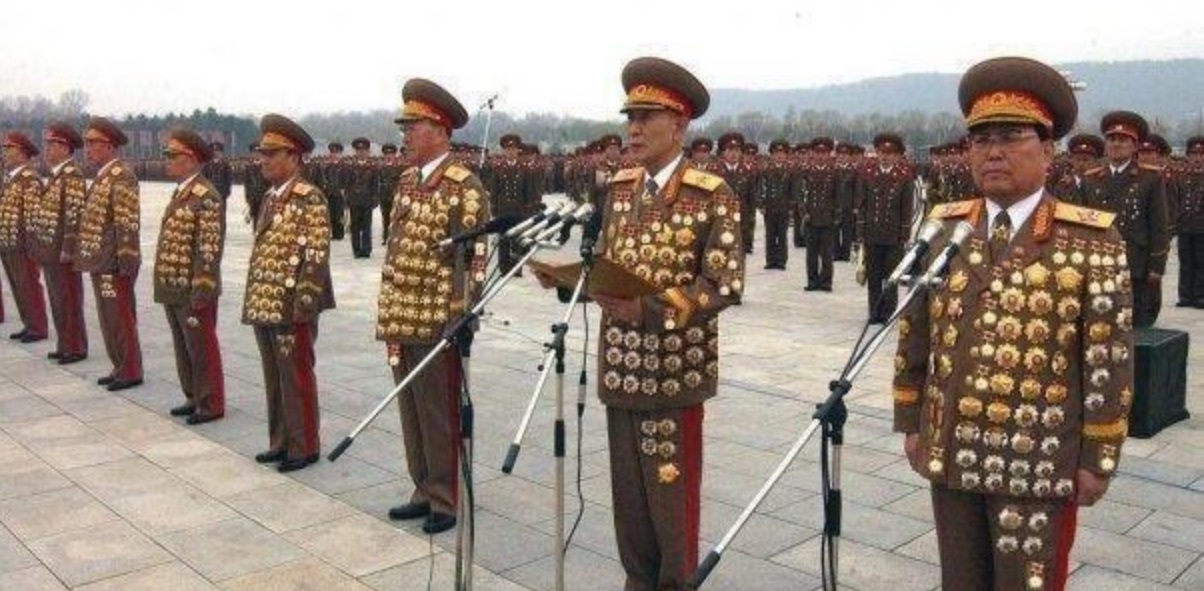
Something like these guys? [:D]

Image

By the way, managed to reproduce it with installing the .11 base first and patching to .40. It's been hanging for 10 minutes now [:D]

It appears to be trying to do a QueryDirectory on MILLIONS of files like this in Documents\My Games:
The Operational Art of War IV\Sound\1588
The Operational Art of War IV\Sound\-2366

The result of these operations is an obvious "NO SUCH FILE" [8|]

Update, been going for over 30 mins now, and ProcessMonitor actually crashed. My Pagefile was about 20GB just from trying to save all these entries. I don't know if it actually ever will finish [:D]
OUW (Order of the Upgrade Wars)
Image
There are folks out there with way too much time on their hands.
- Norm Koger
User avatar
cathar1244
Posts: 1321
Joined: Sat Sep 05, 2009 2:16 am

RE: Not Responding

Post by cathar1244 »

It appears to be trying to do a QueryDirectory on MILLIONS of files like this in Documents\My Games:
The Operational Art of War IV\Sound\1588
The Operational Art of War IV\Sound\-2366

Oops. Definitely sounds like the way forward is a .20 install followed by .40 upgrade. Good to see the software behavior could be replicated.

For record -- my installation of .20 and upgrade to .40 was as a normal user, not "as administrator".

Thanks for the investigation.

Cheers,

Cathar1244
OUW (Order of the Upgrade Wars) [:'(]
User avatar
Shadrach
Posts: 767
Joined: Tue Oct 16, 2001 8:00 am
Location: Oslo, Norway
Contact:

RE: Not Responding

Post by Shadrach »

I just tried to copy the old Sounds folder from my backup Documents directory I zipped earlier, and the game starts in seconds.
Removing them again, the game hangs [:D]

Weird thing is, there are no sound (OGG files) in the game Programs directory. So where does it try to get the files from?

EDIT: It looks like it's just the lack of "Main Theme.ogg" that causes the hang. Loss of file handle pointer (would make sense)?
Setting "nosound=Y" in the ini launches the game immediately as well, even with missing sound files, which makes sense.

I'll go back to a working install now [;)]

And I think I'll award myself this one:

Image
OUW (Order of the Upgrade Wars)
Image
There are folks out there with way too much time on their hands.
- Norm Koger
User avatar
Zovs
Posts: 9275
Joined: Sun Feb 22, 2009 11:02 pm
Location: United States

RE: Not Responding

Post by Zovs »

ORIGINAL: Shadrach
ORIGINAL: cathar1244

Something like these guys? [:D]

Image

Old men with big hats and lots of shinny buttons!
Image
Beta Tester for: War in the East 1 & 2, WarPlan & WarPlan Pacific, Valor & Victory, Flashpoint Campaigns: Sudden Storm, Computer War In Europe 2
SPWW2 & SPMBT scenario creator
Tester for WDS games
User avatar
Curtis Lemay
Posts: 15342
Joined: Fri Sep 17, 2004 3:12 pm
Location: Houston, TX

RE: Not Responding

Post by Curtis Lemay »

ORIGINAL: cathar1244

Shadrach,

Did the .20 install followed by .40 patch today. Scenario manifest appears complete and no 30 minute delay upon first start of the game. I'll actually play the game a bit to see if it is stable, but this installation appears complete.

Thanks and Cheers--
No. You're going to be missing any scenarios added post release of .20. That's not a long list, but you'll still be missing them.
My TOAW web site:

Bob Cross's TOAW Site
User avatar
Curtis Lemay
Posts: 15342
Joined: Fri Sep 17, 2004 3:12 pm
Location: Houston, TX

RE: Not Responding

Post by Curtis Lemay »

ORIGINAL: jmlima

Glad this was all properly tested before release.

So, you would have rather waited till March for an update? That wasn't what it sounded like on this board pre-release.
My TOAW web site:

Bob Cross's TOAW Site
User avatar
Shadrach
Posts: 767
Joined: Tue Oct 16, 2001 8:00 am
Location: Oslo, Norway
Contact:

RE: Not Responding

Post by Shadrach »

ORIGINAL: Curtis Lemay
No. You're going to be missing any scenarios added post release of .20. That's not a long list, but you'll still be missing them.

That makes no sense at all. How will scenarios be missing if we install .20 and followed by .40? That would be all there is to install.

Maybe the release of the patch wasn't tested well enough, maybe it should've been postponed until over the holidays, I don't know. Maybe the patch was stuck in QA at Matrix and they suddenly decided to release it post-haste, and the developers had nothing to do with it.

All people asked for pre-release was some information, like "is there a patch in the works at all?", "what's the expected ETA?" and "what fixes will it contain?"

For the future I think it's important the testers follow consistent and well-tested guidelines for applying the beta patches. Full uninstall and reinstall with the exact files that will be available to new users, for every patch if necessary. Not some random collection of settings and files someone happened to have lying around for years, and that for some miracle works because the Sounds directory is still there but those who do a clean install will never see this and crash...

Oh, and I'll be happy to volunteer for any hypothetical future patch - if you can stand my constant nagging [;)]
OUW (Order of the Upgrade Wars)
Image
There are folks out there with way too much time on their hands.
- Norm Koger
User avatar
Curtis Lemay
Posts: 15342
Joined: Fri Sep 17, 2004 3:12 pm
Location: Houston, TX

RE: Not Responding

Post by Curtis Lemay »

ORIGINAL: Shadrach

That makes no sense at all. How will scenarios be missing if we install .20 and followed by .40? That would be all there is to install.

.40, for whatever reason (ask Ralph), only installs the scenario suite if you do the Steam install. And he isn't doing that.
All people asked for pre-release was some information, like "is there a patch in the works at all?", "what's the expected ETA?" and "what fixes will it contain?"

That's not how I recall it.
Oh, and I'll be happy to volunteer for any hypothetical future patch - if you can stand my constant nagging [;)]

See...oh wait, we don't have a permanent manager yet.
My TOAW web site:

Bob Cross's TOAW Site
User avatar
Shadrach
Posts: 767
Joined: Tue Oct 16, 2001 8:00 am
Location: Oslo, Norway
Contact:

RE: Not Responding

Post by Shadrach »

ORIGINAL: Curtis Lemay
.40, for whatever reason (ask Ralph), only installs the scenario suite if you do the Steam install. And he isn't doing that.

OK so to test it I installed TOAW4 from Steam just now. Compared it to today's full Matrix install of .20 followed by .40.
*Exact* same size of the Steam scenarios folder and the one in the regular install: 821 Files, 17 Folders, 333 MB (349 667 876 bytes).

"Chickamauga 1863.sce" is there (368 389 bytes).

Can't compare timestamps because the way Steam installs files it updates the timestamp, while the Matrix installer keeps the original modify date from compile-time.

I guess that's my "problem" - I never accept what someone tells me. I check it myself, not that hard to do [;)]
OUW (Order of the Upgrade Wars)
Image
There are folks out there with way too much time on their hands.
- Norm Koger
jmlima
Posts: 774
Joined: Wed Feb 28, 2007 10:45 pm

RE: Not Responding

Post by jmlima »

ORIGINAL: Curtis Lemay

ORIGINAL: Shadrach

...
All people asked for pre-release was some information, like "is there a patch in the works at all?", "what's the expected ETA?" and "what fixes will it contain?"

That's not how I recall it.
...

I'm certain someone will find the relevant quote on the thread below of all the people asking for a patch to be released even if it would cause all these issues...

https://www.matrixgames.com/forums/tm.a ... age=1&key=

User avatar
Lobster
Posts: 5582
Joined: Thu Aug 08, 2013 2:12 pm
Location: Third rock from the Sun.

RE: Not Responding

Post by Lobster »

Good Lord how could you not remember all the lamenting about no patch being released. Like jmlima says above, there was lots of moaning. [:D]

In fact, some even decided the game was dead and headed off into the wild blue to make their own.
ne nothi tere te deorsum (don't let the bastards grind you down)

If duct tape doesn't fix it then you are not using enough duct tape.

Two things are infinite: the universe and human stupidity and I’m not sure about the universe-Einstein.
User avatar
Fred98
Posts: 4019
Joined: Fri Jan 05, 2001 10:00 am
Location: Wollondilly, Sydney

RE: Not Responding

Post by Fred98 »

I bought TOAW IV through Matrix at the time it was released.
Somewhere in mid 2018, I retired from wargaming.
In early 2020, I got a new desktop running WIN 10
Today I installed TOAW IV.

I installed the game and it runs fine.
I installed the latest patch, 4.1.0.40 Game will not run.
I uninstalled the game and re-installed
I installed an older patch 4.1.0.23 Game runs just fine

So there is an issue with patch 4.1.0.40 and WIN 10.

I am not after a solution, this is just to let people know.


User avatar
Lobster
Posts: 5582
Joined: Thu Aug 08, 2013 2:12 pm
Location: Third rock from the Sun.

RE: Not Responding

Post by Lobster »

ORIGINAL: Fred98

I bought TOAW IV through Matrix at the time it was released.
Somewhere in mid 2018, I retired from wargaming.
In early 2020, I got a new desktop running WIN 10
Today I installed TOAW IV.

I installed the game and it runs fine.
I installed the latest patch, 4.1.0.40 Game will not run.
I uninstalled the game and re-installed
I installed an older patch 4.1.0.23 Game runs just fine

So there is an issue with patch 4.1.0.40 and WIN 10.

I am not after a solution, this is just to let people know.

Try getting a Steam key. It will install and patch for you. Would be a shame to spend the money and then not be able to use the game.
ne nothi tere te deorsum (don't let the bastards grind you down)

If duct tape doesn't fix it then you are not using enough duct tape.

Two things are infinite: the universe and human stupidity and I’m not sure about the universe-Einstein.
Post Reply

Return to “The Operational Art of War IV”