MWIF Game Interface Design

World in Flames is the computer version of Australian Design Group classic board game. World In Flames is a highly detailed game covering the both Europe and Pacific Theaters of Operations during World War II. If you want grand strategy this game is for you.

Moderator: Shannon V. OKeets

Shannon V. OKeets
Posts: 22165
Joined: Wed May 18, 2005 11:51 pm
Location: Honolulu, Hawaii
Contact:

RE: MWIF Game Interface Design

Post by Shannon V. OKeets »

ORIGINAL: Lava
ORIGINAL: Shannon V. OKeets

The trade off is between "how many" versus "how much detail" is shown. There is only so much real estate available on the screen and if I separate the rows (making each row more specific), then there is less room available for other stuff.

Maybe you are trying to put too much info in one screen. That is what it seems to me. Again, just an impression of someone who has never played the game and not a board gamer.

Have you thought about making two screens... one for ports and one for sea areas? You could then easily list all support ships (as well as all the different classes of ship) and quantities. Six Battleships doesn't mean anything to me unless I can associate it with support ships which can be combined to create task forces.

Ray (alias Lava)
I hadn't thought of that, and you make a good point. I'll mull it over for a while.[&:]

There is something fundamentally attractive at having a single form where you can find all the naval units. Which is why I designed the NRS to have the ports and sea areas displayed together.
Steve

Perfection is an elusive goal.
User avatar
warspite1
Posts: 42130
Joined: Sat Feb 02, 2008 1:06 pm
Location: England

RE: MWIF Game Interface Design

Post by warspite1 »

Steve
 
The forms are looking good and I think I understand what each is doing. Can you just confirm:
1. Do all ships (or even one ship) moving to a sea box need to be in a Task Force first - and then you move the task force - or is there a drag and drop facility?
2. Do I take it the computer will not "flip" units - and therefore the only way of knowing immediately if a unit is still available that turn will be to click the availability box? If so will this apply to Land and Air units too?
 
Are the Vichy units a different colour from the ordinary French units? If so that`s an excellent idea that the board game was (understandably) lacking.
 
 
Now Maitland, now's your time!

Duke of Wellington to 1st Guards Brigade - Waterloo 18 June 1815
Shannon V. OKeets
Posts: 22165
Joined: Wed May 18, 2005 11:51 pm
Location: Honolulu, Hawaii
Contact:

RE: MWIF Game Interface Design

Post by Shannon V. OKeets »

ORIGINAL: warspite1

Steve

The forms are looking good and I think I understand what each is doing. Can you just confirm:
1. Do all ships (or even one ship) moving to a sea box need to be in a Task Force first - and then you move the task force - or is there a drag and drop facility?
2. Do I take it the computer will not "flip" units - and therefore the only way of knowing immediately if a unit is still available that turn will be to click the availability box? If so will this apply to Land and Air units too?

Are the Vichy units a different colour from the ordinary French units? If so that`s an excellent idea that the board game was (understandably) lacking.

Once units become disorganized, or are 'used' to Intercept naval units or Initiative naval combat, their status indicators are changed. Usually this means that the status indicator in the upper left corner of the unit becomes orange. This applies to all units.

When units are stacked, only the status indicators for the top unit are visible. I played around with trying to show them for the stack (most important on top) but that was way too confusing.

Most forms show the status indicators when they show the units, but that takes up space above and to the left of the unit. For the naval review details and task force details forms I am not showing status indicators. So in these rare instances, yes the unit data panel is where you will find the equivalent of the status indicators for the unit under the cursor.

Vichy units are a different color. For land units, that applies to the entire unit background, but for bitmapped air and naval units, only a horizontal stripe is colored to depict it is Vichy.

I am thinking seriously of having a temporary task force created whenever naval units are moved. To go with that I am thinking of creating a small TF form into which the player 'moves' units. My thinking is quite fuzzy about this at the present. CWIF (and MWIF currently) creates a moving stack and while you do not 'drag' the units to their destination hex as per standard Windows commands, the equivalent is done.

Air units are usually moved one at a time and there is no necessity of moving more than one at a time.

Land units need to be picked up as a stack for performing overruns, but that is pretty easy to allow for, and the mechanism CWIF (now MWFI) uses works fine.

But naval units are different, in that they always move as a group, even if there is only one unit in the 'group'. CWIF's mechanism is a little awkward. I'm thinking I might be able to come up with something better.

[Warning: the vagueness that follows reflects the same in my head.]

1 - Bring up a naval review details form for a port or sea area section box.
2 - Select units from same.
3 - Click on "move units" or 'drag' them off the NRD form.
4 - Move the units (i.e., cursor) to the destination hex, or the first sea area in the path of sea areas through which they are moving.
5 - 'Drop' the units in their final destination hex.

EDIT: Typos.
Steve

Perfection is an elusive goal.
User avatar
warspite1
Posts: 42130
Joined: Sat Feb 02, 2008 1:06 pm
Location: England

RE: MWIF Game Interface Design

Post by warspite1 »

Steve

I like the idea of unlimited Task Forces that you can name or number. I always had problems with large fleet powers e.g. CW, US or Japan where I was trying to juggle numerous stacks all over the place - some of which were for escort, some for shore bombardment, some for landings etc etc. By having a named task force, (suitably disguised!) for each stack, or groups of ships in a stack, this would make life so much easier in remembering what on earth they were supposed to be doing.
Now Maitland, now's your time!

Duke of Wellington to 1st Guards Brigade - Waterloo 18 June 1815
Stabilo
Posts: 33
Joined: Sun Feb 03, 2008 8:00 am

Memo

Post by Stabilo »

In long-lasting games like WIF I often have some ideas one day - and forget them until I play the next time. This happens especially when playing computer games.
 
When we play WIF we normally make some memo when we stop playing. Will there be any memo in MWIF? Will it be connected with the calendar (e.g. so the players can write a note to be remembered at the start of political/movement/... of any later turn)?
 
Sorry if this has been discussed before or this is not the right thread...
Shannon V. OKeets
Posts: 22165
Joined: Wed May 18, 2005 11:51 pm
Location: Honolulu, Hawaii
Contact:

RE: Memo

Post by Shannon V. OKeets »

ORIGINAL: Stabilo

In long-lasting games like WIF I often have some ideas one day - and forget them until I play the next time. This happens especially when playing computer games.

When we play WIF we normally make some memo when we stop playing. Will there be any memo in MWIF? Will it be connected with the calendar (e.g. so the players can write a note to be remembered at the start of political/movement/... of any later turn)?

Sorry if this has been discussed before or this is not the right thread...
Something else I have never considered.[X(]

The player has the ability to attach notes to each unit, as I alluded to in discussing task force 'units'.

I would expect players to use the HQ units as the focal points for land operations - attaching notes to individual units saying which HQ the are 'assigned' to. And then the HQ has its own note describing what it, with its group of attached units, is suppose to do.

But for naval units in general and all air units, there is no one unit that would serve as a convenient storage location for plans et al.

For now, I think players can just use non-MWIF text programs, either a word processing program or even NotePad.

Part of my reluctance to provide something more formal is that different players keep different information. Someone this week mentioned production spreadsheets, for instance. Building an elaborate system is beyond the scope for MWIF product 1. I would bet a lot of money that Patrice would like to have the ability to stored maps and mark them up for communicating with other players.[:)]
Steve

Perfection is an elusive goal.
Stabilo
Posts: 33
Joined: Sun Feb 03, 2008 8:00 am

RE: Memo

Post by Stabilo »

OK so it will be the old pen and paper way. [:)]
User avatar
*Lava*
Posts: 1530
Joined: Mon Feb 09, 2004 7:44 pm
Location: On the Beach

RE: Memo

Post by *Lava* »

Well...

Why can't you make a "Task Force Unit" which is created when you combine 2 or more naval units? It needn't be more than a counter which the player names... "4.1.1" It would serve as an administrative HQ (which you can attach notes to) and makes movement of stacks easy (stack automatically moves with TF counter). You just grab the "TF" counter and drop it where you want it to go and all the ships attached to the Task Force go there.

A mockup for your perusal (notice I included Task Forces with the Carriers)...

Image

You could... given you care to... even create a number of different types:

CTF: Carrier Task Force
ATF: Amphibious Task Force
TF: General Grouping of ships

It's more "Navyish" to have some sort of structure then just a stack of ships and it would be functional in that it would make it easier for the player to group and move his "Task Forces" (strategic kinda thing which reduces accounting) vs individual ships (tactical kinda thing which for a major power could be a nightmare).

Also, given that you want to create a Task force kinda thing and list all the different types of ships available in the game, it makes much more sense to divide the NRS into 2 pages.

Ray (alias Lava)
Shannon V. OKeets
Posts: 22165
Joined: Wed May 18, 2005 11:51 pm
Location: Honolulu, Hawaii
Contact:

RE: Memo

Post by Shannon V. OKeets »

ORIGINAL: Lava

Well...

Why can't you make a "Task Force Unit" which is created when you combine 2 or more naval units? It needn't be more than a counter which the player names... "4.1.1" It would serve as an administrative HQ (which you can attach notes to) and makes movement of stacks easy (stack automatically moves with TF counter). You just grab the "TF" counter and drop it where you want it to go and all the ships attached to the Task Force go there.

A mockup for your perusal (notice I included Task Forces with the Carriers)...

Image

You could... given you care to... even create a number of different types:

CTF: Carrier Task Force
ATF: Amphibious Task Force
TF: General Grouping of ships

It's more "Navyish" to have some sort of structure then just a stack of ships and it would be functional in that it would make it easier for the player to group and move his "Task Forces" (strategic kinda thing which reduces accounting) vs individual ships (tactical kinda thing which for a major power could be a nightmare).

Also, given that you want to create a Task force kinda thing and list all the different types of ships available in the game, it makes much more sense to divide the NRS into 2 pages.

Ray (alias Lava)
Ok. Thanks.

What I will do is give the player the option of seeing just ports, just sea areas, or both. If he chooses either of the first two, more details will be provided. For both, I'll use pretty much what I have been showing previously in this thread for teh naval review summary form..

All three of these options will use the same form, I'll just modify what is shown dynamically, which isn't that difficult to do.

I should have a first pass containing those revisions in the next few hours.

What I am wondernig about is how to show summary statistics on:
1 - air and land units in ports that are not aboard transports, and
2 - land based air units in sea areas.

We will have a lot of room for additional rows when just showing ports/sea areas, so that is not a serious constraint. But I would like each row to be meaningful, not so fine-grained as to produce zero entries 90% of the time.
Steve

Perfection is an elusive goal.
Shannon V. OKeets
Posts: 22165
Joined: Wed May 18, 2005 11:51 pm
Location: Honolulu, Hawaii
Contact:

RE: Memo

Post by Shannon V. OKeets »

I forgot to add,...

Putting the task force units in with the carriers is a good idea.

I do not want to impose a structure on task forces, but will let the player name them however he likes. If he wants to use ATF as part of the name, that is up to him.

Some players may want to place all naval units in task forces, rather than have any "stray ships". For example, there could be an Atlantic Reserve East TF in Liverpool and Atlantic Reserve West TF in Norfolk. Though putting every convoy unit in a task force strikes me as a bit excessive.
Steve

Perfection is an elusive goal.
User avatar
*Lava*
Posts: 1530
Joined: Mon Feb 09, 2004 7:44 pm
Location: On the Beach

RE: Memo

Post by *Lava* »

ORIGINAL: Shannon V. OKeets

All three of these options will use the same form

Options... can't have enough.

Probably as a newbie I would want to see the most detailed reports, but as I gain experience, the more condensed version will probably do.

As for Task Forces, totally agree, allowing the player to name them is a great way of allowing them to organize in a way which makes the most sense for the individuals style of play.

Thanks for your patience...

Ray (alias Lava)
User avatar
Froonp
Posts: 7998
Joined: Tue Oct 21, 2003 8:23 pm
Location: Marseilles, France
Contact:

RE: Memo

Post by Froonp »

ORIGINAL: Stabilo

OK so it will be the old pen and paper way. [:)]
Why ?
It can be the Excel & Word way, why not ? You're on a computer, you're just a ALT+TAB away from all its resources.
User avatar
Froonp
Posts: 7998
Joined: Tue Oct 21, 2003 8:23 pm
Location: Marseilles, France
Contact:

RE: Memo

Post by Froonp »

I like the more detailed list of ships that Lava made on is draft drawing.
User avatar
*Lava*
Posts: 1530
Joined: Mon Feb 09, 2004 7:44 pm
Location: On the Beach

RE: Memo

Post by *Lava* »

ORIGINAL: Shannon V. OKeets

What I am wondernig about is how to show summary statistics on:
1 - air and land units in ports that are not aboard transports, and
2 - land based air units in sea areas.

Well...

For air and land units in ports, if you use two different screens, the Ports screen has room at the bottom of the left side below the summary totals to add a new info box. Or you could take the info box you already have, enlarge it and split it into two sections... "Ships/Profile" and "Port Units."

As for land based air units in sea areas, I would use a horizontally prioritized unit listing utilizing the "Carriers" box and rename it "Task Forces, Carriers, Aircraft." Thus, you have TF counters first, then the carriers with their compliment of aircraft to the right of the counter, followed below by any land based air units in the area stacked downwards individually like you do with the Cruisers.

Just ideas...

Ray (alias Lava)
User avatar
warspite1
Posts: 42130
Joined: Sat Feb 02, 2008 1:06 pm
Location: England

RE: Memo

Post by warspite1 »

.....Excellent ideas too IMO - I couldn`t quite see the point of changing to split screens (when you first mentioned it) for ports and sea boxes but with the aid of your mock up I can see how much space saving there is which can be used for port units and more detail on the counter make up.
 
Any chance of a mock up of your second point so we can see how it would look rather than try an visualise it?  
Now Maitland, now's your time!

Duke of Wellington to 1st Guards Brigade - Waterloo 18 June 1815
Shannon V. OKeets
Posts: 22165
Joined: Wed May 18, 2005 11:51 pm
Location: Honolulu, Hawaii
Contact:

RE: Memo

Post by Shannon V. OKeets »

ORIGINAL: Lava
ORIGINAL: Shannon V. OKeets

What I am wondernig about is how to show summary statistics on:
1 - air and land units in ports that are not aboard transports, and
2 - land based air units in sea areas.

Well...

For air and land units in ports, if you use two different screens, the Ports screen has room at the bottom of the left side below the summary totals to add a new info box. Or you could take the info box you already have, enlarge it and split it into two sections... "Ships/Profile" and "Port Units."

As for land based air units in sea areas, I would use a horizontally prioritized unit listing utilizing the "Carriers" box and rename it "Task Forces, Carriers, Aircraft." Thus, you have TF counters first, then the carriers with their compliment of aircraft to the right of the counter, followed below by any land based air units in the area stacked downwards individually like you do with the Cruisers.

Just ideas...

Ray (alias Lava)
I've already decided, and coded, putting the number of carrier air units aboard carriers in with the carrier number. 4:3 means there are 4 carriers whcih are carrying 3 carrier air units.
===
That lets me do what Patrice wanted with splitting the # of units that can invade from other cargo. 3:1 would mean 3 units that can invade and 1 that cannot. This only pertains to sea areas though. Until units are assigned to transports, it would just be guesses about the number that can invade. Yes, I could work that out, but it would take a lot of effort and I do not see a substantial gain. For instance, you could take a corps unit that could not invade and break it down into two divisions that could invade. Far too complex for a 'simple' summary statistic.
Steve

Perfection is an elusive goal.
Shannon V. OKeets
Posts: 22165
Joined: Wed May 18, 2005 11:51 pm
Location: Honolulu, Hawaii
Contact:

RE: Memo

Post by Shannon V. OKeets »

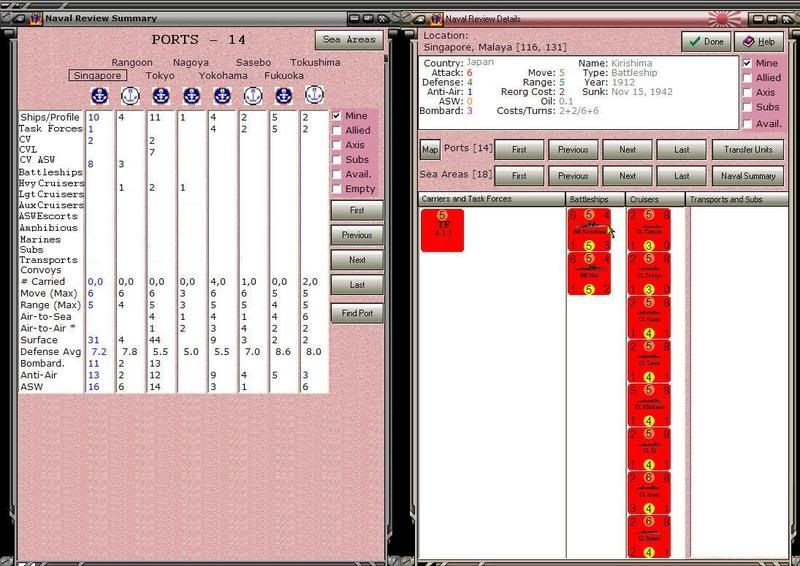
Here is where I am currently.

The Focus box is new and lets the player choose from one of the 3 layouts. I'll finish Both first and then do the other 2.

Note that the carriers row now shows the # of carrier air units too, following the colon.

I have added a Clear Column button, so the player can insert a blank column if he wants.

The filters are now working (except for Empty), which is why the # of ports with units is 12 but only 6 occupied ports are listed. That's because the CW only has units in those 6 ports. The same is true for the sea areas.

Displays is how I am going to handle Saved Display/configurations of columns. What is being saved are the 8 ports, 8 sea areas, and the Focus setting. If the focus is on the ports, then no sea areas will be saved. When a saved display/configuration is restored, I'll use whatever the current filter settings are and instantiate the columns according to which ports and sea areas have been saved. Oh, and the focus setting will be restored too.

Under the word Display there is room for the names of about a dozen different Saved Displays. There are none listed in this screen shot - more code needs to be written first. Left clicking on the name of a Saved Display will restore it. Right clicking on the word Displays will let you bring one in from disk, and save the current one. Right clicking on one of the Saved Display names will let you Rename, Delete, or Redefine it. For the last, the current setting will override whatever had been saved before under the given name.

Image
Attachments
NRS103272008.jpg
NRS103272008.jpg (247.87 KiB) Viewed 190 times
Steve

Perfection is an elusive goal.
Shannon V. OKeets
Posts: 22165
Joined: Wed May 18, 2005 11:51 pm
Location: Honolulu, Hawaii
Contact:

RE: Memo

Post by Shannon V. OKeets »

How about this layout for the port symbols?

Image
Attachments
NRS203272008.jpg
NRS203272008.jpg (135.23 KiB) Viewed 190 times
Steve

Perfection is an elusive goal.
User avatar
Norman42
Posts: 206
Joined: Fri Feb 08, 2008 10:09 pm
Location: Canada

RE: Memo

Post by Norman42 »

ORIGINAL: Shannon V. OKeets

How about this layout for the port symbols?

I like it.

Above the data, but doesnt push the port names too far away from thier symbols.
-------------

C.L.Norman
User avatar
composer99
Posts: 2931
Joined: Mon Jun 06, 2005 8:00 am
Location: Ottawa, Canada
Contact:

RE: Memo

Post by composer99 »

I still kind of like having the port symbols under all the names. However, your notion in post #1098 couples each port with its corresponding symbol more effectively, which must be reckoned an improvement.

Edit: Correcting a split infinitive. Just because it works for Star Trek doesn't mean it works for everything.
~ Composer99
Post Reply

Return to “World in Flames”