Text is too large in-game

Post bug reports, ask for tech support and general requests for help with getting Maximum-Football working in this forum. This is for official support on official versions. Reports based on public beta versions should go in the Public Beta forum.

Moderator: David Winter

Post Reply
Hampe
Posts: 54
Joined: Wed Oct 15, 2008 1:11 pm

Text is too large in-game

Post by Hampe »

I actually have 2 issues, the first one being that the font is too large in the game.

It's noticable in the menu, the "play development" text doesn't fit in the box.:
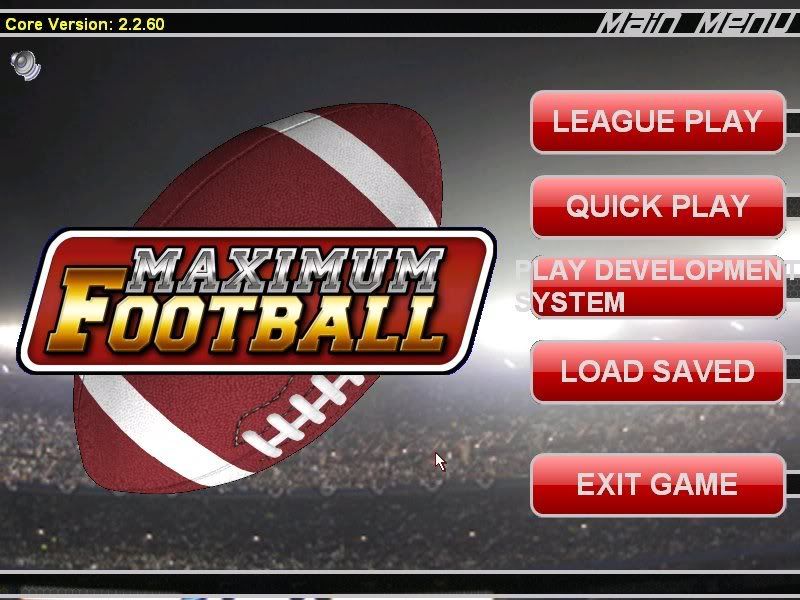
Image

And the problem, in the game the text at the top is all crammed together:
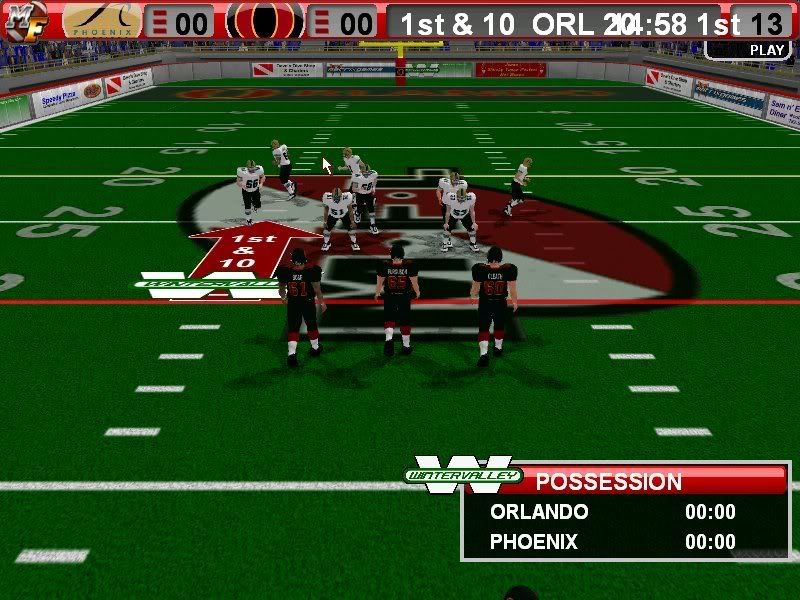
Image

I've tried using different resolutions in game, and in windows, but it still always looks the same:
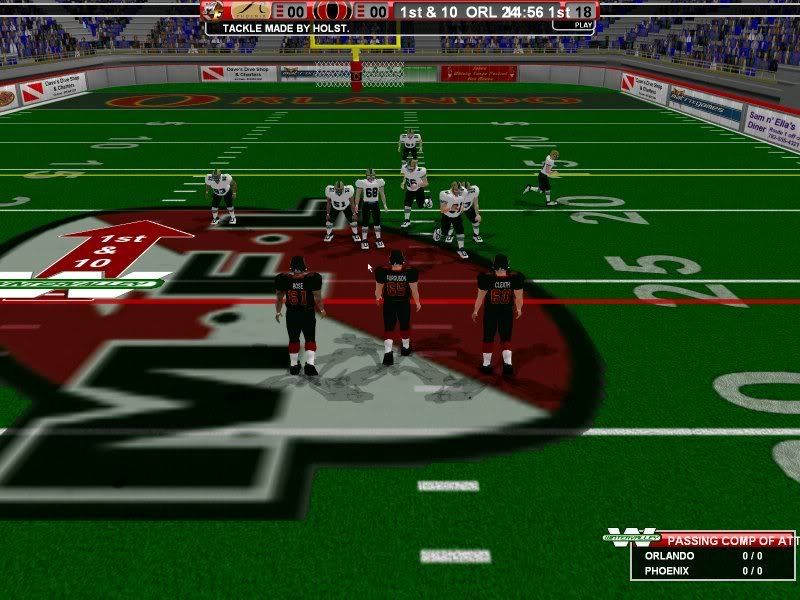
Image

This is also the only App/Game I have this problem with.


The second problem I have is with the depth chart. It says in the manual you have to press the "+/-" button, and since I don't see one on the screen, I take it to mean that it's the +/- keyboard keys. However, when I select a player either already in the list or in the available player list, I can't add or remove players from the depth chart. I tried changing my keyboard settings from German/swiss to US, but that didn't help (and yes, I pressed where the + key would have been on a US keyboard).
Tullius
Posts: 1174
Joined: Thu Nov 18, 2004 2:31 pm
Location: Saxony (Germany)

RE: Text is too large in-game

Post by Tullius »

I tried changing my keyboard settings from German/swiss to US, but that didn't help (and yes, I pressed where the + key would have been on a US keyboard).

Hallo Hampe,

Maximum Football erfordert als lokale Spracheinstellung "Englisch". Das ist nicht zu verwechseln mit der Tastaturbelegung. Das Problem ist, dass die Konventionen in Amerika und im englischsprachigen Raum zum Teil völlig entgegengesetzt sind. So wird im deutschen Raum die Tausend wie folgt geschrieben: 1.000,00; in den USA 1,000.00 . Das Programm liest dann die Zahlen in den USA als 1 oder 1000 und das bringt die ganze Logik durcheinander. Ich vermute daher, dass die Probleme mit dem Font auf die lokalen Spracheinstellungen zurückzuführen sind.
Hampe
Posts: 54
Joined: Wed Oct 15, 2008 1:11 pm

RE: Text is too large in-game

Post by Hampe »

Yea thanks....I'm an American so you can speak English ;)  (I only live in Switzerland).


My Regional Settings are all set to english already.  I saw that that can cause problems, and I haven't had any problems with the gameplay itself.  Just the text size.


Tullius
Posts: 1174
Joined: Thu Nov 18, 2004 2:31 pm
Location: Saxony (Germany)

RE: Text is too large in-game

Post by Tullius »

Then it should be a font problem. But i have seen you are using an older version of the game. The actual version is 2.2.90 .
Hampe
Posts: 54
Joined: Wed Oct 15, 2008 1:11 pm

RE: Text is too large in-game

Post by Hampe »

Ok....I'll upgrade and let you know if that helped.

Where does the game get its font settings from?  Like I said above, this is the only application/game I have this problem with.
Hampe
Posts: 54
Joined: Wed Oct 15, 2008 1:11 pm

RE: Text is too large in-game

Post by Hampe »

Any ideas about the depth chart problem though?


Also...thanks for the help!
Tullius
Posts: 1174
Joined: Thu Nov 18, 2004 2:31 pm
Location: Saxony (Germany)

RE: Text is too large in-game

Post by Tullius »

Here some old from the developer:

(when there still is a problem)
2. Oversized text. Because the game makes use of system fonts with the default setting of 96 DPI you will get strange text effects if you make the DPI larger or smaller. ... Set your desktop font size to 96 DPI

The +/- buttons should be here


Image
Attachments
dc.jpg
dc.jpg (105.9 KiB) Viewed 290 times
Hampe
Posts: 54
Joined: Wed Oct 15, 2008 1:11 pm

RE: Text is too large in-game

Post by Hampe »

hmmmm.....don't recall seeing them on mine.....or the up and down arrows.  I'll have another look after the update....it's downloading now. I changed the dpi setting to (it was at 120).

Thanks again.
Hampe
Posts: 54
Joined: Wed Oct 15, 2008 1:11 pm

RE: Text is too large in-game

Post by Hampe »

Alright....I got it now.  Thanks a bunch. 
Post Reply

Return to “Maximum-Football Support”