Graphical glitch: plane art missing on combat screen

Post bug reports and ask for help with other issues here.

Moderators: wdolson, MOD_War-in-the-Pacific-Admirals-Edition

Post Reply
User avatar
Brausepaul
Posts: 484
Joined: Wed Aug 11, 2004 7:54 pm
Location: Braunschweig, Deutschland

Graphical glitch: plane art missing on combat screen

Post by Brausepaul »

Hi,

I run WitP: AE using -ww -dual options on my Windows Vista x64 computer. I have a Q6600 quadcore CPU, an Asus P5Q (enabled onboard sound) and 4 GB RAM. During turn resolution I noticed that plane arts are missing on combat screen. Ship arts are there, at least during air attacks.


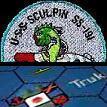
Image
Attachments
witp.jpg
witp.jpg (68.02 KiB) Viewed 256 times
User avatar
Brausepaul
Posts: 484
Joined: Wed Aug 11, 2004 7:54 pm
Location: Braunschweig, Deutschland

RE: Graphical glitch: plane art missing on combat screen

Post by Brausepaul »

My DxDiag.txt
Attachments
DxDiag.txt
(22.19 KiB) Downloaded 11 times
User avatar
michaelm75au
Posts: 12464
Joined: Sat May 05, 2001 8:00 am
Location: Melbourne, Australia

RE: Graphical glitch: plane art missing on combat screen

Post by michaelm75au »

I have the same problem on my XP single core so it isn't a OS or PC issue.

Restart the game.
DO NOT CHANGE SCREEN UNTIL THE GAME FINISHES LOADING AND THE MAIN SCREEN IS SHOWN.

Plane images are loaded during the initial loading of the game core. If you move away from the loading screen, the images don't get loaded properly.
The only reason I can come up with is that the plane images are in one big file that get chopped up in memory to create the individual images as opposed to the ship ones which start out as individual images.
Moving away from the loading screen interrupts the allocation/split process from I can tell.
It is something I have been looking at when not doing other things.
Michael
User avatar
Brausepaul
Posts: 484
Joined: Wed Aug 11, 2004 7:54 pm
Location: Braunschweig, Deutschland

RE: Graphical glitch: plane art missing on combat screen

Post by Brausepaul »

Does that mean we have to watch the intro video in full length and wait for it to finish?
User avatar
GenChaos33
Posts: 347
Joined: Thu Sep 28, 2000 8:00 am

RE: Graphical glitch: plane art missing on combat screen

Post by GenChaos33 »

Just rename the intro video in the Matrix/AE/video folder( I changed it to Xintro.avi). Now, AE goes right to game load screen. I know its a cool video. But alot of times, I want to get right to the game asap. But if I want to, I will sometime load the video manually for kicks when not in game.
Image
User avatar
michaelm75au
Posts: 12464
Joined: Sat May 05, 2001 8:00 am
Location: Melbourne, Australia

RE: Graphical glitch: plane art missing on combat screen

Post by michaelm75au »

ORIGINAL: Brausepaul

Does that mean we have to watch the intro video in full length and wait for it to finish?

Hit ESC or space key will shut it down
Michael
User avatar
Brausepaul
Posts: 484
Joined: Wed Aug 11, 2004 7:54 pm
Location: Braunschweig, Deutschland

RE: Graphical glitch: plane art missing on combat screen

Post by Brausepaul »

SOrry for being dense, Michael, but I think I don't understand your advice above. You said that not changing screen would work around the bug, that's why I was asking if I had to watch the video in full. Which screen am I supposed not to leave too early?
Post Reply

Return to “Tech Support”