

WitPTracker AE News
Moderators: wdolson, MOD_War-in-the-Pacific-Admirals-Edition

RE: WitPTracker AE Release 1.1
I have found that about 200 turns is the maximum I can stand.

RE: WitPTracker AE Release 1.1
Gentlemen,
This looks like a great programme however I can not get this to update. I have loaded the programme and initialised the first turn. The progamme appears to have full functionality and work correctly.
However it will not let me load turn 2 etc. In AE I have saved the turns in continuous slots wpae020.pws, wpae021.pws etc. Therefore I have moved the files to the Tracker folder and renumbered them 020.pws.001 etc with no joy. I have endeavoured to take turn 2 and rename it to the same file name as the initialisation file, i.e. wpae020.pws, then saved closed, reopened and tried to load ,no joy.
I have taken the properties doc and changed the file to load the second turn file name, i.e wpae021.pws, again ,all with no joy.
Every time I get the same message: either if i try a single turn load, Turn 1 is already loaded or if I try mulitple turns wherever I go on the tree I can not find a single file classed as a save file. The system finds nothing.
Help!!
The game was started after patch 1 but had the second Hotfix loaded over some of the files.
This looks like a great programme however I can not get this to update. I have loaded the programme and initialised the first turn. The progamme appears to have full functionality and work correctly.
However it will not let me load turn 2 etc. In AE I have saved the turns in continuous slots wpae020.pws, wpae021.pws etc. Therefore I have moved the files to the Tracker folder and renumbered them 020.pws.001 etc with no joy. I have endeavoured to take turn 2 and rename it to the same file name as the initialisation file, i.e. wpae020.pws, then saved closed, reopened and tried to load ,no joy.
I have taken the properties doc and changed the file to load the second turn file name, i.e wpae021.pws, again ,all with no joy.
Every time I get the same message: either if i try a single turn load, Turn 1 is already loaded or if I try mulitple turns wherever I go on the tree I can not find a single file classed as a save file. The system finds nothing.
Help!!
The game was started after patch 1 but had the second Hotfix loaded over some of the files.
"Klotzen nicht Kleckern" v. Manstein
RE: WitPTracker AE Release 1.1
ORIGINAL: Nomad
I have found that about 200 turns is the maximum I can stand.
You have more patience than I do. I'll see what I can do to speed things up.
Delete the trackerdb.* files.
Copy the pwsdll.dll file from the game folder to the WitPTracker folder.
Try running the WitPTracker.bat again.
Copy the pwsdll.dll file from the game folder to the WitPTracker folder.
Try running the WitPTracker.bat again.
RE: WitPTracker AE Release 1.1
ORIGINAL: siganm
Gentlemen,
This looks like a great programme however I can not get this to update. I have loaded the programme and initialised the first turn. The progamme appears to have full functionality and work correctly.
However it will not let me load turn 2 etc. In AE I have saved the turns in continuous slots wpae020.pws, wpae021.pws etc. Therefore I have moved the files to the Tracker folder and renumbered them 020.pws.001 etc with no joy. I have endeavoured to take turn 2 and rename it to the same file name as the initialisation file, i.e. wpae020.pws, then saved closed, reopened and tried to load ,no joy.
I have taken the properties doc and changed the file to load the second turn file name, i.e wpae021.pws, again ,all with no joy.
Every time I get the same message: either if i try a single turn load, Turn 1 is already loaded or if I try mulitple turns wherever I go on the tree I can not find a single file classed as a save file. The system finds nothing.
Help!!
The game was started after patch 1 but had the second Hotfix loaded over some of the files.
Try using the Multi-turn load function and just select the folder - the program will show you eligible save files from that folder. So if you have the saves in the WitPTrackerAE folder, just choose Select and you'll see your saves.
Floyd
Delete the trackerdb.* files.
Copy the pwsdll.dll file from the game folder to the WitPTracker folder.
Try running the WitPTracker.bat again.
Copy the pwsdll.dll file from the game folder to the WitPTracker folder.
Try running the WitPTracker.bat again.
RE: WitPTracker AE Release 1.1
ORIGINAL: floydg
ORIGINAL: siganm
Gentlemen,
This looks like a great programme however I can not get this to update. I have loaded the programme and initialised the first turn. The progamme appears to have full functionality and work correctly.
However it will not let me load turn 2 etc. In AE I have saved the turns in continuous slots wpae020.pws, wpae021.pws etc. Therefore I have moved the files to the Tracker folder and renumbered them 020.pws.001 etc with no joy. I have endeavoured to take turn 2 and rename it to the same file name as the initialisation file, i.e. wpae020.pws, then saved closed, reopened and tried to load ,no joy.
I have taken the properties doc and changed the file to load the second turn file name, i.e wpae021.pws, again ,all with no joy.
Every time I get the same message: either if i try a single turn load, Turn 1 is already loaded or if I try mulitple turns wherever I go on the tree I can not find a single file classed as a save file. The system finds nothing.
Help!!
The game was started after patch 1 but had the second Hotfix loaded over some of the files.
Try using the Multi-turn load function and just select the folder - the program will show you eligible save files from that folder. So if you have the saves in the WitPTrackerAE folder, just choose Select and you'll see your saves.
Floyd
Try using the Multi-turn load function and just select the folder - the program will show you eligible save files from that folder. So if you have the saves in the WitPTrackerAE folder, just choose Select and you'll see your saves.
Floyd
Would that it were. Whichever tree branch I highlight be it the AE save folder or the folder where i hve moved the saves to displays nothing and merely states no saves here or similar.
Tony M
"Klotzen nicht Kleckern" v. Manstein

RE: WitPTracker AE Release 1.1
Tony,
I think you're thinking that for the multi-turn load works on a sequence of saves like wpae003.pws, wpae004.pws, wpae005.pws ... this is not the case at present.
For multi-turn load you need to have have them sequence differently. So if in your properties file, your first turn is wpae003.pws, then the next turn must be renamed wpae003.pws.01 or wpae003.01.pws, then the next wpae003.pws.02 or wpae003.02.pws (but stick to one type of naming convention)
This might seem a little cumbersome at present, but it is the system we are still using from the "old" witp days, but I think Floyd might be convinced to change that sometime.
I think you're thinking that for the multi-turn load works on a sequence of saves like wpae003.pws, wpae004.pws, wpae005.pws ... this is not the case at present.
For multi-turn load you need to have have them sequence differently. So if in your properties file, your first turn is wpae003.pws, then the next turn must be renamed wpae003.pws.01 or wpae003.01.pws, then the next wpae003.pws.02 or wpae003.02.pws (but stick to one type of naming convention)
This might seem a little cumbersome at present, but it is the system we are still using from the "old" witp days, but I think Floyd might be convinced to change that sometime.
RE: WitPTracker AE Release 1.1
I had a bit of trouble myself doing the upgrade. I found I had to make sure that the current turn in the save file was the earliest turn I was going to use. If you forget and leave the last turn and then initialize a new database it wont find usable files because all of the files will be earlier than the turn you used for the initialization. I now have the first turn of the game saved so I use it to initialize the database and then I can multiload the last 10-20 turns.
RE: WitPTracker AE Release 1.1
One thing you may be missing is that the dialog will only show folders - you will not see the save files in this window. Select a folder, then another screen will shown showing eligible saves files in that folder.
Delete the trackerdb.* files.
Copy the pwsdll.dll file from the game folder to the WitPTracker folder.
Try running the WitPTracker.bat again.
Copy the pwsdll.dll file from the game folder to the WitPTracker folder.
Try running the WitPTracker.bat again.
RE: WitPTracker AE Release 1.1
No I understood that and tried a series of differing renumbering conventions including both those above and it did not work.ORIGINAL: n01487477
Tony,
I think you're thinking that for the multi-turn load works on a sequence of saves like wpae003.pws, wpae004.pws, wpae005.pws ... this is not the case at present.
For multi-turn load you need to have have them sequence differently. So if in your properties file, your first turn is wpae003.pws, then the next turn must be renamed wpae003.pws.01 or wpae003.01.pws, then the next wpae003.pws.02 or wpae003.02.pws (but stick to one type of naming convention)
This might seem a little cumbersome at present, but it is the system we are still using from the "old" witp days, but I think Floyd might be convinced to change that sometime.
Tony
"Klotzen nicht Kleckern" v. Manstein
RE: WitPTracker AE Release 1.1
ORIGINAL: floydg
One thing you may be missing is that the dialog will only show folders - you will not see the save files in this window. Select a folder, then another screen will shown showing eligible saves files in that folder.
No again I understand the theory, I browse through the tree clicking on the various options until I reach the folder where the files are stored and click the bottom left button "display files?"or whatever itis called. All I get is a message sayng there are no files. In reply to Nomad's kind comments this is a relatively new game there are only some 17 turns and I intialised the system with game turn 1.
I think I shall try binning the whole programme and installing again from scratch.
Tony
"Klotzen nicht Kleckern" v. Manstein
RE: WitPTracker AE Release 1.1
Seems very very strange ... Note these files are in the witptrackerAe folder.

- Attachments
-
- Capture.jpg (176.37 KiB) Viewed 784 times
RE: WitPTracker AE Release 1.1
ORIGINAL: siganm
ORIGINAL: floydg
One thing you may be missing is that the dialog will only show folders - you will not see the save files in this window. Select a folder, then another screen will shown showing eligible saves files in that folder.
No again I understand the theory, I browse through the tree clicking on the various options until I reach the folder where the files are stored and click the bottom left button "display files?"or whatever itis called. All I get is a message sayng there are no files. In reply to Nomad's kind comments this is a relatively new game there are only some 17 turns and I intialised the system with game turn 1.
I think I shall try binning the whole programme and installing again from scratch.
Tony
Tony -
The button is Select Directory.
Can you post a screen shot of the folder you're selecting and a screen shot of the Open dialog just before you select the Select Directory button?
Floyd
Delete the trackerdb.* files.
Copy the pwsdll.dll file from the game folder to the WitPTracker folder.
Try running the WitPTracker.bat again.
Copy the pwsdll.dll file from the game folder to the WitPTracker folder.
Try running the WitPTracker.bat again.
RE: WitPTracker AE Release 1.1
Here we go
Here is the screen prior to initialisation:
Here is the screen prior to initialisation:
- Attachments
-
- Screenpri..itialise.jpg (14.23 KiB) Viewed 802 times
"Klotzen nicht Kleckern" v. Manstein
RE: WitPTracker AE Release 1.1
Hi Floyd
don't normally as in ever do screen shots there fore finding this complicated to try and merge enough of them together to be allowed to post 1 file only will email you with the series of shots on the e=mail address at the head of the forum.
Tony
don't normally as in ever do screen shots there fore finding this complicated to try and merge enough of them together to be allowed to post 1 file only will email you with the series of shots on the e=mail address at the head of the forum.
Tony
"Klotzen nicht Kleckern" v. Manstein
RE: WitPTracker AE Release 1.1
Hi fellahs,
thank you for the time. Have sent the various screen shots by email to the witptracker@gmail.com address. Unfortunately I now have to break off to attend to real world matters. Look forward to your answer. I am sure it is some idiocy on my part. I generally am quite good at following instructions although I am no computer expert!!!![&:]
Tony
thank you for the time. Have sent the various screen shots by email to the witptracker@gmail.com address. Unfortunately I now have to break off to attend to real world matters. Look forward to your answer. I am sure it is some idiocy on my part. I generally am quite good at following instructions although I am no computer expert!!!![&:]
Tony
"Klotzen nicht Kleckern" v. Manstein
RE: WitPTracker AE Release 1.1
ORIGINAL: siganm
Here we go
Here is the screen prior to initialisation:
Tony: this screen shot shows only one turn, as I see only one .pws file; and if that's the one you're using as the save to initialize the program, there are no eligible save files in that folder.
Floyd
Delete the trackerdb.* files.
Copy the pwsdll.dll file from the game folder to the WitPTracker folder.
Try running the WitPTracker.bat again.
Copy the pwsdll.dll file from the game folder to the WitPTracker folder.
Try running the WitPTracker.bat again.

RE: WitPTracker AE Release 1.0
ORIGINAL: jdkbph
Deleted post
Side by Side error - found the solution up top.
Works now?
Delete the trackerdb.* files.
Copy the pwsdll.dll file from the game folder to the WitPTracker folder.
Try running the WitPTracker.bat again.
Copy the pwsdll.dll file from the game folder to the WitPTracker folder.
Try running the WitPTracker.bat again.
-
grisouille_slith
- Posts: 627
- Joined: Thu Jun 07, 2007 11:37 am
RE: WitPTracker AE Release 1.1
ORIGINAL: [RS]Wedge
I have used the search function and cannot find the solution to this particular problem. I am new to WitPTracker AE and cannot get it to run. Please see the below screen shot. I am using Windows Vista Ultimate 64bit.
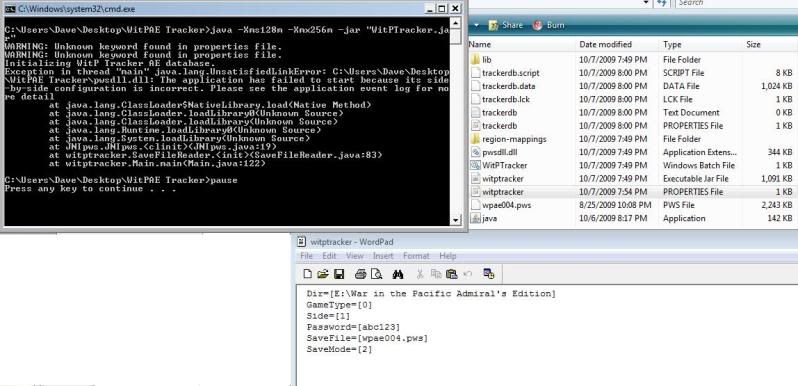
Although I have installed vcredist_x86.exe, I have the same trouble as RSWedge with Vista 32 bit!?[&:]
RE: WitPTracker AE Release 1.1
Although I have installed vcredist_x86.exe, I have the same trouble as RSWedge with Vista 32 bit!?
Grisouille,
if you are getting the same "side-by-side" errors ...
rarely this problem has occurred, but when it does I recommend, uninstalling the Microsoft patch and re installing ... sometimes the first attempt has failed.
If this continues to fail, then go the long route of installing the initial redistributable
http://www.microsoft.com/downloads/deta ... laylang=en
then the redistributable Service Pack 1 (the x86 one you are using now)
Hope this helps