Well, this version is a bit better than the original Tracker IMO, and getting better all the time ... anyway enough of thumping my chest.ORIGINAL: 1EyedJacks
ORIGINAL: n01487477
Mike,ORIGINAL: 1EyedJacks
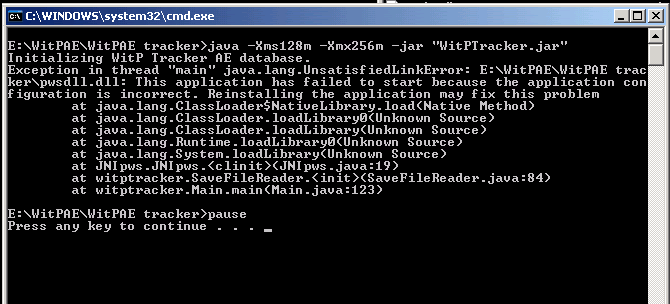
C:\Users\Mike\Desktop\AE Tracker 1.2>java -Xms128m -Xmx256m -jar "WitPTracker.ja
r"
Initializing WitP Tracker AE database.
Exception in thread "main" java.lang.UnsatisfiedLinkError: C:\Users\Mike\Desktop
\AE Tracker 1.2\pwsdll.dll: Can't load IA 32-bit .dll on a AMD 64-bit platform
at java.lang.ClassLoader$NativeLibrary.load(Native Method)
at java.lang.ClassLoader.loadLibrary0(Unknown Source)
at java.lang.ClassLoader.loadLibrary(Unknown Source)
at java.lang.Runtime.loadLibrary0(Unknown Source)
at java.lang.System.loadLibrary(Unknown Source)
at JNIpws.JNIpws.<clinit>(JNIpws.java:19)
at witptracker.SaveFileReader.<init>(SaveFileReader.java:84)
at witptracker.Main.main(Main.java:123)
C:\Users\Mike\Desktop\AE Tracker 1.2>pause
Press any key to continue . . .
welcome to AE Tracker[;)]
Probably best not to include your product key in the post [;)]
Is this Windows 7 or Vista 64 ?
Strange you have an AMD warning on a Intel system. Did you use the correct MS patch ? vcredist_x64.exe ?
Thanks for the welcome to AE Tracker. I'm prepping for the second patch and wanna get my favorite tool for this game installed. [;)]
Vista 64 - and yup vcredist_x64.exe. I have both the 32 bit and 64 bit Java as I use IE 32 sometimes. Would that be a problem?
Java shouldn't be a problem at the moment -- you're getting *.dll errors nothing to do with Java.
Uninstall the MS 64 bit C++ redistributable patch and reapply ...
I've even had some that have had to go back to the original redistributable and then patch up.
If this doesn't work, then uninstall again and try the 32 bit x86.
Still I've never seen the AMD error on an intel system, so I'm a little confused too. I know these things a pain in the rear, but different things help different 64 bit users... there seems not to be just one solution (mostly thanks to MS)