

Main form disappearing
Moderator: Shannon V. OKeets
Main form disappearing
How do I keep the main form with menus visible when I expand the map screen? It pops under and can't be accessed.
And it's one, two, three,
What are we fightin' for?
What are we fightin' for?

RE: Main form disappearing
I don't think there's a way to do it, but I could be mistaken. It would be nice to have a "Main Form Always On Top" UI option, as there is for the Global Map. I've tried putting the Main Form on a second monitor, but I don't like having to look back and forth that much.
-
Shannon V. OKeets
- Posts: 22165
- Joined: Wed May 18, 2005 11:51 pm
- Location: Honolulu, Hawaii
- Contact:
RE: Main form disappearing
Not doable, sorry. The detailed map goes to the "top view" when the cursor moves over it.ORIGINAL: FJeff
How do I keep the main form with menus visible when I expand the map screen? It pops under and can't be accessed.
What you can do is to make the detailed map not completely cover the Main form, leaving a portion of the Main form visible. Then when you want to access the Main form, you can click on it. But as Geoff said, you will pretty much always want the Main form fully visible. See section 8.6 in the Players Manual for some ideas on arranging forms.
By the way, I scrunched the Main form down to the absolute minimum to leave more of the detailed map visible.
Steve
Perfection is an elusive goal.
Perfection is an elusive goal.
RE: Main form disappearing
What a waste of screen space, to not be able to go full screen. What is this, 2005?
And it's one, two, three,
What are we fightin' for?
What are we fightin' for?
-
Shannon V. OKeets
- Posts: 22165
- Joined: Wed May 18, 2005 11:51 pm
- Location: Honolulu, Hawaii
- Contact:
RE: Main form disappearing
You can use the 'wasted' space alongside the Main form for other things. Common choices are: global map (partial view), screen layouts list, map views list, selectable units form, units in hex form.ORIGINAL: FJeff
What a waste of screen space, to not be able to go full screen. What is this, 2005?
Please, look at section 8.6 (volume 1) where several examples are shown for different size monitors.
Steve
Perfection is an elusive goal.
Perfection is an elusive goal.
RE: Main form disappearing
At this point I don't think anything can be done, but why was the end phase function left off of the main map? All the other windows I am fine with them being separate, but the combat odds, date, current phase, zoom and end current phase button would have been very helpful if made a menu bar at the top of the main map.
This is the only thing I find frustrating. Now, that I use two monitors I keep it on a separate monitor but I still find myself wishing it was imbedded on the main map.
This is the only thing I find frustrating. Now, that I use two monitors I keep it on a separate monitor but I still find myself wishing it was imbedded on the main map.
*Warning: Dr. Foo is not an actual doctor.
Do not accept or follow any medical advice*
Do not accept or follow any medical advice*
-
Shannon V. OKeets
- Posts: 22165
- Joined: Wed May 18, 2005 11:51 pm
- Location: Honolulu, Hawaii
- Contact:
RE: Main form disappearing
It never occurred to me.ORIGINAL: Dr. Foo
At this point I don't think anything can be done, but why was the end phase function left off of the main map? All the other windows I am fine with them being separate, but the combat odds, date, current phase, zoom and end current phase button would have been very helpful if made a menu bar at the top of the main map.
This is the only thing I find frustrating. Now, that I use two monitors I keep it on a separate monitor but I still find myself wishing it was imbedded on the main map.
There can be multiple detailed maps. Detailed maps can also be deleted. So putting the end-of-phase button on a detailed map would take some rethinking.
EDIT: Shift+Enter is the keystroke shortcut to end a phase.
Steve
Perfection is an elusive goal.
Perfection is an elusive goal.
RE: Main form disappearing
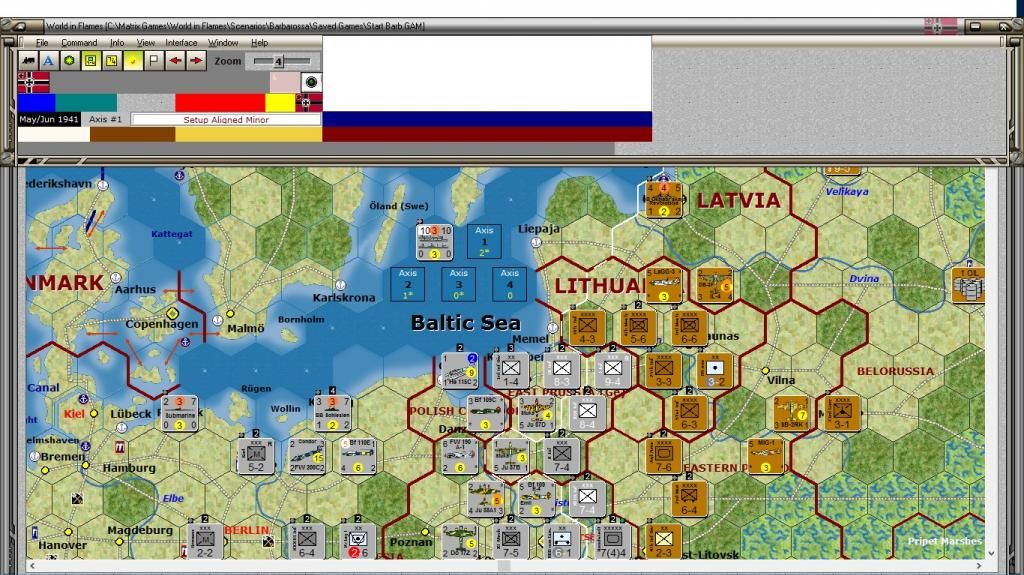
What I would like (wish list) is an all in one main map and info bar. I would love all the info located as part of the map and not a separate window. For those that like the current set up I believe it is possible to make the window detach and reattach, but I am not a programmer and have no idea if this is an easy fix or something that will take a great deal of time. Just wishing here.
Something like below gives me the info I need at a glace and it is always at the top of the map. The info would not hide behind the map once the cursor leave the area it would be embedded and always there. As you can see with it stretched out more information can be placed vertically making the info bar smaller and getting more use of the space while giving more map as well.
Something like below gives me the info I need at a glace and it is always at the top of the map. The info would not hide behind the map once the cursor leave the area it would be embedded and always there. As you can see with it stretched out more information can be placed vertically making the info bar smaller and getting more use of the space while giving more map as well.
*Warning: Dr. Foo is not an actual doctor.
Do not accept or follow any medical advice*
Do not accept or follow any medical advice*
-
paulderynck

- Posts: 8522
- Joined: Sat Mar 24, 2007 5:27 pm
- Location: Canada
RE: Main form disappearing
This is super easy. You can resize and move the detailed map. Position the mouse over one of the corners until you see a diagonal line with arrows on either end. Left click and resize. Then click on the title bar and drag the thing to where you want it, then do some more fine tune resizing to absolutely max out the screen real estate. You can move the main form and your map views and screen layouts too. (These last two are tricky - most of the windows are easy to drag by clicking on their title bars and dragging, but for these two the "sweet spot" is only where the letters "S L" and "M V" are.)
For the detailed map you may have to drag it slightly to the side first so you can "catch" the edge and make the arrows appear.
Here's an example which took me less time to create and screen capture than it took to type this post:
Edit: Once you're happy with it then you'll need to save the screen layout or you'll have to do it all over again. See the manual about saving and restoring screen layouts.

For the detailed map you may have to drag it slightly to the side first so you can "catch" the edge and make the arrows appear.
Here's an example which took me less time to create and screen capture than it took to type this post:
Edit: Once you're happy with it then you'll need to save the screen layout or you'll have to do it all over again. See the manual about saving and restoring screen layouts.
- Attachments
-
- MWiFonescreen.jpg (560.34 KiB) Viewed 698 times
Paul
-
Shannon V. OKeets
- Posts: 22165
- Joined: Wed May 18, 2005 11:51 pm
- Location: Honolulu, Hawaii
- Contact:
RE: Main form disappearing
Note: Paul is running the beta test version which is why his screen shot shows a couple of extra panels at the bottom of the main form. And the Debug drop down menu. But everything he said applies to the released game too.
Steve
Perfection is an elusive goal.
Perfection is an elusive goal.
-
paulderynck
- Posts: 8522
- Joined: Sat Mar 24, 2007 5:27 pm
- Location: Canada
RE: Main form disappearing
ORIGINAL: paulderynck
This is super easy. You can resize and move the detailed map. Position the mouse over one of the corners until you see a diagonal line with arrows on either end. Left click and resize. Then click on the title bar and drag the thing to where you want it, then do some more fine tune resizing to absolutely max out the screen real estate. You can move the main form and your map views and screen layouts too. (These last two are tricky - most of the windows are easy to drag by clicking on their title bars and dragging, but for these two the "sweet spot" is only where the letters "S L" and "M V" are.)
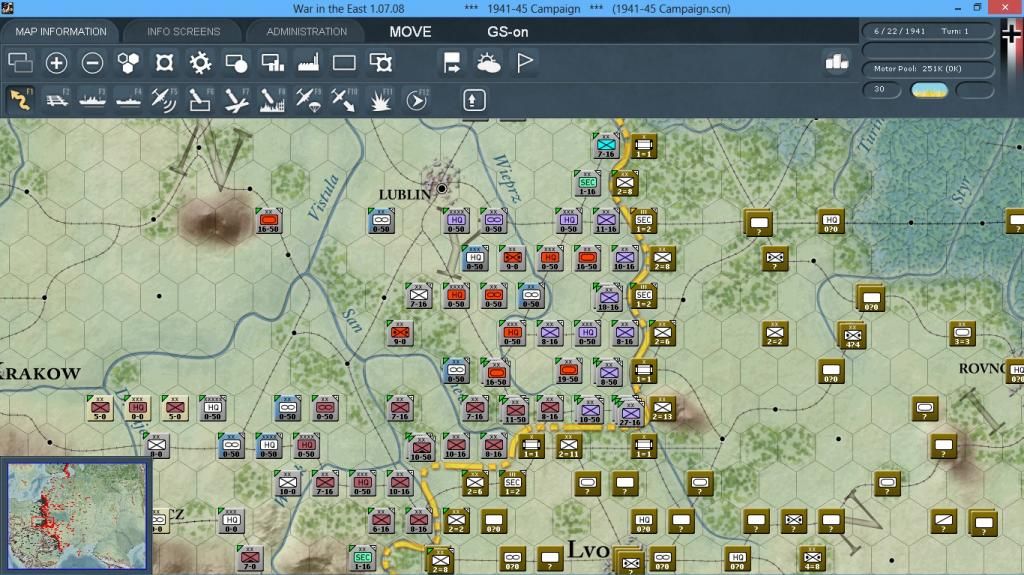
Thank you. That works OK but what I am saying what I really wish we had was something more like below.
*Warning: Dr. Foo is not an actual doctor.
Do not accept or follow any medical advice*
Do not accept or follow any medical advice*
-
Joseignacio
- Posts: 3138
- Joined: Fri May 08, 2009 11:25 am
- Location: Madrid, Spain
RE: Main form disappearing
To be true, I am having a lot of problems with this too.
At first, I couldn't see the lower part of the screen in my laptop, then I saw a mail where Steve counseled not to have the task bar on when playing, cause the game needs the 768 lines (or whatever) widht.
I did, and I could finally see all the buttons and units, so I could play. However, that had the secondary effect that I couldn't (and can't) see the menu/phase screen while seeing the map, instead of displaying above it, it does appear under it.
I need to do my moves, minimize map, click on the "next phase", maximize maps, do the actions, minimize map, click on next phase, and like this all the time.
Besides, the pop-ups with units like those that I can send to a ground strike, those that I need to return to base after that ground strike or the screen of the HQ reorg, appear in the most disturbing places, usually in the área where you can minimize the map, so the final sequence can be:
I need to do my moves, minimize map, click on the "next phase", move the pop-ups elsewhere, maximize maps, do the actions, minimize map, click on next phase, and like this all the time.
Note: The pop-ups are difficult and disturbing to move, I always need to try several times.
Sometimes, too, none of the players gets the ok button necessary to pass to the next phase and we need to reload a savegame, but this I don't know if it happens because of a display problema or just because the bad working of the Slitherin website cuts the connection between players.
I am under the impression that one of the computers works as host and the other is not, so supposing the active side is the host and they switch (or something similar), the game keeps on running normally in the server (or active) while the other is unaware of what is going on , including (several) phase changes.
Important note (maybe someone can confirm) the bugs I found (crashes, not updating phases to the other payer) and screen problems seem to happen only in netplay, not in solitaire. And I have only played Barbarossa, so it could be a scenario bug and not a game bug, but because of not happening at a solo game don't think it's a scenario problem, but a Slitherin problem.
EDIT: The form location problems persist in the solitaire in my laptop screen. The phases errors and the error messages don't.
At first, I couldn't see the lower part of the screen in my laptop, then I saw a mail where Steve counseled not to have the task bar on when playing, cause the game needs the 768 lines (or whatever) widht.
I did, and I could finally see all the buttons and units, so I could play. However, that had the secondary effect that I couldn't (and can't) see the menu/phase screen while seeing the map, instead of displaying above it, it does appear under it.
I need to do my moves, minimize map, click on the "next phase", maximize maps, do the actions, minimize map, click on next phase, and like this all the time.
Besides, the pop-ups with units like those that I can send to a ground strike, those that I need to return to base after that ground strike or the screen of the HQ reorg, appear in the most disturbing places, usually in the área where you can minimize the map, so the final sequence can be:
I need to do my moves, minimize map, click on the "next phase", move the pop-ups elsewhere, maximize maps, do the actions, minimize map, click on next phase, and like this all the time.
Note: The pop-ups are difficult and disturbing to move, I always need to try several times.
Sometimes, too, none of the players gets the ok button necessary to pass to the next phase and we need to reload a savegame, but this I don't know if it happens because of a display problema or just because the bad working of the Slitherin website cuts the connection between players.
I am under the impression that one of the computers works as host and the other is not, so supposing the active side is the host and they switch (or something similar), the game keeps on running normally in the server (or active) while the other is unaware of what is going on , including (several) phase changes.
Important note (maybe someone can confirm) the bugs I found (crashes, not updating phases to the other payer) and screen problems seem to happen only in netplay, not in solitaire. And I have only played Barbarossa, so it could be a scenario bug and not a game bug, but because of not happening at a solo game don't think it's a scenario problem, but a Slitherin problem.
EDIT: The form location problems persist in the solitaire in my laptop screen. The phases errors and the error messages don't.
-
Shannon V. OKeets
- Posts: 22165
- Joined: Wed May 18, 2005 11:51 pm
- Location: Honolulu, Hawaii
- Contact:
RE: Main form disappearing
As you noted, your problems fall into two groups: player interface and NetPlay. There are NetPlay bugs which I am working on. Hopefully I'll have the critical ones fixed sometime this week.ORIGINAL: Joseignacio
To be true, I am having a lot of problems with this too.
At first, I couldn't see the lower part of the screen in my laptop, then I saw a mail where Steve counseled not to have the task bar on when playing, cause the game needs the 768 lines (or whatever) widht.
I did, and I could finally see all the buttons and units, so I could play. However, that had the secondary effect that I couldn't (and can't) see the menu/phase screen while seeing the map, instead of displaying above it, it does appear under it.
I need to do my moves, minimize map, click on the "next phase", maximize maps, do the actions, minimize map, click on next phase, and like this all the time.
Besides, the pop-ups with units like those that I can send to a ground strike, those that I need to return to base after that ground strike or the screen of the HQ reorg, appear in the most disturbing places, usually in the área where you can minimize the map, so the final sequence can be:
I need to do my moves, minimize map, click on the "next phase", move the pop-ups elsewhere, maximize maps, do the actions, minimize map, click on next phase, and like this all the time.
Note: The pop-ups are difficult and disturbing to move, I always need to try several times.
Sometimes, too, none of the players gets the ok button necessary to pass to the next phase and we need to reload a savegame, but this I don't know if it happens because of a display problema or just because the bad working of the Slitherin website cuts the connection between players.
I am under the impression that one of the computers works as host and the other is not, so supposing the active side is the host and they switch (or something similar), the game keeps on running normally in the server (or active) while the other is unaware of what is going on , including (several) phase changes.
Important note (maybe someone can confirm) the bugs I found (crashes, not updating phases to the other payer) and screen problems seem to happen only in netplay, not in solitaire. And I have only played Barbarossa, so it could be a scenario bug and not a game bug, but because of not happening at a solo game don't think it's a scenario problem, but a Slitherin problem.
EDIT: The form location problems persist in the solitaire in my laptop screen. The phases errors and the error messages don't.
As for your player interface problems, it seems like you have maximized the detailed map so it covers the entire screen. That won't work on a single monitor system. You'll run into all the troubles you listed in your post. Instead, manually resize the detailed map. You need to give the Main form some dedicated room - at the top of the screen is best. Since the Main form isn't very wide, you are likely going to have some extra space beside the Main form. Leave enough room to the left of the Main form for the Selectable units form. Use any extra room to the right for partial views of other forms (e.g., the global map). Section 8.6 of the Players Manual has some examples and a discussion about working with one monitor.
The assumption you and several other players are making is that by maximizing the detailed map they will see as much of the map as possible. Other games let you do that, but then they superimpose a Main form (or Command form) on top, which covers part of the detailed map. MWIF gets to the same place in a different manner. The same amount of the detailed map is visible, but using the maximize button (on a single monitor system) creates the problems already discussed. Instead, in MWIF, you should resize the detailed map manually to fill as much of the screen as possible, leaving room for the Main form and perhaps partial views of other forms.
Note that if you are using two monitors, maximizing the detailed map on one monitor is a good thing to do. Since other forms can be placed on the second monitor.
Going into NetPlay as quickly as you did can be very frustrating since there is a lot to learn about MWIF, its player interface in particular. Sorry about that.[:(]
Steve
Perfection is an elusive goal.
Perfection is an elusive goal.

RE: Main form disappearing
This is the screen lay-out I'm using for a Lap Top screen...

This has the major maps and forms at hand. In the upper left corner, pop up screens appear (as f.e. the selectable units form etc.).
If you move the mouse over the global map, you can click on the area you want to go to and the detailed map changes immediately to this part of the word.
It works for me...
This has the major maps and forms at hand. In the upper left corner, pop up screens appear (as f.e. the selectable units form etc.).
If you move the mouse over the global map, you can click on the area you want to go to and the detailed map changes immediately to this part of the word.
It works for me...
Peter
-
Joseignacio
- Posts: 3138
- Joined: Fri May 08, 2009 11:25 am
- Location: Madrid, Spain
RE: Main form disappearing
ORIGINAL: Shannon V. OKeets
As you noted, your problems fall into two groups: player interface and NetPlay. There are NetPlay bugs which I am working on. Hopefully I'll have the critical ones fixed sometime this week.ORIGINAL: Joseignacio
...
As for your player interface problems, it seems like you have maximized the detailed map so it covers the entire screen. That won't work on a single monitor system. You'll run into all the troubles you listed in your post. Instead, manually resize the detailed map. You need to give the Main form some dedicated room - at the top of the screen is best. Since the Main form isn't very wide, you are likely going to have some extra space beside the Main form. Leave enough room to the left of the Main form for the Selectable units form. Use any extra room to the right for partial views of other forms (e.g., the global map). Section 8.6 of the Players Manual has some examples and a discussion about working with one monitor.
The assumption you and several other players are making is that by maximizing the detailed map they will see as much of the map as possible. Other games let you do that, but then they superimpose a Main form (or Command form) on top, which covers part of the detailed map. MWIF gets to the same place in a different manner. The same amount of the detailed map is visible, but using the maximize button (on a single monitor system) creates the problems already discussed. Instead, in MWIF, you should resize the detailed map manually to fill as much of the screen as possible, leaving room for the Main form and perhaps partial views of other forms.
Note that if you are using two monitors, maximizing the detailed map on one monitor is a good thing to do. Since other forms can be placed on the second monitor.
Going into NetPlay as quickly as you did can be very frustrating since there is a lot to learn about MWIF, its player interface in particular. Sorry about that.[:(]
I hadn`t read this post for some reason...
Is it very difficult to configure the game with btwo screens? Or is it just plug, play and select visualization in the keyboard? (My Dell has an specific button for this)
That simple?
-
paulderynck
- Posts: 8522
- Joined: Sat Mar 24, 2007 5:27 pm
- Location: Canada
RE: Main form disappearing
Pretty simple. The plug and play and extended desktop functions are all part of the OS. Once you have two screens and MWiF launched, then you need to learn all about using screen layouts, so that once you've dragged the different forms and maps to where you like them, you can save your settings and not have to repeat all that work.
See Players Manual 8.6.
See Players Manual 8.6.
Paul
RE: Main form disappearing
But, according to this thread
tm.asp?m=3466105
you still can't separate the main form form the detail map, even with two monitors.
tm.asp?m=3466105
you still can't separate the main form form the detail map, even with two monitors.
And it's one, two, three,
What are we fightin' for?
What are we fightin' for?
-
paulderynck
- Posts: 8522
- Joined: Sat Mar 24, 2007 5:27 pm
- Location: Canada
RE: Main form disappearing
I did not mean it's impossible, I meant it may not be advisable. Additionally, the concerns I ran into a couple months ago were when my left side monitor had a negative x-coordinate.
So if you can keep your monitors aligned as 1 2 or 1 2 3 then there'll be no negative coordinates. In early beta testing I had more difficulties when I separated the Main Form from the Detailed Map so my recommendation is not to do that or at least to warn you that you may have a problem if you try it. It's not the kind of bug that will be high on the list for fixing for some time.
So if you can keep your monitors aligned as 1 2 or 1 2 3 then there'll be no negative coordinates. In early beta testing I had more difficulties when I separated the Main Form from the Detailed Map so my recommendation is not to do that or at least to warn you that you may have a problem if you try it. It's not the kind of bug that will be high on the list for fixing for some time.
Paul

RE: Main form disappearing
I would like to see multiple containers and all widgets dockable. So you can arrange everything you want to see the way you want to see it.
Why is it that the screen layout changes when the major power changes in solo play?
p.s.: why is it so hard to do a proper gui? any modern sdk should provide anything you need in a couple of clicks. should be doable without impacting game code.
Why is it that the screen layout changes when the major power changes in solo play?
p.s.: why is it so hard to do a proper gui? any modern sdk should provide anything you need in a couple of clicks. should be doable without impacting game code.
"If we come to a minefield, our infantry attacks exactly as it were not there." ~ Georgy Zhukov