

ORIGINAL: LJBurstyn
Okay, I've tried several times but cannot seem to design units as a PLAYER. I can design units in the Editor but cannot figure out how as a PLAYER I designate which units are subject to a TOE design.
DO ALL TOE's have to be designed before the game starts using the editor?
When a SFT is replaced by a new design (such as Panzer II C being updated by research to the Panzer II Puma) does the TOE automatically update also?
TOE's change during the course of a war..is there a way to design new TOE's once the game is underway?
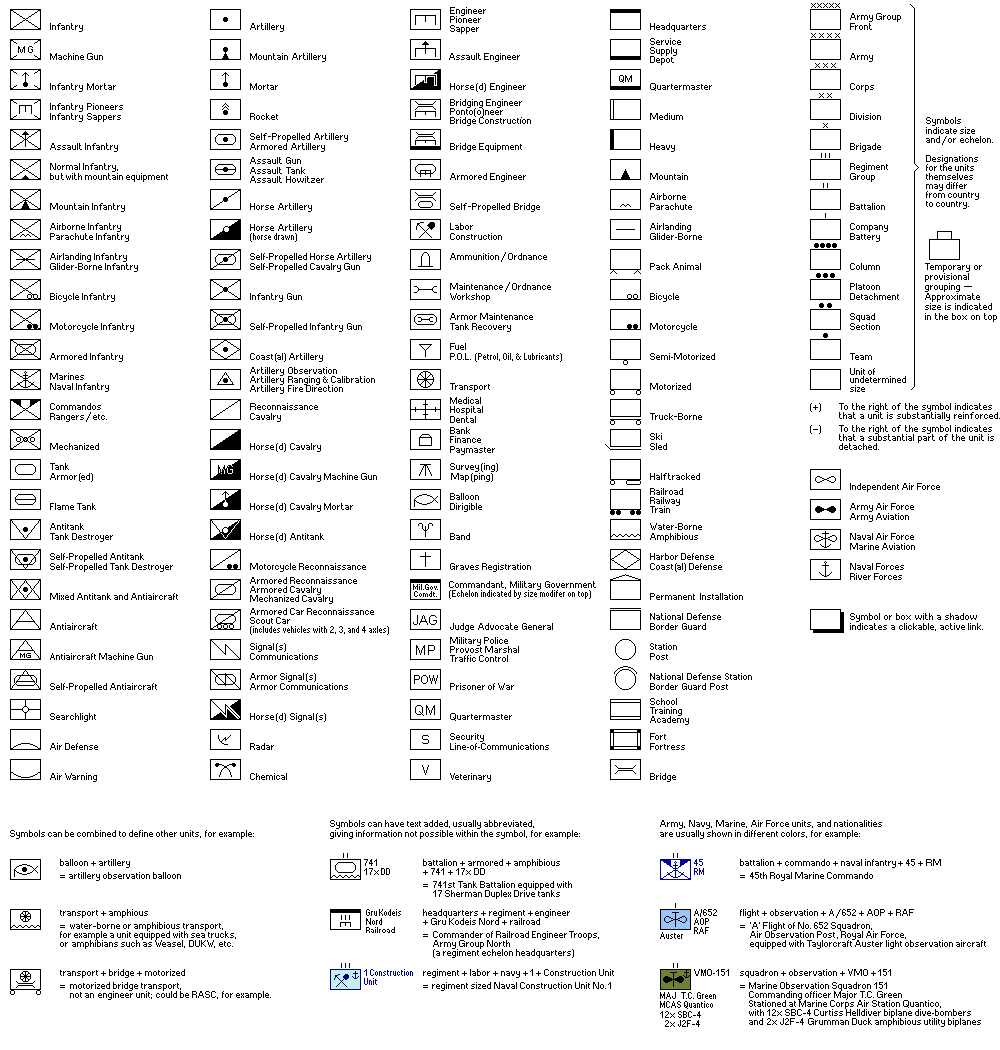
Is there somewhere where I can find what all the NATO symbols mean. Right now I use non-NATO symbols.
As a PLAYER how do I make a new unit up. I want to build a new infantry division (predesigned in Editor).
I will do more research and report back what I find.
Private beta test ATG v2.21d : TOEs and auto-reinforcements
Moderator: Vic
RE: Private beta test ATG v2.20m
This post will show what most of the NATO symbols represent: http://www.matrixgames.com/forums/fb.asp?m=3871712. It does not cover all the NATO symbols introduced in the TO&E patch but does cover many of them.
Tac2i (formerly webizen)
-
GaryChildress
- Posts: 6933
- Joined: Sun Jul 17, 2005 3:41 pm
- Location: The Divided Nations of Earth
RE: Private beta test ATG v2.20m
ORIGINAL: Webizen
This post will show what most of the NATO symbols represent: http://www.matrixgames.com/forums/fb.asp?m=3871712. It does not cover all the NATO symbols introduced in the TO&E patch but does cover many of them.
ORIGINAL: LJBurstyn
Okay, I've tried several times but cannot seem to design units as a PLAYER. I can design units in the Editor but cannot figure out how as a PLAYER I designate which units are subject to a TOE design.
DO ALL TOE's have to be designed before the game starts using the editor?
When a SFT is replaced by a new design (such as Panzer II C being updated by research to the Panzer II Puma) does the TOE automatically update also?
TOE's change during the course of a war..is there a way to design new TOE's once the game is underway?
Is there somewhere where I can find what all the NATO symbols mean. Right now I use non-NATO symbols.
As a PLAYER how do I make a new unit up. I want to build a new infantry division (predesigned in Editor).
I will do more research and report back what I find.
I also like this webpage for identifying symbols:
http://www.niehorster.org/000_admin/009_symbols.html
-
GaryChildress
- Posts: 6933
- Joined: Sun Jul 17, 2005 3:41 pm
- Location: The Divided Nations of Earth
RE: Private beta test ATG v2.20m
ORIGINAL: LJBurstyn
Okay, I've tried several times but cannot seem to design units as a PLAYER. I can design units in the Editor but cannot figure out how as a PLAYER I designate which units are subject to a TOE design.
DO ALL TOE's have to be designed before the game starts using the editor?
When a SFT is replaced by a new design (such as Panzer II C being updated by research to the Panzer II Puma) does the TOE automatically update also?
TOE's change during the course of a war..is there a way to design new TOE's once the game is underway?
Is there somewhere where I can find what all the NATO symbols mean. Right now I use non-NATO symbols.
As a PLAYER how do I make a new unit up. I want to build a new infantry division (predesigned in Editor).
I will do more research and report back what I find.
Hi LJBurstyn, If I am understanding your question correctly see the pic below on how to add TO&Es in game.

- Attachments
-
- Untitled.gif (275.58 KiB) Viewed 545 times
RE: Private beta test ATG v2.20m
Hey guys. Thanks for the info.
Apparently when I did the changes to the editor I FORGOT to save the changes to the rules so when I started my scenario the buttons were not available. That is now resolved.
But when I use the TOE designer for the player when I click on NATO1 and NATO2 buttons empty boxes shows up with no graphics to find. In my game I don't have a folder called system graphics/NATO....I have a folder called graphics which has LOTS of entries under it but not one called NATO. There are folders called EURO, WatW, Bombur, alt, etc., but not NATO. I think I might have seen a folder called system graphics under the graphics folder. There are folders called newdawn under my graphics folder.
SO in order for this to pull up the NATO graphics what do I have to do. When I use the editor and I click the NATO button I get a warning message that whatever number I entered is in the wrong format it should be -1 or 1-X????
Still would like to know if the TOE are automatically updated when replacement equipment is research or do you have to make new TOE's.
I did a little experiment creating a panzer unit and a HQ unit. Then I set them up using the Player TOE. Set up production to go to the main HQ...I did not create enough units to completely fill the HQ with staff...so it took staff from the main HQ to make the lower HQ complete. Noticed the final order of the SFT's in the unit were not the same as in the TOE...not bad but it surprised me at first to see them in a different order than the TOE. Now I'll have to read up on priority setting so that it fills up the units in the front lines FIRST and than the reserve units as the factories build the stuff. This can cut down of my time filling up units to what I want them to be.
Apparently when I did the changes to the editor I FORGOT to save the changes to the rules so when I started my scenario the buttons were not available. That is now resolved.
But when I use the TOE designer for the player when I click on NATO1 and NATO2 buttons empty boxes shows up with no graphics to find. In my game I don't have a folder called system graphics/NATO....I have a folder called graphics which has LOTS of entries under it but not one called NATO. There are folders called EURO, WatW, Bombur, alt, etc., but not NATO. I think I might have seen a folder called system graphics under the graphics folder. There are folders called newdawn under my graphics folder.
SO in order for this to pull up the NATO graphics what do I have to do. When I use the editor and I click the NATO button I get a warning message that whatever number I entered is in the wrong format it should be -1 or 1-X????
Still would like to know if the TOE are automatically updated when replacement equipment is research or do you have to make new TOE's.
I did a little experiment creating a panzer unit and a HQ unit. Then I set them up using the Player TOE. Set up production to go to the main HQ...I did not create enough units to completely fill the HQ with staff...so it took staff from the main HQ to make the lower HQ complete. Noticed the final order of the SFT's in the unit were not the same as in the TOE...not bad but it surprised me at first to see them in a different order than the TOE. Now I'll have to read up on priority setting so that it fills up the units in the front lines FIRST and than the reserve units as the factories build the stuff. This can cut down of my time filling up units to what I want them to be.
RE: Private beta test ATG v2.20m
If you have a TO&E based on the standard light tank and later create a new light tank model or upgrade to Light Tank II, your HQs and subsequently your units based on that template will begin to receive it. Your existing standard light tanks will still exist in your inventory until destroyed or disbanded. I believe that is how it works.
ORIGINAL: LJBurstyn
Still would like to know if the TOE are automatically updated when replacement equipment is research or do you have to make new TOE's.
Tac2i (formerly webizen)
RE: Private beta test ATG v2.20m
More experimentation.
I choose the 211th Infantry to use the new TOE....it did that but it also changed the name of the unit to (in this case) 8th Infantry. Is there a command so that it will not change the historical name of the unit. I went into the unit name and changed it back to 211th but that did not change the graphic number from 8th that showed on the board.
I choose the 211th Infantry to use the new TOE....it did that but it also changed the name of the unit to (in this case) 8th Infantry. Is there a command so that it will not change the historical name of the unit. I went into the unit name and changed it back to 211th but that did not change the graphic number from 8th that showed on the board.
-
ernieschwitz

- Posts: 4654
- Joined: Tue Sep 15, 2009 3:46 pm
- Location: Denmark
RE: Private beta test ATG v2.20m
SO in order for this to pull up the NATO graphics what do I have to do. When I use the editor and I click the NATO button I get a warning message that whatever number I entered is in the wrong format it should be -1 or 1-X???
This is SO much what i got into too, of troubling stuff.
With alittle help from Vic I got it solved.
Seems you need to have to set a modgraphics folder, and in that folder (and also the SMALL and BIG folders) you need to put the natosymbols from the modgraphics that come with a newdawn. You can of course also make your own...
Creator of High Quality Scenarios for:
- Advanced Tactics Gold
DC: Warsaw to Paris
DC: Community Project.
RE: Private beta test ATG v2.20m
Looking forward to it! : - )
ORIGINAL: Vic
Going to make a new version tomorrow (Friday).
best wishes,
Vic
Tac2i (formerly webizen)
RE: Private beta test ATG v2.20m
I got it done, sort of, I get graphics in the Nato1 and Nato2...but it's MURDER on my poor eyes...the things are so small I cannot even see the squares much less the symbols that are in them. Ernieschwitz (spelling?)...says I need the small and large graphics also...will copy them into the folder (same or different folder--probably different). Maybe that will solve the small size of the graphics in the pick graphics box that pops up when you click on NATO1 or NATO2.
Still would like to somehow keep the historical names of the units intact...the TOE choice wants to change the name of the unit (not on the graphics but the name itself (where you can change the name of the unit).
Still would like to somehow keep the historical names of the units intact...the TOE choice wants to change the name of the unit (not on the graphics but the name itself (where you can change the name of the unit).
RE: Private beta test ATG v2.20g : TOEs and auto-reinforcements
Amazing update, congratulations! [&o]
A question, and sorry if it's repeated. Here --> http://www.vrdesigns.nl/atwiki/doku.php?id=tables_of_organisation_and_equipment says "Units or HQs can specify their reinforcement level to: DISBAND / 0%, 25%, 50%, 75%, 100%, PRIORITY." but I can't find the option in the game...
A question, and sorry if it's repeated. Here --> http://www.vrdesigns.nl/atwiki/doku.php?id=tables_of_organisation_and_equipment says "Units or HQs can specify their reinforcement level to: DISBAND / 0%, 25%, 50%, 75%, 100%, PRIORITY." but I can't find the option in the game...
RE: Private beta test ATG v2.20g : TOEs and auto-reinforcements
@lion,
thanks for the files. it helped me a lot. i found the bug and it will be fixed next version.
@lecrop,
If you have a unit with TOE model enabled you should find it just right of the 'ENT' entrenchment stat of the unit.
best wishes,
vic
thanks for the files. it helped me a lot. i found the bug and it will be fixed next version.
@lecrop,
If you have a unit with TOE model enabled you should find it just right of the 'ENT' entrenchment stat of the unit.
best wishes,
vic
Visit www.vrdesigns.net for the latest news, polls, screenshots and blogs on Shadow Empire, Decisive Campaigns and Advanced Tactics
RE: Private beta test ATG v2.20g : TOEs and auto-reinforcements
Thank you Vic [:)]
RE: Private beta test ATG v2.20g : TOEs and auto-reinforcements
Posted version 2.21.
Hopefully this is the one that can move forward to public beta.
Updated the wiki page.
And Fixed/Added:
* Bug in history replay fixed
* Made Nice Model Designer accesible in editor (so you'll only have to use the 'ugly' toe-tab for some very specific settings or changes)
* Model designer window list added filter buttons for: HQ, LAND, AIR, SEA
* Allow name overrule setting for MODEL on/off....
* Allow changing the shortname of a counter in change model button
* Allow for full block of TOE changeability with Fixed option (to be set in toe tab of editor)
* In model editor show for a model also a preview of: Weight, CarryCap, Power Points, Stack Points, Fuel use per 100AP moved, Supply use, Movement Type
* Allow models sharing a common number counter
* Added AddHistoricalUnit ( TOE model ID# , x, ,y ,) for event scripting
* Added ExecSwitchModel ( unit slot nr, TOE model ID# ) for event scripting
* Added CheckUnitHistoricalModel ( historical unit ID#) for event scripting
Thanks once more for all the screenshots, savefiles and feedback and bug reports.
Best wishes,
Vic
Hopefully this is the one that can move forward to public beta.
Updated the wiki page.
And Fixed/Added:
* Bug in history replay fixed
* Made Nice Model Designer accesible in editor (so you'll only have to use the 'ugly' toe-tab for some very specific settings or changes)
* Model designer window list added filter buttons for: HQ, LAND, AIR, SEA
* Allow name overrule setting for MODEL on/off....
* Allow changing the shortname of a counter in change model button
* Allow for full block of TOE changeability with Fixed option (to be set in toe tab of editor)
* In model editor show for a model also a preview of: Weight, CarryCap, Power Points, Stack Points, Fuel use per 100AP moved, Supply use, Movement Type
* Allow models sharing a common number counter
* Added AddHistoricalUnit ( TOE model ID# , x, ,y ,) for event scripting
* Added ExecSwitchModel ( unit slot nr, TOE model ID# ) for event scripting
* Added CheckUnitHistoricalModel ( historical unit ID#) for event scripting
Thanks once more for all the screenshots, savefiles and feedback and bug reports.
Best wishes,
Vic
Visit www.vrdesigns.net for the latest news, polls, screenshots and blogs on Shadow Empire, Decisive Campaigns and Advanced Tactics
RE: Private beta test ATG v2.20g : TOEs and auto-reinforcements
Usability request: The TO&E editor is maturing nicely. What I'd like to see is not check boxes but simply buttons that when clicked display the contents. As it is, if you want to see land only you must uncheck the others. If then you want only air, then you must uncheck land then check air.

- Attachments
-
- toe.jpg (109.04 KiB) Viewed 539 times
Tac2i (formerly webizen)
RE: Private beta test ATG v2.20g : TOEs and auto-reinforcements
AWESOME..now if I can just get off of work early to give it a try!
Th only reason some people are still alive is because it is illegal to kill them!
RE: Private beta test ATG v2.21 : TOEs and auto-reinforcements
I like the stats you can now see for each of your TO&E templates.

- Attachments
-
- 20150605_161643.jpg (295.63 KiB) Viewed 539 times
Tac2i (formerly webizen)
RE: Private beta test ATG v2.21 : TOEs and auto-reinforcements
Amazing, I wanted this feature years ago and now it is there. Great job, Vic. Still love this game.
Another suggestion for the automatic reinforcements would be the possibility to set a minimum experience level in HQ's for sf's to be transferred to line units. E.G. setting the level to 30 will keep fresh units in the HQ for "training" until they reach 30 experience. This way it can be avoided to send totally unexperienced greenhorns to the front lines in exchange for slower reinforcements. You could then also design Elite HQ's and more regular HQ's.
Another suggestion for the automatic reinforcements would be the possibility to set a minimum experience level in HQ's for sf's to be transferred to line units. E.G. setting the level to 30 will keep fresh units in the HQ for "training" until they reach 30 experience. This way it can be avoided to send totally unexperienced greenhorns to the front lines in exchange for slower reinforcements. You could then also design Elite HQ's and more regular HQ's.
MrLongleg
Life is too short to drink bad wine
Life is too short to drink bad wine
RE: Private beta test ATG v2.21 : TOEs and auto-reinforcements
Hay, the new version allows keeping the old name...thanks. The rename yes/no button...thanks again.
What does the other counter button do? More experimenting to come.
Is there anything I can do to get the graphics picks LARGER. Those things are so small I can barely see them much less see what the symbol is (grammar?). This is the pick graphics screen that pops up when you click on NATO1 or NATO2. Right now I have to click on one and see how the model changes. I successfully moved the graphics to where the program can find them.
What does the other counter button do? More experimenting to come.
Is there anything I can do to get the graphics picks LARGER. Those things are so small I can barely see them much less see what the symbol is (grammar?). This is the pick graphics screen that pops up when you click on NATO1 or NATO2. Right now I have to click on one and see how the model changes. I successfully moved the graphics to where the program can find them.
RE:to Private beta test ATG v2.21 : TOEs and auto-reinforcements
@LJBurstyn: Can you post a screeenshot of what you are seeing re NATO picker? Don't look too small to me.
Tac2i (formerly webizen)
-
GaryChildress
- Posts: 6933
- Joined: Sun Jul 17, 2005 3:41 pm
- Location: The Divided Nations of Earth
RE: Private beta test ATG v2.21 : TOEs and auto-reinforcements
ORIGINAL: LJBurstyn
Hay, the new version allows keeping the old name...thanks. The rename yes/no button...thanks again.
What does the other counter button do? More experimenting to come.
As far as I can tell, the "other counter" button allows you to pick another formation that will be numbered consecutively with the current formation. For example let's say you have two types of infantry division TO&Es. If you don't want both infantry division types to start with the number "1", by clicking the "other counter" button and choosing the other infantry division type, both division types will now be numbered consecutively together.