

Change Graphics to Non-Nato Icons
-
PoorOldSpike

- Posts: 244
- Joined: Sat Apr 19, 2008 4:59 pm
- Location: Plymouth, England
RE: Change Graphics to Non-Nato Icons
deleted sorry
"Fight with your brain first and your weapons second!"

RE: Change Graphics to Non-Nato Icons
I know it is not an easy job. But it is also with a strange feeling I try to play a scenario from the time of Napoleon with NATO counters 
-
PoorOldSpike
- Posts: 244
- Joined: Sat Apr 19, 2008 4:59 pm
- Location: Plymouth, England
RE: Change Graphics to Non-Nato Icons
ORIGINAL: jnpoint
I know it is not an easy job. But it is also with a strange feeling I try to play a scenario from the time of Napoleon with NATO counters
Although I kow how to easily create pictures and images with Microsoft Paint, I'm a PC dummy and wouldn't know how to put them into computer language to make new mod icons.
"Fight with your brain first and your weapons second!"

RE: Change Graphics to Non-Nato Icons
You don't have to look far to understand why infantry and cavalry units have the symbols that are currently present. Look at Napoleon era uniforms for an example. These symbols have been around for a long, long time. NATO had nothing to do with it. So playing a Napoleonic era scenario would look no different now than it did in 1805. Infantry symbols mimic infantry uniforms. Cavalry symbols mimic cavalry uniforms. The more modern symbols are also very self explanatory. An armor unit has treads. Mech infantry a mix of infantry symbol and armor.
One of the biggest problems with using little pictures is the huge numbers of different equipment used. You would have to have 20x more counters just to cover all of the different tanks. You couldn't very well have a Sherman and call it a T-34 or a Cromwell and call it a PzIV. The German armor alone would eat up all of the current counter symbols and then some. And since TOAW covers such a huge time period I think doing something like that would not be practical. You would have to modify the counters yourself for each scenario because I don't see it happening as a TOAW release.
One of the biggest problems with using little pictures is the huge numbers of different equipment used. You would have to have 20x more counters just to cover all of the different tanks. You couldn't very well have a Sherman and call it a T-34 or a Cromwell and call it a PzIV. The German armor alone would eat up all of the current counter symbols and then some. And since TOAW covers such a huge time period I think doing something like that would not be practical. You would have to modify the counters yourself for each scenario because I don't see it happening as a TOAW release.
ne nothi tere te deorsum (don't let the bastards grind you down)
If duct tape doesn't fix it then you are not using enough duct tape.
Two things are infinite: the universe and human stupidity and I’m not sure about the universe-Einstein.
If duct tape doesn't fix it then you are not using enough duct tape.
Two things are infinite: the universe and human stupidity and I’m not sure about the universe-Einstein.

RE: Change Graphics to Non-Nato Icons
Ah yes, Rodia and his Pelopenisian Wars [no idea how to spell it]. Sadly, he disappeared three years ago. Hope all is well with him, his sound and graphics mods were awesome.and the chap who did the Ancient Greek one!
RE: Change Graphics to Non-Nato Icons
ORIGINAL: Lobster
You don't have to look far to understand why infantry and cavalry units have the symbols that are currently present. Look at Napoleon era uniforms for an example. These symbols have been around for a long, long time. NATO had nothing to do with it. So playing a Napoleonic era scenario would look no different now than it did in 1805. Infantry symbols mimic infantry uniforms. Cavalry symbols mimic cavalry uniforms. The more modern symbols are also very self explanatory. An armor unit has treads. Mech infantry a mix of infantry symbol and armor.
One of the biggest problems with using little pictures is the huge numbers of different equipment used. You would have to have 20x more counters just to cover all of the different tanks. You couldn't very well have a Sherman and call it a T-34 or a Cromwell and call it a PzIV. The German armor alone would eat up all of the current counter symbols and then some. And since TOAW covers such a huge time period I think doing something like that would not be practical. You would have to modify the counters yourself for each scenario because I don't see it happening as a TOAW release.
Yes, maybe TOAW miss a creative person that GG's war in the west had. I think one NATO counter can be replaced with one picture/icon looking like a tank no matter the type and so forth.
Another question - why is there a folder with 'custom graphics' - it seems to be the same graphics as the rest of the game? or what am I missing here?
RE: Change Graphics to Non-Nato Icons
ORIGINAL: jnpoint
Yes, maybe TOAW miss a creative person that GG's war in the west had. I think one NATO counter can be replaced with one picture/icon looking like a tank no matter the type and so forth.
I see a lot of NATO symbols in WitW. Not only that but TOAW is almost 10 years old and originally produced by another company. I don't see why people compare the two. Apples and oranges. Also, telling the people who worked their butts off to get TOAW where it is now that they are not creative is a nasty insult. They did as much as they could with an old game and did an over the top fantastic job and will continue to do so. Maybe if you were as creative as they were you would get off your rear and make your own counters. [:'(]
ne nothi tere te deorsum (don't let the bastards grind you down)
If duct tape doesn't fix it then you are not using enough duct tape.
Two things are infinite: the universe and human stupidity and I’m not sure about the universe-Einstein.
If duct tape doesn't fix it then you are not using enough duct tape.
Two things are infinite: the universe and human stupidity and I’m not sure about the universe-Einstein.
-
Redmarkus5

- Posts: 4454
- Joined: Sat Dec 01, 2007 1:59 pm
- Location: 0.00
RE: Change Graphics to Non-Nato Icons
ORIGINAL: PoorOldSpike
Although I kow how to easily create pictures and images with Microsoft Paint, I'm a PC dummy and wouldn't know how to put them into computer language to make new mod icons.
You don't need any computer programming skills. The icons in the game are just images. You could edit them or create your own - nothing in the game logic will be affected. Even if you totally mess up the images, the only effect will be messed up looking icons on your screen - the game will still work exactly as it did before.
I suggest you make a copy of the game icons (have look in the graphics folder inside the main game installation folder) and play around at modding them to suit your tastes. If you're happy with the result, post it here
WitE2 tester, WitW, WitP, CMMO, CM2, GTOS, GTMF, WP & WPP, TOAW4, BA2
-
Redmarkus5
- Posts: 4454
- Joined: Sat Dec 01, 2007 1:59 pm
- Location: 0.00
RE: Change Graphics to Non-Nato Icons
A few pointers

- Attachments
-
- Icons.jpg (467.2 KiB) Viewed 1029 times
WitE2 tester, WitW, WitP, CMMO, CM2, GTOS, GTMF, WP & WPP, TOAW4, BA2
RE: Change Graphics to Non-Nato Icons
If I could I would. I am not very creative, so that's it I guess.ORIGINAL: Lobster
ORIGINAL: jnpoint
Yes, maybe TOAW miss a creative person that GG's war in the west had. I think one NATO counter can be replaced with one picture/icon looking like a tank no matter the type and so forth.
I see a lot of NATO symbols in WitW. Not only that but TOAW is almost 10 years old and originally produced by another company. I don't see why people compare the two. Apples and oranges. Also, telling the people who worked their butts off to get TOAW where it is now that they are not creative is a nasty insult. They did as much as they could with an old game and did an over the top fantastic job and will continue to do so. Maybe if you were as creative as they were you would get off your rear and make your own counters. [:'(]
WitW has NATO counters, but someone did mod them so you can install them instead of the NATO counters, and I have.
RE: Change Graphics to Non-Nato Icons
Thanks - that's handy. Maybe all hope isn't lost. Even I should be able to do something when I have some sparetime after Christmas.ORIGINAL: redmarkus4
A few pointers
-
PoorOldSpike
- Posts: 244
- Joined: Sat Apr 19, 2008 4:59 pm
- Location: Plymouth, England
RE: Change Graphics to Non-Nato Icons
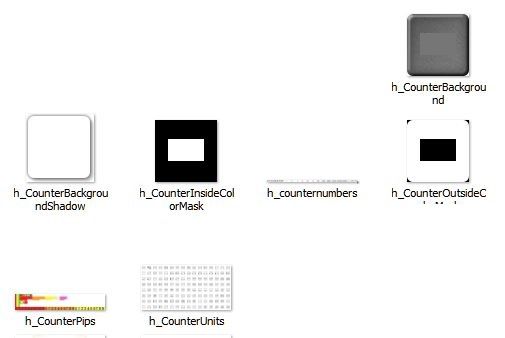
As a PC dummy I think I'd be out of my depth trying to produce new counters, I just had a look at the graphics folder and haven't a clue what to do with these 7 counter bits and pieces in there.
I had a brief dabble but chickened when a warning message came up saying something about "losing transparency" whatever that meant.
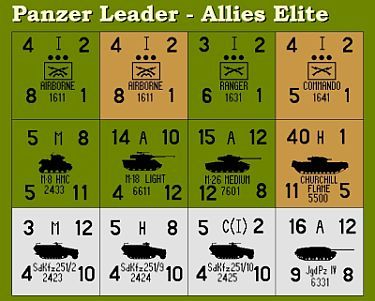
I was hoping to produce something beautifully simple like these counters from the PzLeader boardgame but I'm stuck (sniffle)-
I had a brief dabble but chickened when a warning message came up saying something about "losing transparency" whatever that meant.
I was hoping to produce something beautifully simple like these counters from the PzLeader boardgame but I'm stuck (sniffle)-
"Fight with your brain first and your weapons second!"
RE: Change Graphics to Non-Nato Icons
ORIGINAL: jnpoint
If I could I would. I am not very creative, so that's it I guess.
WitW has NATO counters, but someone did mod them so you can install them instead of the NATO counters, and I have.
You are correct, it may not be easy. All you really need is one person of the same mind who knows how to work with .png graphics who is willing to make a mod for you and others. Maybe the same person who did the ones for the Grigsby game would help you. Some people love to do modding. I think Bob Cross has a tutorial on how to mod the counters.
ne nothi tere te deorsum (don't let the bastards grind you down)
If duct tape doesn't fix it then you are not using enough duct tape.
Two things are infinite: the universe and human stupidity and I’m not sure about the universe-Einstein.
If duct tape doesn't fix it then you are not using enough duct tape.
Two things are infinite: the universe and human stupidity and I’m not sure about the universe-Einstein.
RE: Change Graphics to Non-Nato Icons
Guys, I encourage you to get involved in modifying icons and graphics if you have an interest in it. It can be a lot of fun. However, currently there are unfortunate restrictions. Pictured below is the one counter sheet that we have to work with, it is used for all sides/forces/factions, and some of these icons have obvious attributes that restrict their use for particular purposes.
Edit: Don't use this file, it is only a picture of the real file [CounterUnits.png]

Edit: Don't use this file, it is only a picture of the real file [CounterUnits.png]
- Attachments
-
- CounterUnits.jpg (82.63 KiB) Viewed 1035 times
RE: Change Graphics to Non-Nato Icons
Pictured above is the CounterUnit file, found in the main Graphics folder [not the Override folder]. You can open it in a program like Paint.net and easily rearrange pixels to make custom icons. Put the modified sheet into a scenario specific folder for it to be used. Hopefully someday we will have the ability to modify multiple sheets.
-
Redmarkus5
- Posts: 4454
- Joined: Sat Dec 01, 2007 1:59 pm
- Location: 0.00
RE: Change Graphics to Non-Nato Icons
OK, ignore my posts. That approach doesn't work for me either.
Where do we find these files in the main game? I see examples in the graphics override folder (this one is from Blitzkreig 1950) but if I edit this image and add it to the Directive 21 graphics override folder, nothing happens.
Which unit graphics is a scenario like Directive 21 using and where are they stored within OPART IV?

Where do we find these files in the main game? I see examples in the graphics override folder (this one is from Blitzkreig 1950) but if I edit this image and add it to the Directive 21 graphics override folder, nothing happens.
Which unit graphics is a scenario like Directive 21 using and where are they stored within OPART IV?
- Attachments
-
- h_units_1_019_2.jpg (283.56 KiB) Viewed 1026 times
WitE2 tester, WitW, WitP, CMMO, CM2, GTOS, GTMF, WP & WPP, TOAW4, BA2
RE: Change Graphics to Non-Nato Icons
Prior to TOAW IV, we had 100+ Counter Sheets to work with, making modifications a snap. TOAW IV absent-mindedly reduced that to one sheet, making modifications near impossible. So what you see in Post #35 is all you get. We need this situation to be corrected, so I will gripe about it at every opportunity. However, my voice alone carries little weight, so more of you need to speak up so that we can get something done. Half measures will not work, we need FULL modification abilities returned.
RE: Change Graphics to Non-Nato Icons
Files exist from the past in many scenario folders, but they are not used. The only icon set that is currently used is the one pictured in Post #35. That one is used across the board for all units.I see examples in the graphics override folder
D21 uses the stock sheet [the only one that is currently used].Which unit graphics is a scenario like Directive 21 using
RE: Change Graphics to Non-Nato Icons
IMHO the 2D map looks so much better than the 3D one - but I prefer the 3D unit icons.
Is it possible to switch the icons around so the 2D map uses the 3D icons?
Is it possible to switch the icons around so the 2D map uses the 3D icons?