Using the "All-icons.png" file to be had in this thread: tm.asp?m=4597257&mpage=3&key=
and converting the lab.col.txt file [ also to be had in the same thread ] to my COL
file I converted the colors of the German units to a better shade of grey.
I found out which unit to convert from the GAM file and the color I wanted from the
All-icons.png file and copied the color line from number 0 to the number 10 line and
changed the unit ID from "0" to a "10" and then ran the scenario through the editor
and now the color of the german infantry unit is a better shade of grey.
Do I place a default .col file in the folder and just edit one line or do I copy the scenario and edit in the editor?
You can do either. If the number of units to change color is large, the easiest way is probably to edit the .col file as Larry mentioned. If it is just a handful of units, the editor may be the faster way to go.
I have created my own .col file fire my WIE scenario to reflect both SPI and DG board game counter colors (a mix from both) and include it in the appropriate scenario folder along with my modified eqp file.
Beta Tester for: War in the East 1 & 2, WarPlan & WarPlan Pacific, Valor & Victory, Flashpoint Campaigns: Sudden Storm, Computer War In Europe 2 SPWW2 & SPMBT scenario creator Tester for WDS games
I have created my own .col file fire my WIE scenario to reflect both SPI and DG board game counter colors (a mix from both) and include it in the appropriate scenario folder along with my modified eqp file.
And.....
Did it work? Got a screenshot? Why modify the EQP file? Are you using the TOAW 5.1 equipment file yet?
Yes it did (my PC is still unrecoverable, but I got backups of all my stuff), I'll try to post a screen shot when I am "live" again. FWI in my dropbox account it has my latest Larry if you wanted to take another look.
As far as the eqp file, before I found out about the TOAW 5.1 equipment file I had started modifying my own units (I created about 10, and then I "painstakingly" manually cut and pasted and then renumbered all the equipment I wanted/needed out of the TOAW 5.1 DB files into mine, I did not want to loose my SS Polizei and NKVD squads I created nor the extended range artillery for my scenario (its based on 25 miles to the hex so I modified a few countries artillery to reach the 2 hex range and allocated these 'specially modified guns/howitzers' to specific artillery units.
So for my scenario I customized quite a lot, and only used WW2 data from that DB to supplement my changes.
Going forward I won't do that again.
But that TOAW 5.1 DB is missing a lot of items (the SS Polizei and NKVD, plus the German command tanks, I created I think 5 of these, but at the end of it all with only 24 slots available to units I had to ditch using them, nice chrome for historical purposes but not for a Generic Panzer divisions covering 1939-1945.
Beta Tester for: War in the East 1 & 2, WarPlan & WarPlan Pacific, Valor & Victory, Flashpoint Campaigns: Sudden Storm, Computer War In Europe 2 SPWW2 & SPMBT scenario creator Tester for WDS games
I finally recovered my PC, going to take a few days to get it all settled...
Here is a few screenies...
Germans vs. Polish...
Kriegsmarine...
French near Maginot Line...
More Frenchies...
Brits...
Italians...
German, Poles and Russians, 39 (no guards yet...)...
Beta Tester for: War in the East 1 & 2, WarPlan & WarPlan Pacific, Valor & Victory, Flashpoint Campaigns: Sudden Storm, Computer War In Europe 2 SPWW2 & SPMBT scenario creator Tester for WDS games
Had been looking for a way to modify the colors for the counters. Is their somewhere that I can get the standard color codes that came with TOAW IV?
thx again,
In https://www.matrixgames.com/forums/tm.asp?m=4385511 , the first comment tells how to save a colors (.col) file. Start the editor in the game, load a standard scenario like the Korea 50 - 51 scenario, and press "X" to save the .col file.
I have around 30 or so scenario's I have recolored and will be posting about 25 or so color files within a somewhat short time. I also have about 3-5 scenarios I have tweaked (setting the AD and MRPB and a few other updates) and will be also uploading them as well.
Further I have a series of 11 scenarios that I have both recolored, updated (AD & MRPB) and am updating their scenario briefings and creating updated word docs for them. These last will most likely be uploaded near the end of December.
Beta Tester for: War in the East 1 & 2, WarPlan & WarPlan Pacific, Valor & Victory, Flashpoint Campaigns: Sudden Storm, Computer War In Europe 2 SPWW2 & SPMBT scenario creator Tester for WDS games
How will you be identifying the scenario version? Would like to see a standard convention that shows the scenario is a product of your work and revision history. Something like "Scenario Name Zv01".
Regards
Colin Wright:
Pre Combat Air Strikes # 64 . . . I need have no concern about keeping it civil
Post by broccolini » Sun Nov 06, 2022
. . . no-one needs apologize for douchebags acting like douchebags
For scenarios where I only provided a color file, the zip will just be a folder of said name of scenario and you'll need to introduce it on your system to pick up the color changes.
For scenarios that I modified, I have upgraded their version numbers as follows:
If the scenario is stock or no version listed, I assume that is version 1.0, if so then I upgrade it to version 2.0 and make note of this in the scenario briefing right under the title of the scenario in question, and then at the end I have a change log section with my changes.
If the scenario is not stock or has a version listed, I increment the version to the next highest version and make note of this in the scenario briefing right under the title of the scenario in question, and then at the end I have a change log section with my changes.
Some examples:
Ardennes 1944, stock scenario, no changes, only added a color file so the zip will only contain the folder name with the color file.
St Lo 44, stock scenario, no version listed, so upgraded it and renamed it to: St Lo 1944 2.0, zip file will contain new scenario with new name and new folder with color file and the briefing shows Version 2.0 after the scenario title in the scenario briefing and a change log at the end.
AGSouth1942-1943, by Valhain (a pre-TOAW III scenario), renamed to AGS 1942-1943, set the version to 4.0 (original version was 2.0, I converted this to TOAW III as 3.0 and then to 4.0 for TOAW IV), since it was also a scenario rename, only the version number shows in the scenario briefing. This one also came with a word document file, I took the liberty to correct all the spelling and grammar errors and to reformat it in a nice way, also gave it an image and put in my conversion notes.
And so on.
That is how or what I have been doing with some of these. Currently testing the ones where I added in the AD and MRPB, but I'll release the color modifications only soon.
Beta Tester for: War in the East 1 & 2, WarPlan & WarPlan Pacific, Valor & Victory, Flashpoint Campaigns: Sudden Storm, Computer War In Europe 2 SPWW2 & SPMBT scenario creator Tester for WDS games
Beta Tester for: War in the East 1 & 2, WarPlan & WarPlan Pacific, Valor & Victory, Flashpoint Campaigns: Sudden Storm, Computer War In Europe 2 SPWW2 & SPMBT scenario creator Tester for WDS games
And the end result (still testing out the AD/MRPB effects):
Beta Tester for: War in the East 1 & 2, WarPlan & WarPlan Pacific, Valor & Victory, Flashpoint Campaigns: Sudden Storm, Computer War In Europe 2 SPWW2 & SPMBT scenario creator Tester for WDS games
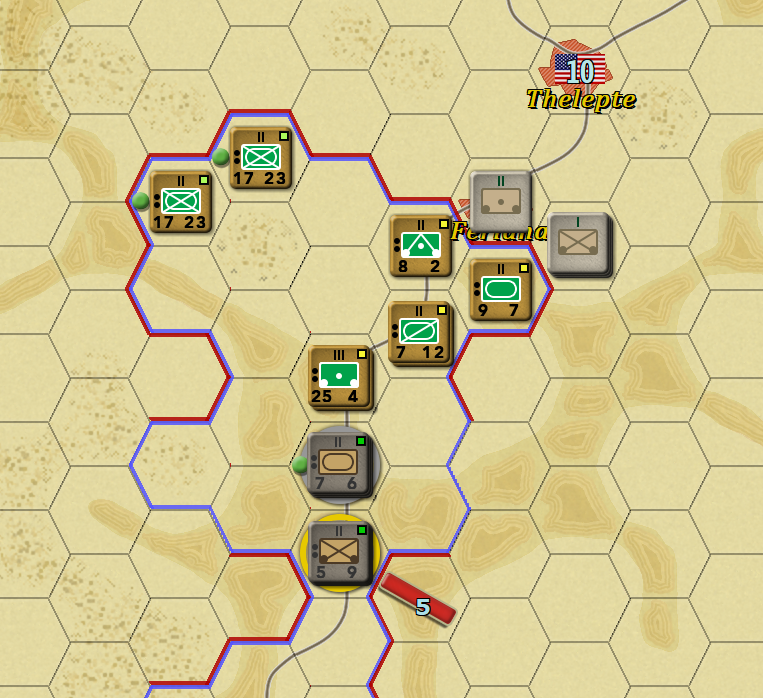
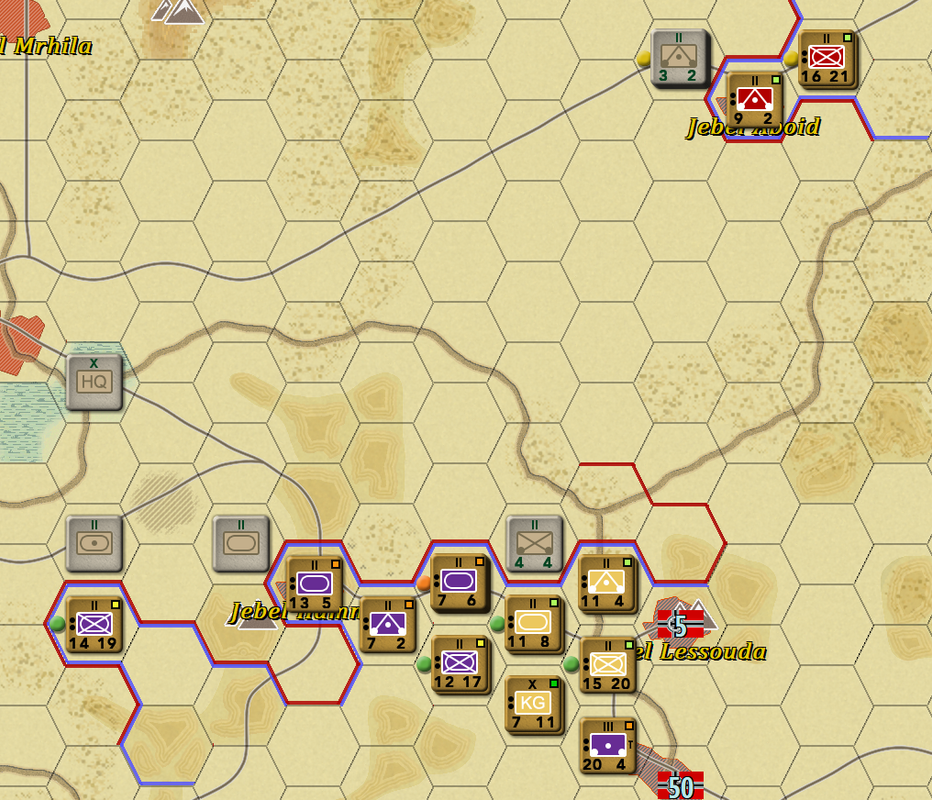
Re-Coloured the Kasserine 43 scenario to help identify the different formations. Adjusted the "Support Scope" to ensure the units interacted correctly.
Used cathar1244's AK colour for the main background and the various Allies colours. The TOAW XML Editor by 76mm to investigate the GAM file for unit colour ID's, "Support Scope" info and editing. Last but not least, Curtis Lemay's https://www.matrixgames.com/forums/tm.asp?m=4385511.
Cheers
There is only one principle of war and that's this.
Hit the other fellow, as quickly as you can, as hard as you can, where it hurts him most, when he ain't lookin'.