


WitE’s air war had quite a high level of abstraction with the moveable air base counters. In WitW there was a change to on map air bases and a separate air phase with instructions issued through air directives. This same approach is used in WitE2. However, the grander scale of WitE2, particularly the greater distances covered, has meant we have had to add a new concept – the Air Operational Group (AOG). AOGs allow the grouping of air units within a command structure and has some similarity to how different ground elements are grouped together within a combat or support unit. The key idea is that instead of having to individually manage every single air unit you can control them within the simpler AOG structure. To start with we’ll explain AOGs and then we’ll explain how air missions are controlled.
Your very first exposure to AOGs will be when you open your first scenario as the air planning phase is the first phase you will encounter.

The AOG labels function like counters in that they provide information about the AOG but they are not strictly on the map. Their positioning is aligned to the distribution of the AOG’s air units at air bases on the map. The only on map air related counters are high level air command HQs. AOGs have a 3 tiered command structure of Army, Corps and Div/Bde/Regt (Low-Level).
As is common across the game as you zoom in you can see more information and if you select a specific AOG then you can see more detail including sub-ordinate AOGs and associated air bases. In this screenshot I have selected I Fliegerkorps and then Gerdauen air base.

On the Gerdauen’s air base label you can see that it is short of supply and support with both of these marked in yellow. However, it has enough to function, you probably only need to worry if this shows as orange or red.
The AOG symbol is a little more complicated to explain so I’ve taken the liberty of stealing from the AOG One Page Guide we have done so you can see what’s what:

This snapshot hints at some of the functionality we have given AOGs to help you manage the air units more easily. We have included significant AI controlled air functionality. At the most extreme you and your opponent can select Automate AI Air Assist as a game preference which will result in the AI handling most of the air war. At an intermediate level there is the AI Air Assist button which you press to trigger the AI doing its stuff. For the lovers of management you can control everything yourself.
If you are happy to delegate control then HQ Follow is quite simple to understand – AOGs can be set to follow specific HQs as they move. Stance is a setting which dictates when air units will move as to do so at the wrong time may impact their ability to provide the air support needed. Mission Setting controls at what time of the day air missions will be flown. Of course you can also control the movement of AOGs manually.
I think the last paragraph highlights the key message in this showcase - there is real choice in how involved you are in the WitE2 air war. On the one hand you can do very little and allow the AI to be your air commander; on the other you can do it all yourself. In between there is a spectrum of layers of involvement to choose to suit your playing style.
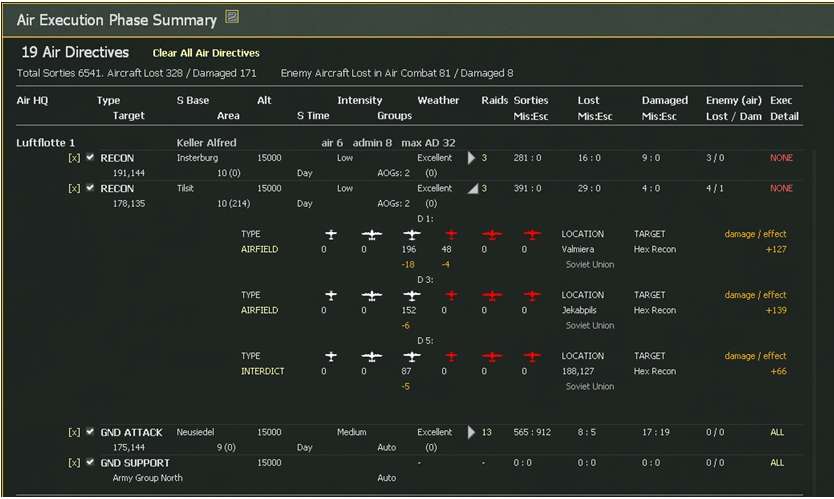
Now that you have an understanding of the AOG structure and their subordinate air units we can look at how they are given instructions to conduct air operations. Those familiar with WitW will understand Air Directives but for those who aren’t let me explain. Air Directives (ADs) are a broad set on instructions that you give to control air units. These instructions can be summarised in terms like “I want Koluft 16 to recon area X” or “I want Fliegerkorps I to provide Ground Support to Army Group North”. In setting an AD you can specify more detailed criteria such as the time of day, number of aircraft to fly, escorts and altitude or leave them as is - it really is up to you! Whatever your choice the individual missions that are then flown to deliver the intent of the AD are controlled by the computer. This makes controlling the air war much simpler. A quick run of Axis Turn1 for GC41 using the ADs set in the scenario saw 6541 different sorties flown!
There are a choice of six different ADs:
- Ground Attack – This AD focuses on a map area and slows & interdicts enemy ground units.
- Strategic Bombing / Bomb City – Used to bomb production facilities & manpower in cities.
- Air Recon – Used to increase the detection level of enemy ground units in the target area.
- Air Superiority – Fighter units fly to an area and try to disrupt enemy missions in that area.
- Naval Patrol - – The units will attempt to create naval interdiction points in the target area.
and finally
- Ground Support – Provides ground units with direct air support during ground attacks. Unlike the other ADs Air Groups will fly during the ground movement phase.
In WitE2 by far the most important are Recon and Ground Support.
You are able on the map to show all the ADs that have been set so you can ensure you are covering the areas that you want. The green shaded hexes indicate the reach of the fighter escorts.

This neatly brings me on to the ability to show the ranges of air units from their air bases. Here you can see the range circles of JG54’s aircraft. JG54 is I Fliegerkorps’ fighter AOG – compare the circles with the green shaded hexes above. Certain AOGs are limited in the aircraft types they can use but actually that makes things easier to manage.

This next screenshot focuses on the Recon AD on the map for Luftflotte 1 which will be flown by Koluft 18 and Koluft 4 PGr. On the right hand side you can see some of the specified criteria.

You can move the AD boxes on the map to position them exactly as you need:
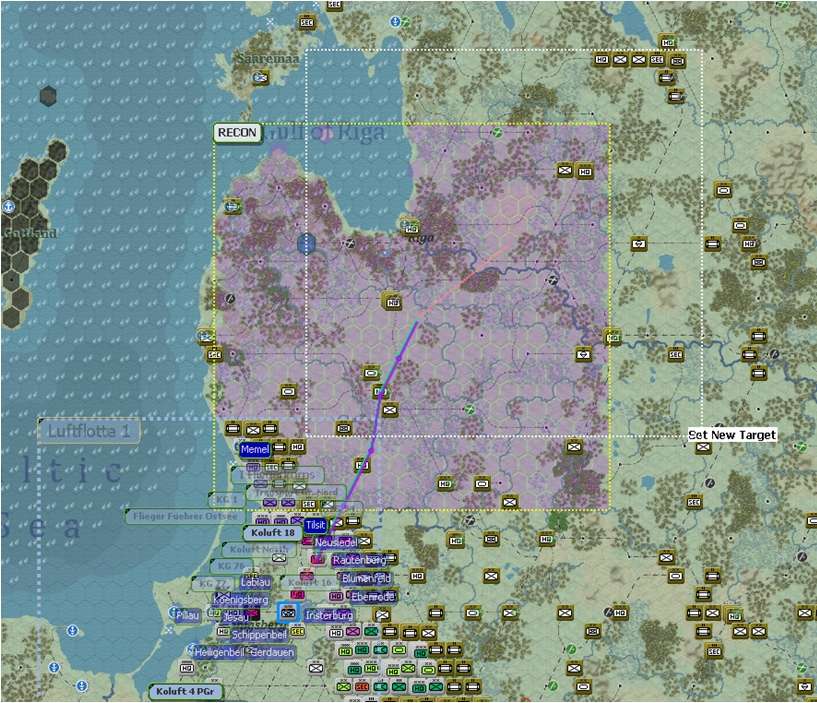
Once you are happy you can run the air turn and watch how things go a varying levels of information (more choice!). At the end you get a summary. This next screenshot shows Luftflotte 1, again focusing on the Recon AD assigned to Koluft 18 and Koluft 4 PGr:
As mentioned above Ground Support ADs are flown during the ground phase. In setting the AD you can allocate the air units to be used or set allocation to automatic. When you launch an attack using your ground forces you have the choice to specify whether air units will fly in support.
In summary I hope you can see we have added significant functionality to control air units within the new AOG construct and choice to allow you to either let the AI take most of the burden or immerse yourself in what has been described as a game within a game.


