

First of all greetings from Spain.
I have a question that I cannot find the answer in the forums.
When editing a scenario, I would like to include an image in a message that appears to the player when an X condition occurs. I see the option to include the image, but I can't figure out what to put in the "Href" box.
I would be very grateful if someone could help me. Thanks.
Insert an image to message
Post new mods and scenarios here.
Moderator: MOD_Command
-
KnightHawk75
- Posts: 1850
- Joined: Thu Nov 15, 2018 7:24 pm
RE: Insert an image to message
Post by KnightHawk75 »
TLDR:
If you are using an image from the internet (ie your scene requires internet connection) and this is just a basic Message action then you can just enter the url either as the href (when inserting image) or when editing the raw html's src= property.
(click thumbnail for full image)
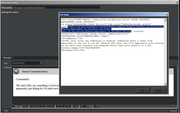
Extended: (provided not so much for your question but for others in future that may come up)
Some things to know for image paths relating to scene Description or Briefings only:
-If you want to use the local filesystem you can use relative path referencing in loaddoc'd html.
-If using [loaddoc] external file method then see: https://www.matrixgames.com/forums/tm.asp?m=4973025 for how to use them and for the various ways you can use relative paths (there are functional example scenes included).
Some things to know for image paths relating to Action Messages or Special Messages only:
- You can't use the [loaddoc] method. (that I know of as of build 1147.36)
- If trying to use a local file path you can't use relative path referencing like with [loaddoc], and must use a full path.
- Since it must be full path you will have to build it on the fly using VP_GetScenario().FileNamePath as your starting point.
- If trying to use a standard display message with a local file image that is built at runtime, the preview image will not show unless it's currently set to a valid local path and file on the system.
- You can insert placeholder text like src="__URL1__" where you replace __URL1__ on scene startup or dynamically during use, where you use the action-message really as just a template.
- You do need to be careful about how that is done, especially if actually doing a permanent replace via lua. One must first convert <, >,' ','&' etc codes to real characters before usage or setting back, otherwise it can get double escaped when setting the action text, or if just using the raw text it gets read literally by SpecialMessage who expects the html).
All: Keep your html to 4.x and css\styles and to what is supported in IE8-9ish.
So if you're wanting images in special message and trying to use internet source, then just use normal url.
If trying to use local file system say from loading from the folder the scene is contained in then use src= VP_GetScenario().FileNamePath .. '\\nameofimage', or alternatively src= 'file:///' .. VP_GetScenario().FileNamePath .. '\\nameofimage.png'. Just know that relative entries like 'file:./nameofimage.png' or './nameofimage.png' that work elsewhere will not function in display/special messages. Usage of said VP_ function requires cmo build 1147.2x+
For example a console test:
As you might guess I often have use filepath's and Message Actions that have images or other _fillinblank_ values in templates and just display them via specialmessage using the template with placeholder and fill them in before display. Alternatively you can update the original message with the revised text in a condition before display (gKH.Message:MessageFromTemplate('thename',{stuffhere},true)), etc. When it comes to filepaths I don't recommend that approach as if a user moves their scenario files between plays the template values have already been replaced and saved they can end up out of date.
edit: changed some of the code line breaks where there are longer string to try to not scroll off the forum screen as much as original.
If you are using an image from the internet (ie your scene requires internet connection) and this is just a basic Message action then you can just enter the url either as the href (when inserting image) or when editing the raw html's src= property.
(click thumbnail for full image)
Extended: (provided not so much for your question but for others in future that may come up)
Some things to know for image paths relating to scene Description or Briefings only:
-If you want to use the local filesystem you can use relative path referencing in loaddoc'd html.
-If using [loaddoc] external file method then see: https://www.matrixgames.com/forums/tm.asp?m=4973025 for how to use them and for the various ways you can use relative paths (there are functional example scenes included).
Some things to know for image paths relating to Action Messages or Special Messages only:
- You can't use the [loaddoc] method. (that I know of as of build 1147.36)
- If trying to use a local file path you can't use relative path referencing like with [loaddoc], and must use a full path.
- Since it must be full path you will have to build it on the fly using VP_GetScenario().FileNamePath as your starting point.
- If trying to use a standard display message with a local file image that is built at runtime, the preview image will not show unless it's currently set to a valid local path and file on the system.
- You can insert placeholder text like src="__URL1__" where you replace __URL1__ on scene startup or dynamically during use, where you use the action-message really as just a template.
- You do need to be careful about how that is done, especially if actually doing a permanent replace via lua. One must first convert <, >,' ','&' etc codes to real characters before usage or setting back, otherwise it can get double escaped when setting the action text, or if just using the raw text it gets read literally by SpecialMessage who expects the html).
All: Keep your html to 4.x and css\styles and to what is supported in IE8-9ish.
So if you're wanting images in special message and trying to use internet source, then just use normal url.
If trying to use local file system say from loading from the folder the scene is contained in then use src= VP_GetScenario().FileNamePath .. '\\nameofimage', or alternatively src= 'file:///' .. VP_GetScenario().FileNamePath .. '\\nameofimage.png'. Just know that relative entries like 'file:./nameofimage.png' or './nameofimage.png' that work elsewhere will not function in display/special messages. Usage of said VP_ function requires cmo build 1147.2x+
For example a console test:
Code: Select all
--console example setup
 local gKH = {}; gKH.Message={}; gKH.SceneGlobals={}; gKH.SceneGlobals.SceneMessages={};
 gKH.SceneGlobals.SceneMessages.InitialMsg={};

 --little function to convert whats in Message.Text (xml escaped) back to html.
 function gKH.Message.EscapedToHTML(s)
   s = s:gsub('<',"<"):gsub('>',">"):gsub(' '," "):gsub('&',"&"):gsub(''',"'");
   return s;
 end

 --this returns the Message.Text field from a specified existing action name or guid.
 function gKH.Message:GetActionMessageText(actionName)
   local r, ea = pcall(ScenEdit_SetAction,{Description=actionName, Mode='list'});
   if ((((r==true) and ea ~=nil) and ea.actions ~= nil) and ea.actions[1].Message ~=nil) and ea.actions[1].Message.Text ~=nil then
     return gKH.Message.EscapedToHTML(ea.actions[1].Message.Text); --unescape it first.
   end
   return nil;
 end
Code: Select all
 --gets the existing action text, does a search and replace for everything in the table and returns the result.
 function gKH.Message:MessageFromTemplate(actionName,valuesTable,bChangeAction)
   if bChangeAction == nil then bChangeAction = false; end
   local txt = gKH.Message:GetActionMessageText(actionName)
   if ((txt ~= nil) and valuesTable ~=nil) and type(valuesTable) == 'table' then
     for k,v in pairs(valuesTable) do
       txt = txt:gsub(k,v); --replace k with v
     end
     if bChangeAction == true then ScenEdit_SetAction({Description=actionName, Mode='update',type="Message",Text=txt}) end
     return txt;
   else return nil; end
 end
Code: Select all
 --wraps the send adding default body start and default body end html if not otherwise provided.
 function gKH.Message:SendHTMLMessageBlackOnWhite2(theSide,msgOpen,theMsg,msgClose,lat1,lon1)
      if(theSide == nil) then return;end
      if (msgOpen == nil) or msgOpen =='' then
      msgOpen = '<HTML><style>body {background-color: #FFFFFF; font-family: """New Times Roman""",arial,verdana,san-serif; color:#000000;}</style><body>'; end
      if (msgClose ==nil) or msgClose =='' then msgClose ='</body></HTML>' ; end
      if(lat1 ==nil or lon1==nil) then
           ScenEdit_SpecialMessage(theSide,string.format('%s%s%s',msgOpen,theMsg,msgClose) );
      else
           ScenEdit_SpecialMessage(theSide,string.format('%s%s%s',msgOpen,theMsg,msgClose),{lat=lat1,lon=lon1});
      end
 end
Code: Select all
 --sample vars
 --sample header.
 gKH.SceneGlobals.SecureCommsHeader =
 '<p style="color: #000000; background-color: #cccccc"><IMG src="%s" style="vertical-align:middle" height="45" width="45"></IMG>    Secure Communication</p>';
 gKH.SceneGlobals.SceneMessages.InitialMsg.uri =
 "https://upload.wikimedia.org/wikipedia/commons/thumb/0/09/Seal_of_the_United_States_Department_of_the_Navy.svg/240px-Seal_of_the_United_States_Department_of_the_Navy.svg.png"
 -- you will manually have to add this file to the same folder as scene for this exact test
 gKH.SceneGlobals.SceneMessages.InitialMsg.filepath =
 VP_GetScenario().FileNamePath .. '\\240px-Seal_of_the_United_States_Department_of_the_Navy.png'
 -- sample msg.
 gKH.SceneGlobals.SceneMessages.InitialMsg.text =
 '<p>Commander,</p><p>This is some couple line message. Here is the text for me to look at, hello world. Ok this should be enough to test with for now. Good Luck.</p>';

 --Example when building text yourself, swap values based on if user has internet.
 gKH.SceneGlobals.InternetEnabled = false; local tmpstr = gKH.SceneGlobals.SceneMessages.InitialMsg.uri
 if gKH.SceneGlobals.InternetEnabled ==false then tmpstr = gKH.SceneGlobals.SceneMessages.InitialMsg.filepath; end
 gKH.Message:SendHTMLMessageBlackOnWhite2('playerside',nil,string.format(gKH.SceneGlobals.SecureCommsHeader,tmpstr) .. gKH.SceneGlobals.SceneMessages.InitialMsg.text)

 --Example when using an existing message in this case with images in subfolder images in a subfolder MyCoolScenarioNameAssets.
 --This presumes there is a action called test containing something like:
 --<BODY scroll=auto><P>Testies 1 2 <IMG alt=testimage src="__URL1__"> </P><P>Side: __PLAYERSIDE__</P></BODY>
 ScenEdit_SpecialMessage('playerside',gKH.Message:MessageFromTemplate('test',{__URL1__=VP_GetScenario().FileNamePath ..
 '\\MyCoolScenarioNameAssets\\images\\MyCool_ScenarioName_Yellow.png',__PLAYERSIDE__=ScenEdit_PlayerSide()},false))
As you might guess I often have use filepath's and Message Actions that have images or other _fillinblank_ values in templates and just display them via specialmessage using the template with placeholder and fill them in before display. Alternatively you can update the original message with the revised text in a condition before display (gKH.Message:MessageFromTemplate('thename',{stuffhere},true)), etc. When it comes to filepaths I don't recommend that approach as if a user moves their scenario files between plays the template values have already been replaced and saved they can end up out of date.
edit: changed some of the code line breaks where there are longer string to try to not scroll off the forum screen as much as original.
Return to “Mods and Scenarios”
Jump to
- General
- ↳ Press Releases, News and Events from Matrix
- ↳ General Discussion
- ↳ Quizzes, Trivial and other Interesting Information
- ↳ Site Feedback
- ↳ Latest Matrix Downloads
- ↳ Official Matrix Games Discord Server
- ↳ Official Support: Matrix Games Help Desk
- ↳ Automated Purchased Game Re-Downloads (Members Club My Orders)
- ↳ FAQ
- ↳ Unofficial Tech Support By Gamers for Gamers
- Regional
- ↳ Español
- ↳ Français
- Coming Soon
- ↳ Strategic Command: Korea
- ↳ Commander: Europe at War
- ↳ Decisive Campaigns: Twilight in the East
- ↳ Tech Support
- ↳ Official Decisive Campaigns Discord Server
- New Releases from Matrix Games
- ↳ Distant Worlds 2
- ↳ Distant Worlds 2: Tech Support
- ↳ After Action Reports
- ↳ The War Room
- ↳ Design and Modding
- ↳ Distant Worlds 2 Product Page
- ↳ Official Distant World 2 Discord Server
- ↳ Flashpoint Campaigns: Cold War
- ↳ Tech Support
- ↳ After Action Report
- ↳ Mods and Scenarios
- ↳ Scenario School
- ↳ The War Room
- ↳ Opponents Wanted
- ↳ Requested Features and Ideas
- ↳ Flashpoint Campaigns: Cold War Product Page
- ↳ Join the Discord!
- ↳ Strategic Command Series
- ↳ Strategic Command WWII: War in the Pacific
- ↳ Tech Support
- ↳ After Action Report
- ↳ Scenario Design and Modding
- ↳ Feature Suggestions
- ↳ The War Room
- ↳ Opponents Wanted
- ↳ Strategic Command WWII: War in the Pacific Buy Now
- ↳ Strategic Command WWII: War in the Pacific Discord Server
- ↳ Manual
- ↳ Strategic Command: World War I
- ↳ PDF Manual
- ↳ Tech Support
- ↳ MODS and Scenarios
- ↳ AAR
- ↳ Multiplayer Sessions
- ↳ War Room
- ↳ Strategic Command: American Civil War
- ↳ Tech Support
- ↳ Features Suggestions
- ↳ Scenario Design and Modding
- ↳ The War Room
- ↳ After Action Report
- ↳ Opponents Wanted
- ↳ Strategic Command: American Civil War Buy now
- ↳ Strategic Command: American Civil War Discord
- ↳ Strategic Command WWII: World at War
- ↳ Tech Support
- ↳ MODS and Scenarios
- ↳ AAR
- ↳ Multiplayer Sessions
- ↳ War Room
- ↳ SC WWII World at War Manual (PDF EBOOK)
- ↳ Strategic Command WWII War in Europe
- ↳ Strategic Command WWII War in Europe Public Beta
- ↳ Tech Support
- ↳ After Action Reports
- ↳ Videos, Tutorials, Let's Plays
- ↳ Developer Blog
- ↳ The War Room
- ↳ Multiplayer (PBEM and head to head)
- ↳ Scenario Design and Modding
- ↳ Strategic Command WWII: War in Europe Product Page
- ↳ Buy Strategic Command WWII: War in Europe Now!
- ↳ Strategic Command Classic: WWI
- ↳ Tech Support
- ↳ Tech Support
- ↳ Strategic Command Classic: Global Conflict
- ↳ Tech Support
- ↳ Strategic Command Classic WWII
- ↳ Tech Support
- ↳ Shadow Empire
- ↳ Tech Support
- ↳ AAR
- ↳ War Room
- ↳ Shadow Empire MATRIX VERSION Open Beta
- ↳ Suggestions and Feedback
- ↳ Graphic Mods
- ↳ Buy the Game
- ↳ Manual
- ↳ Story and Stratagem (S&S) Editor
- ↳ Rule the Waves 3
- ↳ Rule the Waves 3: Tech Support
- ↳ After Action Reports
- ↳ The War Room
- ↳ Design and Modding
- ↳ Ship Designs and Scenarios
- ↳ Rule the Waves 3 Product Page
- ↳ Official Rule the Waves 3 Discord Server
- ↳ Rule the Waves 3 - Manual
- ↳ Armored Brigade II
- ↳ Manual
- ↳ Armored Brigade II: Tech Support Forum
- ↳ Armored Brigade II: Mods
- ↳ Armored Brigade II: Maps and Map Making
- ↳ Armored Brigade II: Scenarios
- ↳ Combat Mission Series
- ↳ Combat Mission Battle for Normandy
- ↳ Tech Support
- ↳ Feature Suggestions
- ↳ Scenario Design and Modding
- ↳ The War Room
- ↳ After Action Report
- ↳ Opponents Wanted
- ↳ Buy Now
- ↳ Combat Mission Official Discord Channel
- ↳ Combat Mission: Final Blitzkrieg
- ↳ Tech Support
- ↳ Feature Suggestions
- ↳ Scenario Design and Modding
- ↳ The War Room
- ↳ After Action Report
- ↳ Opponents Wanted
- ↳ Buy Base Game
- ↳ Buy Downfall DLC
- ↳ Combat Mission Official Discord Channel
- ↳ Downfall DLC Manual
- ↳ Combat Mission Fortress Italy
- ↳ Tech Support
- ↳ Feature Suggestions
- ↳ Scenario Design and Modding
- ↳ The War Room
- ↳ After Action Report
- ↳ Opponents Wanted
- ↳ Buy Now
- ↳ Combat Mission Official Discord Channel
- ↳ Base Game Manual
- ↳ Gustav Line DLC Manual
- ↳ Rome to Victory DLC manual
- ↳ Combat Mission Red Thunder
- ↳ Tech Support
- ↳ Feature Suggestions
- ↳ Scenario Design and Modding
- ↳ The War Room
- ↳ After Action Report
- ↳ Opponents Wanted
- ↳ Buy Now
- ↳ Combat Mission Official Discord Channel
- ↳ Fire and Rubble DLC Manual
- ↳ Base Game Manual
- ↳ Combat Mission Cold War
- ↳ Public Beta Tournament
- ↳ Tech Support
- ↳ Feature Suggestions
- ↳ Scenario Design and Modding
- ↳ The War Room
- ↳ After Action Report
- ↳ Opponents Wanted
- ↳ Buy Combat Mission: Cold War Now!
- ↳ Combat Mission Official Discord Channel
- ↳ Combat Mission Black Sea
- ↳ Tech Support
- ↳ Feature Suggestions
- ↳ Scenario Design and Modding
- ↳ The War Room
- ↳ After Action Report
- ↳ Opponents Wanted
- ↳ Buy Combat Mission: Black Sea Now!
- ↳ Combat Mission Official Discord Channel
- ↳ Combat Mission Shock Force 2
- ↳ Tech Support
- ↳ Feature Suggestions
- ↳ Scenario Design and Modding
- ↳ The War Room
- ↳ After Action Report
- ↳ Opponents Wanted
- ↳ Buy Combat Mission: Shock Force 2 Now!
- ↳ Combat Mission Official Discord Channel
- ↳ War in Spain 1936-39
- ↳ Tech Support
- ↳ After Action Reports
- ↳ The War Room
- ↳ Opponents Wanted
- ↳ Scenario Design and Modding
- ↳ Buy War in Spain 1936-39 Now!
- ↳ Official Matrix Games Discord
- ↳ WEGO Series
- ↳ WEGO World War II: Overlord
- ↳ Tech Support
- ↳ WEGO World War II: Stalingrad
- ↳ WEGO World War II: Stalingrad: Tech Support
- ↳ WEGO World War II: Stalingrad: Multiplayer War Room
- ↳ WEGO World War II: Stalingrad: Mods and Scenarios
- ↳ WEGO World War II: Stalingrad: Editor and Campaign Editor
- ↳ WEGO World War II: Stalingrad - Scenario AAR
- ↳ WEGO World War II: Stalingrad Suggestions/Future Improvements
- ↳ Desert War 1940 - 1942
- ↳ After Action Reports
- ↳ Tech Support
- ↳ Mods and Scenarios
- ↳ Future Ideas
- ↳ Campaign Series: Middle East 1948-1985
- ↳ Tech Support
- ↳ After Action Reports
- ↳ The War Room
- ↳ Mods and Scenarios
- ↳ Opponents Wanted
- ↳ Buy Campaign Series: Middle East 1948-1985 Now!
- ↳ Campaign Series: Middle East 1948-1985 Product Info
- ↳ Command: Modern Operations series
- ↳ Command: DLCs
- ↳ Command: Desert Storm
- ↳ Command: Shifting Sands
- ↳ Command: Chains of War
- ↳ Command: Northern Inferno
- ↳ Tech Support
- ↳ Multiplayer PBEM - Unofficial
- ↳ After Action Report
- ↳ Mods and Scenarios
- ↳ WarfareSims Mods and Scenarios Archive
- ↳ Useful Material
- ↳ Lua Legion
- ↳ The War Room
- ↳ Command: Modern Operations Product Info
- ↳ Buy Command: Modern Operations Now!
- ↳ CMO PDF Manual
- ↳ Official Discord Command Modern Operations
- ↳ Campaign Series: Vietnam
- ↳ Tech Support
- ↳ Features Suggestions
- ↳ Scenario Design and Modding
- ↳ The War Room
- ↳ After Action Report
- ↳ Opponents Wanted
- ↳ Campaign Series Vietnam Product Page
- ↳ Campaign Series Vietnam Official Discord Server
- ↳ Valor & Victory
- ↳ Tech Support Forum
- ↳ Scenario Design
- ↳ Opponents Wanted
- ↳ The War Room
- ↳ After Action Reports
- ↳ Buy Valor & Victory Now
- ↳ Valor & Victory Official Discord Server
- ↳ Flashpoint Campaigns Southern Storm
- ↳ Tech Support
- ↳ After Action Report
- ↳ Mods and Scenarios
- ↳ Scenario School
- ↳ The War Room
- ↳ Opponents Wanted
- ↳ Requested Features and Ideas
- ↳ Flashpoint Campaigns: Southern Storm Product Page
- ↳ Flashpoint Campaigns Southern Storm Official Discord
- ↳ Nuclear War Simulator
- ↳ Gary Grigsby's War in the East 2
- ↳ Tech Support
- ↳ Scenario Data / Map Issues
- ↳ Feature Suggestions
- ↳ Scenario Design and Modding
- ↳ The War Room
- ↳ After Action Reports
- ↳ Opponents Wanted
- ↳ Buy Gary Grigsby's War in the East 2 Now!
- ↳ War in the East 2 Official Discord Server
- ↳ Race for the Caucasus Tournament
- ↳ Gary Grigsby's World at War: A World Divided
- ↳ Tech Support
- ↳ After Action Reports
- ↳ The War Room
- ↳ Mods and Scenarios
- ↳ Opponents Wanted
- ↳ Limited Public Beta Feedback
- ↳ Buy Gary Grigsby's World at War: A World Divided Now!
- ↳ World at War: A World Divided Official Discord Server
- ↳ Decisive Campaigns: Ardennes Offensive
- ↳ Open Beta
- ↳ Tech Support
- ↳ Scenario Design and Modding
- ↳ After Action Reports
- ↳ Opponents wanted
- ↳ Buy Decisive Campaigns: Ardennes Offensive Now!
- ↳ Join the Official Decisive Campaigns Discord!
- ↳ Warplan Pacific
- ↳ Warplan Pacific: Tech Support Forum
- ↳ Scenario Design and Modding
- ↳ The War Room
- ↳ After Action Reports
- ↳ Opponents Wanted
- ↳ Buy Warplan Pacific Now!
- ↳ WarPlan Pacific Beta
- ↳ Empires in Arms the Napoleonic Wars of 1805 - 1815
- ↳ Tech Support
- ↳ After Action Reports
- ↳ The War Room
- ↳ Opponents Wanted
- ↳ Mods and Scenarios
- ↳ Buy Empires in Arms Now!
- ↳ Advanced Tactics Series
- ↳ Advanced Tactics Support
- ↳ After Action Reports
- ↳ Mods and Scenarios
- ↳ The War Room
- ↳ Opponents Wanted
- ↳ Advanced Tactics Community Site
- ↳ Advanced Tactics Gold: Open Beta
- ↳ Buy Advanced Tactics: Gold Now!
- ↳ Armored Brigade
- ↳ Armored Brigade: Tech Support Forum
- ↳ Armored Brigade - Factions Overviews & Dev Diaries
- ↳ Armored Brigade - Dev Diaries
- ↳ AAR
- ↳ MODS and Scenarios
- ↳ Manual PDF
- ↳ Map Making Tutorial - PDF guide
- ↳ Tutorial Videos
- ↳ Armored Brigade Campaign Generator Guide
- ↳ Research
- ↳ France
- ↳ Belgium
- ↳ Czechoslovakia
- ↳ Canada
- ↳ Suggestions
- ↳ Close Combat – The Bloody First
- ↳ Close Combat: The Bloody First - Tech Support Forum
- ↳ Close Combat The Bloody First - Modding
- ↳ Close Combat Series
- ↳ Close Combat - Gateway to Caen
- ↳ Tech Support
- ↳ After Action Reports
- ↳ Mods and Scenarios
- ↳ The War Room
- ↳ Opponents Wanted
- ↳ Close Combat - Gateway to Caen Product Page
- ↳ Buy Close Combat - Gateway to Caen Now!
- ↳ Close Combat: Panthers in the Fog
- ↳ Tech Support
- ↳ After Action Reports
- ↳ Mods and Scenarios
- ↳ The War Room
- ↳ Opponents Wanted
- ↳ Close Combat: Panthers in the Fog Product Info
- ↳ Buy Close Combat: Panthers in the Fog Now!
- ↳ Close Combat: Last Stand Arnhem
- ↳ Tech Support
- ↳ After Action Reports
- ↳ Mods and Scenarios
- ↳ The War Room
- ↳ Opponents Wanted
- ↳ Close Combat Website
- ↳ Close Combat: Last Stand Arnhem Product Info
- ↳ Buy Close Combat: Last Stand Arnhem Now!
- ↳ Close Combat: Modern Tactics
- ↳ Tech Support
- ↳ After Action Reports
- ↳ Mods and Scenarios
- ↳ Opponents Wanted
- ↳ Close Combat Website
- ↳ Buy Close Combat: Modern Tactics Now!
- ↳ Close Combat - Cross of Iron
- ↳ Cross of Iron Support
- ↳ After Action Reports
- ↳ Opponents Wanted
- ↳ Scenario Design and Editing
- ↳ Cross of Iron Modding
- ↳ Close Combat Website
- ↳ Close Combat: Cross of Iron Product Info
- ↳ Buy Close Combat: Cross of Iron Now!
- ↳ Close Combat: The Longest Day
- ↳ Tech Support
- ↳ Mods and Scenarios
- ↳ The War Room
- ↳ After Action Reports
- ↳ Opponents Wanted
- ↳ Close Combat Website
- ↳ Close Combat: The Longest Day Product Info
- ↳ Buy Close Combat: The Longest Day Now!
- ↳ Close Combat: Wacht am Rhein
- ↳ Tech Support
- ↳ Mods and Scenarios
- ↳ The War Room
- ↳ After Action Reports
- ↳ Opponents Wanted
- ↳ Close Combat Website
- ↳ Close Combat: Wacht am Rhein Product Info
- ↳ Buy Close Combat - Wacht am Rhein Now!
- ↳ Decisive Campaigns Series
- ↳ Decisive Campaigns: The Blitzkrieg from Warsaw to Paris
- ↳ Tech Support
- ↳ Historical Issues
- ↳ After Action Reports
- ↳ Mods and Tweaks
- ↳ The War Room
- ↳ Opponents Wanted
- ↳ Decisive Campaigns: The Blitzkrieg from Warsaw to Paris Product Info
- ↳ Buy Decisive Campaigns: The Blitzkrieg from Warsaw to Paris Now!
- ↳ Decisive Campaigns: Case Blue
- ↳ Tech Support
- ↳ After Action Reports
- ↳ Mods and Scenarios
- ↳ The War Room
- ↳ Opponents Wanted
- ↳ Decisive Campaigns: Case Blue Product Info
- ↳ Buy Decisive Campaigns: Case Blue Now!
- ↳ Join the Official Decisive Campaigns Discord!
- ↳ Decisive Campaigns: Barbarossa
- ↳ Tech Support
- ↳ After Action Report
- ↳ Mods
- ↳ Scenario Design with the Community Project
- ↳ Tech Forum
- ↳ The War Room
- ↳ Opponents Wanted
- ↳ Decisive Campaigns: Barbarossa Product Info
- ↳ Buy Decisive Campaigns: Barbarossa Now!
- ↳ Join the Official Decisive Campaigns Discord!
- ↳ Distant Worlds 1 Series
- ↳ Tech Support
- ↳ After Action Reports
- ↳ The War Room
- ↳ Design and Modding
- ↳ Distant Worlds: Universe Product Info
- ↳ Buy Distant Worlds: Universe Now!
- ↳ Flashpoint Campaigns Classic
- ↳ Tech Support
- ↳ After Action Report
- ↳ Mods and Scenarios
- ↳ Scenario School
- ↳ The War Room
- ↳ Opponents Wanted
- ↳ Requested Features and Ideas
- ↳ Flashpoint Campagns: Red Storm Product Info
- ↳ Buy Flashpoint Campaigns Red Storm Now!
- ↳ Gary Grigsby's Eagle Day to Bombing the Reich
- ↳ After Action Reports
- ↳ Tech Support
- ↳ The War Room
- ↳ Opponents Wanted
- ↳ Scenarios and Modding
- ↳ Buy Eagle Day to Bombing the Reich Now!
- ↳ Eagle Day to Bombing the Reich Discord server
- ↳ Gary Grigsby's War in the East Series
- ↳ Tech Support
- ↳ After Action Reports
- ↳ The War Room
- ↳ Opponents Wanted
- ↳ Scenario Design and Modding
- ↳ Buy Gary Grigsby's War in the East Now!
- ↳ Buy Gary Grigsby's Don to the Danube Now!
- ↳ Buy Gary Grigsby's War in the East: Lost Battles Now!
- ↳ War in the East Discord Server
- ↳ Gary Grigsby's War in the West
- ↳ Tech Support
- ↳ After Action Reports
- ↳ The War Room
- ↳ Opponents Wanted
- ↳ Scenario Design and Modding
- ↳ Buy Gary Grigsby's War in the West Now!
- ↳ Buy Gary Grigsby's Operation Torch Now!
- ↳ War in the West Discord Server
- ↳ The Operational Art of War IV
- ↳ Mods and Scenarios
- ↳ Mods
- ↳ Tech Support
- ↳ After Action Reports
- ↳ The War Room
- ↳ Opponents Wanted
- ↳ The Operational Art of War IV Product Info
- ↳ Buy The Operational Art of War IV Now!
- ↳ Manual
- ↳ Victory and Glory: Napoleon
- ↳ Tech Support
- ↳ Victory and Glory: Napoleon - Buy Now!
- ↳ Victory and Glory: Napoleon AAR
- ↳ War in the Pacific: Admiral's Edition
- ↳ Tech Support
- ↳ After Action Reports
- ↳ The War Room
- ↳ Opponents Wanted
- ↳ Scenario Design and Modding
- ↳ Buy War in the Pacific: Admiral's Edition Now!
- ↳ War in the Pacific: Admiral's Edition Discord Server
- ↳ WarPlan
- ↳ War Plan: Tech Support
- ↳ WarPlan Manual
- ↳ AAR
- ↳ Opponents Wanted
- ↳ MODS and Scenarios
- ↳ War Room
- ↳ WarPlan Open Beta Versions
- ↳ North Africa Scenario Open Beta
- ↳ World in Flames
- ↳ Tech Support
- ↳ NetPlay Tech Support
- ↳ After Action Report
- ↳ Mods and Scenarios
- ↳ The War Room
- ↳ Opponents Wanted
- ↳ AI Opponent Discussion
- ↳ WIF School
- ↳ World in Flames Map Pack Product Info
- ↳ Buy World in Flames Map Pack Now!
- ↳ World in Flames Product Info
- ↳ Buy World in Flames Now!
- ↳ Modern Naval Warfare
- Current Games From Matrix.
- ↳ [Fantasy]
- ↳ Fantasy Kommander – Eukarion Wars
- ↳ Tech Support
- ↳ After Action Report
- ↳ Mods and Scenarios
- ↳ The War Room
- ↳ Fantasy Kommander - Eukarion Wars Product Info
- ↳ Buy Fantasy Kommander - Eukarion Wars Now!
- ↳ Drums of War
- ↳ Tech Support
- ↳ After Action Report
- ↳ Mods and Scenarios
- ↳ The War Room
- ↳ Opponents Wanted
- ↳ Drums of War Product Info.
- ↳ Buy Drums of War Now!
- ↳ Ravenmark: Scourge of Estellion
- ↳ Hell
- ↳ Sovereignty: Crown of Kings
- ↳ Tech Support
- ↳ Sovereignty: Crown of Kings Product Info
- ↳ Buy Sovereignty: Crown of Kings Now!
- ↳ Ancients
- ↳ Aggressors: Ancient Rome
- ↳ Alea Jacta Est Series
- ↳ Tech Support
- ↳ After Action Reports
- ↳ Mods and Scenarios
- ↳ The War Room
- ↳ Opponents Wanted
- ↳ AGEOD Official Forums
- ↳ Alea Jacta Est Product Info
- ↳ Birth of Rome Product Info
- ↳ Alea Jacta Est- The Spartacus Revolt 73 BC Product Info
- ↳ Alea Jacta Est- The Cantabrian Wars - 29BC Product Info
- ↳ Alea Jacta Est: Parthian Wars Product Info
- ↳ Hannibal: Terror of Rome Product Info
- ↳ Buy Alea Jacta Est Now!
- ↳ Buy Birth of Rome Now!
- ↳ Buy Alea Jacta Est- The Spartacus Revolt 73 BC Now!
- ↳ Buy Alea Jacta Est- The Cantabrian Wars - 29BC Now!
- ↳ Buy Alea Jacta Est: Parthian Wars Now!
- ↳ Buy Hannibal: Terror of Rome Now!
- ↳ Field of Glory Series
- ↳ Tech Support
- ↳ After Action Reports
- ↳ The War Room
- ↳ Scenario Design and Modding
- ↳ Opponents Wanted
- ↳ Official Slitherine Forum
- ↳ Field of Glory Product Info
- ↳ Field of Glory: Rise of Rome Product Info
- ↳ Field of Glory: Storm of Arrows Product Info
- ↳ Field of Glory: Immortal Fire Product Info
- ↳ Field of Glory: Swords and Scimitars Product Info
- ↳ Field of Glory: Legions Triumphant Product Info
- ↳ Field of Glory: Eternal Empire Product Info
- ↳ Field of Glory: Decline And Fall Product Info
- ↳ Field of Glory: Battle Pack Product Info
- ↳ Field of Glory: Wolves from the Sea Product Info
- ↳ Field of Glory: Oath of Fealty Product Info
- ↳ Buy Field of Glory Now!
- ↳ Buy Field of Glory: Rise of Rome Now!
- ↳ Buy Field of Glory: Storm of Arrows Now!
- ↳ Buy Field of Glory: Immortal Fire Now!
- ↳ Buy Field of Glory: Swords and Scimitars Now!
- ↳ Buy Field of Glory: Legions Triumphant Now!
- ↳ Buy Field of Glory: Eternal Empire Now!
- ↳ Buy Field of Glory: Decline And Fall Now!
- ↳ Buy Field of Glory: Battle Pack Now!
- ↳ Buy Field of Glory: Wolves from the Sea Now!
- ↳ Buy Field of Glory: Oath of Fealty Now!
- ↳ Field of Glory 2
- ↳ Field of Glory: Empires
- ↳ Hannibal: Rome and Carthage in the Second Punic War
- ↳ Tech Support
- ↳ After Action Reports
- ↳ The War Room
- ↳ Hannibal: Rome and Carthage in the Second Punic War Product Info
- ↳ Buy Hannibal: Rome and Carthage Now!
- ↳ Legion Arena Gold
- ↳ Legion Arena Gold Support
- ↳ After Action Reports
- ↳ Opponents Wanted
- ↳ Legion Arena Gold Developer Forum
- ↳ Buy Legion Arena Gold Now!
- ↳ Legion Gold, Gates of Troy, Spartan & Chariots of War
- ↳ Tech Support
- ↳ After Action Reports
- ↳ Opponents Wanted
- ↳ Mods and Scenarios
- ↳ Official Developer Forums
- ↳ Buy Gates of Troy Now!
- ↳ Buy Spartan Now!
- ↳ Buy Chariots of War Now!
- ↳ Buy Legion Gold Now!
- ↳ Legion for iPad Product Info
- ↳ Buy Legion for iPad Now!
- ↳ Mare Nostrvm
- ↳ Tech Support
- ↳ Tin Soldiers: Alexander the Great
- ↳ Tech Support
- ↳ After Action Reports
- ↳ Buy Tin Soldiers: Alexander The Great Now!
- ↳ Tin Soldiers: Julius Caesar
- ↳ Tech Support
- ↳ Buy Tin Soldiers: Julius Caesar Now!
- ↳ QVADRIGA
- ↳ Tech Support
- ↳ After Action Reports
- ↳ The War Room
- ↳ Qvadriga Product Info
- ↳ Buy Qvadriga Now!
- ↳ Medieval
- ↳ Conquest! Medieval Realms
- ↳ Tech Support
- ↳ After Action Reports
- ↳ The War Room
- ↳ Opponents Wanted
- ↳ Conquest! Product Info
- ↳ Buy Conquest! Medieval Realms Now!
- ↳ Conquest: Medieval Realms for iOS/Android
- ↳ Conquest! Medieval Realms for iOS/Android Product Info
- ↳ Buy Conquest Medieval Realms for iOS/Android Now!
- ↳ Field of Glory Series
- ↳ Great Invasions
- ↳ Tech Support
- ↳ The War Room
- ↳ After Action Reports
- ↳ Mods and Scenarios
- ↳ Official AGEOD Forum
- ↳ Buy "Great Invasions" Now!
- ↳ HISTORY Great Battles Medieval
- ↳ Tech Support
- ↳ Slitherine Tech Support for HISTORY Great Battles Medieval
- ↳ After Action Reports
- ↳ Mods and Scenarios
- ↳ The War Room
- ↳ Opponents Wanted
- ↳ Slitherine HISTORY Great Battle Medieval Forums
- ↳ HISTORY Great Battles Medieval Product Info
- ↳ HISTORY Great Battles Medieval - iPad Product Info
- ↳ Buy HISTORY Great Battles Medieval Now!
- ↳ Magnifico - Da Vinci’s Art of War
- ↳ Tech Support
- ↳ After Action Reports
- ↳ The War Room
- ↳ Magnifico Product Info
- ↳ Buy Magnifico Now!
- ↳ Thirty Years' War
- ↳ Tech Support
- ↳ Mods and Scenarios
- ↳ After Action Reports
- ↳ The War Room
- ↳ Opponents Wanted
- ↳ Product info
- ↳ Buy Thirty Years' War Now!
- ↳ Sengoku Jidai: Shadow of the Shogun
- ↳ Age of Muskets
- ↳ Birth of America
- ↳ Birth of America Support
- ↳ After Action Reports
- ↳ Birth of America Modding Forum
- ↳ Opponents Wanted
- ↳ Official AGEOD Forums
- ↳ Buy Birth of America Now!
- ↳ Birth of America 2: Wars in America
- ↳ Tech Support
- ↳ The War Room
- ↳ Mods and Scenarios
- ↳ After Action Reports
- ↳ Official AGEOD Forum
- ↳ Buy Wars in America Now!
- ↳ English Civil War
- ↳ Tech Support
- ↳ For Liberty! & 1848
- ↳ For Liberty! Support
- ↳ After Action Reports
- ↳ The War Room
- ↳ Opponents Wanted
- ↳ Buy For Liberty! Now!
- ↳ Horse and Musket: Volume I, Frederick the Great
- ↳ Tech Support
- ↳ Mods and Scenarios
- ↳ After Action Reports
- ↳ Opponents Wanted
- ↳ The War Room
- ↳ Buy Horse and Musket: Volume I Now!
- ↳ Rise of Prussia Gold
- ↳ Tech Support
- ↳ Ageod Rise of Prussia Tech Support Forum
- ↳ After Action Reports
- ↳ Mods and Scenarios
- ↳ The War Room
- ↳ Opponents Wanted
- ↳ Rise of Prussia Gold Upgrade Kit Product Info
- ↳ Buy Rise of Prussia Gold Upgrade Kit
- ↳ Rise of Prussia Gold Product Info
- ↳ Buy Rise of Prussia Gold Now!
- ↳ Pike & Shot Series
- ↳ Tech Support
- ↳ After Action Reports
- ↳ Mods and Scenarios
- ↳ The War Room
- ↳ Opponents Wanted
- ↳ Pike & Shot Product Info
- ↳ Buy Pike & Shot Now!
- ↳ Pike and Shot: Campaigns Product Product Info
- ↳ Pike and Shot - Tercio to Salvo Product Info
- ↳ Buy Pike and Shot - Tercio to Salvo Now!
- ↳ Buy Pike and Shot - Campaigns Now!
- ↳ Pride of Nations
- ↳ Tech Support
- ↳ Ageod PON Tech Support Forum
- ↳ After Action Reports
- ↳ Mods and Scenarios
- ↳ The War Room
- ↳ Opponents Wanted
- ↳ Pride of Nations Product Info
- ↳ Pride of Nations - The American Civil War 1862 Product Info
- ↳ Pride of Nations - The Franco-Prussian War 1870-1871 Product Info
- ↳ Pride of Nations - The Scramble for Africa Campaign 1880 Product Info
- ↳ Pride of Nations - The Spanish-American War 1898 Product Info
- ↳ Buy Pride of Nations Now!
- ↳ Buy Pride of Nations - The American Civil War 1862 Now!
- ↳ Buy Pride of Nations - The Franco-Prussian War 1870-1871 Now!
- ↳ Buy Pride of Nations - The Scramble for Africa Campaign 1880 Now!
- ↳ Buy Pride of Nations - The Spanish-American War 1898 Now!
- ↳ Wars of Succession
- ↳ Wars of Succession: Tech Support
- ↳ Napoleonics
- ↳ Campaigns on the Danube 1805 - 1809
- ↳ Campaigns on the Danube Support
- ↳ Mods and Scenarios
- ↳ After Action Reports
- ↳ Opponents Wanted
- ↳ Commander - Napoleon at War
- ↳ Tech Support
- ↳ The War Room
- ↳ Mods and Scenarios
- ↳ After Action Reports
- ↳ Public Beta Feedback
- ↳ Official Slitherine Forum
- ↳ Buy Commander - Napoleon at War Now!
- ↳ Crown of Glory
- ↳ Crown Of Glory Support
- ↳ After Action Report
- ↳ Opponents Wanted
- ↳ The War Room
- ↳ Limited Beta Feedback
- ↳ Games Depot at Wargamer.com
- ↳ BattleLeagues at Wargamer.com
- ↳ OpponentsWanted at Wargamer.com
- ↳ Buy Crown of Glory Now!
- ↳ Crown of Glory: Emperor's Edition
- ↳ Tech Support
- ↳ Napoleonic History
- ↳ Mods and Scenarios
- ↳ The War Room
- ↳ Opponents Wanted
- ↳ After Action Reports
- ↳ Buy Crown of Glory: Emperor's Edition Now!
- ↳ John Tiller's Battleground Napoleonic Wars
- ↳ March to Glory
- ↳ Napoleon in Italy
- ↳ Napoleon in Italy Support
- ↳ After Action Reports
- ↳ Mods and Scenarios
- ↳ Opponents Wanted
- ↳ Official Developer Site
- ↳ Buy Napoleon in Italy Now!
- ↳ Napoleon's Campaigns
- ↳ Tech Support
- ↳ Ageod Tech Support Forum
- ↳ After Action Reports
- ↳ Mods and Scenarios
- ↳ The War Room
- ↳ Opponents Wanted
- ↳ Napoleon's Campaigns Product Info
- ↳ Buy Napoleon's Campaigns Now!
- ↳ Scourge of War: Waterloo
- ↳ Tech Support
- ↳ After Action Report
- ↳ Mods and Scenarios
- ↳ The War Room
- ↳ Opponents Wanted
- ↳ Scourge of War: Waterloo Product Info
- ↳ Buy Scourge of War: Waterloo Now!
- ↳ Wars of Napoleon
- ↳ Tech Support
- ↳ Ageod Wars Of Napoleon Technical Support Forum
- ↳ After Action Report
- ↳ The War Room
- ↳ Opponents Wanted
- ↳ Wars of Napoleon Product Info
- ↳ Buy Wars of Napoleon Now!
- ↳ American Civil War
- ↳ American Civil War – The Blue and the Gray
- ↳ American Civil War – The Blue and the Gray Support
- ↳ After Action Reports
- ↳ Opponents Wanted
- ↳ Official AGEOD Forums
- ↳ Buy American Civil War – The Blue and the Gray Now!
- ↳ Brother against Brother: The Drawing of the Sword
- ↳ Tech Support
- ↳ After Action Report
- ↳ Mods and Scenarios
- ↳ The War Room
- ↳ Opponents Wanted
- ↳ Brother against Brother Product Info
- ↳ Buy Brother Against Brother Now!
- ↳ Forge of Freedom: The American Civil War 1861-1865
- ↳ Generals' Ratings
- ↳ Generals' Biographies Project
- ↳ Forge of Freedom - Support
- ↳ After Action Reports
- ↳ Mods and Scenarios
- ↳ Opponents Wanted
- ↳ The War Room
- ↳ Public Beta Feedback
- ↳ Buy Forge Of Freedom Now!
- ↳ Gary Grigsby's War Between the States
- ↳ Tech Support
- ↳ Mods and Scenarios
- ↳ The War Room
- ↳ Opponents Wanted
- ↳ After Action Reports
- ↳ Buy War Between the States Now!
- ↳ John Tiller's Battleground Series
- ↳ Battleground Series Support
- ↳ After Action Reports
- ↳ Mods and Scenarios
- ↳ Opponents Wanted
- ↳ Buy Battleground Civil War Now!
- ↳ Buy Battleground Napoleonic Wars Now!
- ↳ Scourge of War Gettysburg Series
- ↳ Tech Support
- ↳ Norb Software Development Tech Forum
- ↳ After Action Reports
- ↳ Mods and Scenarios
- ↳ The War Room
- ↳ Opponents Wanted
- ↳ NorbSoftDev Official Forums
- ↳ Scourge of War - Gettysburg Product Info
- ↳ Scourge of War - Pipe Creek Product Info
- ↳ Scourge of War - Antietam Product Info
- ↳ Scourge of War - Chancellorsville Product Info
- ↳ SoW - Brandy Station Product Info
- ↳ SoW - Gettysburg 150th Anniversary Collection Product Info
- ↳ Buy Scourge of War - Gettysburg Now!
- ↳ Buy Scourge of War - Pipe Creek Now!
- ↳ Buy Scourge of War - Antietam Now!
- ↳ Buy Scourge of War - Chancellorsville Now!
- ↳ Buy SoW - Brandy Station Now!
- ↳ Buy SoW - Gettysburg 150th Anniversary Collection Now!
- ↳ Civil War II
- ↳ Tech Support
- ↳ Ageod Tech Support Forum
- ↳ After Action Report
- ↳ Mods and Scenarios
- ↳ The War Room
- ↳ Opponents Wanted
- ↳ Civil War II Product Info
- ↳ Civil War II: The Bloody Road South Product Info
- ↳ Buy Civil War II Now!
- ↳ Buy Civil War II: The Bloody Road South Now!
- ↳ Gettysburg: The Tide Turns
- ↳ World War I
- ↳ Advanced Tactics
- ↳ Flyboys Squadron and Warbirds
- ↳ Tech Support
- ↳ Official Totalsims Forums
- ↳ Buy Flyboys Squadron Now!
- ↳ Guns of August 1914 - 1918
- ↳ Guns of August Support
- ↳ After Action Reports
- ↳ Opponents Wanted
- ↳ Buy Guns of August Now!
- ↳ War Plan Orange: Dreadnoughts in the Pacific 1922 - 1930
- ↳ Tech Support
- ↳ After Action Reports
- ↳ The War Room
- ↳ Opponents Wanted
- ↳ Scenario Design
- ↳ Buy War Plan Orange Now!
- ↳ World War One Gold
- ↳ Tech Support
- ↳ The War Room
- ↳ Mods and Scenarios
- ↳ After Action Reports
- ↳ Opponents Wanted
- ↳ Official AGEOD Forums
- ↳ World War One Gold Product Info
- ↳ Discount for Owners of World War One
- ↳ Buy World War One Gold Now!
- ↳ Revolution Under Siege Gold
- ↳ Tech Support
- ↳ Mods and Scenarios
- ↳ After Action Reports
- ↳ The War Room
- ↳ Opponents Wanted
- ↳ Official Developer Site
- ↳ Revolution Under Siege Gold Product Info
- ↳ Buy Revolution Under Siege Gold Now!
- ↳ To End All Wars Series
- ↳ Tech Support
- ↳ After Action Reports
- ↳ Mods and Scenarios
- ↳ The War Room
- ↳ Opponents Wanted
- ↳ To End All Wars Product Page
- ↳ Buy To End All Wars Now!!
- ↳ To End All Wars: Breaking the Deadlock Product Info
- ↳ Buy To End All Wars: Breaking the Deadlock Now!
- ↳ Commander - The Great War
- ↳ Tech Support
- ↳ After Action Reports
- ↳ Mods and Scenarios
- ↳ The War Room
- ↳ Opponents Wanted
- ↳ Commander - The Great War Product Info
- ↳ Buy Commander: The Great War Now!
- ↳ World War II
- ↳ Achtung Panzer Operation Star
- ↳ Tech Support
- ↳ After Action Reports
- ↳ Mods and Operations
- ↳ The War Room
- ↳ Achtung Panzer Operation Star Product Info
- ↳ Buy Achtung Panzer Operation Star Now!
- ↳ Across the Dnepr - Second Edition
- ↳ Tech Support
- ↳ After Action Reports
- ↳ The War Room
- ↳ Design and Modding
- ↳ Across the Dnepr Second Edition Product Info
- ↳ SSG Run5 Site and Forums
- ↳ Buy Across the Dnepr Second Edition Now!
- ↳ Battle Academy Series
- ↳ Battle Academy
- ↳ Tech Support
- ↳ After Action Reports
- ↳ Mods and Scenarios
- ↳ The War Room
- ↳ Opponents Wanted
- ↳ Official Slitherine Support Forum
- ↳ Battle Academy Product Info
- ↳ Battle Academy - Blitzkrieg France Product Info
- ↳ Battle Academy - Market Garden Product Info
- ↳ Battle Academy - Operation Sealion Product Info
- ↳ Battle Academy - Operation Husky Product Info
- ↳ Battle Academy - Rommel in Normandy Product Info
- ↳ Battle Academy - Fortress Metz Product Info!
- ↳ Battle Academy Mega Pack Product Info
- ↳ Buy Battle Academy Now!
- ↳ Buy Battle Academy - Blitzkrieg France Now!
- ↳ Buy Battle Academy - Market Garden Now!
- ↳ Buy Battle Academy - Operation Sealion Now!
- ↳ Buy Battle Academy for iPad Now!
- ↳ Buy Battle Academy - Operation Husky Now!
- ↳ Buy Battle Academy - Rommel in Normandy Now!
- ↳ Buy Battle Academy - Fortress Metz Now!
- ↳ Buy Battle Academy Mega Pack Now!
- ↳ Battle Academy 2
- ↳ Tech Support
- ↳ After Action Reports
- ↳ Mods and Scenarios
- ↳ The War Room
- ↳ Opponents Wanted
- ↳ Battle Academy 2 Product Page!
- ↳ Buy Battle Academy 2 Now!!
- ↳ Battle Academy 2 Battle of Kursk Product Info
- ↳ Buy Battle Academy 2 Battle of Kursk Now!
- ↳ Battlefront
- ↳ Battlefront Support
- ↳ After Action Reports
- ↳ Opponents Wanted
- ↳ Scenario Design and Editing
- ↳ The Official SSG Run5 Site
- ↳ Buy Battlefront Now!
- ↳ Battle For Korsun
- ↳ Battle for Korsun - Tech Support
- ↳ Battle of Britain 2: Wings of Victory
- ↳ Tech Support
- ↳ Official Developer Forum
- ↳ Buy Battle of Britain 2 Now! (North America Only)
- ↳ Battle of the Bulge
- ↳ Carriers At War
- ↳ Carriers at War Support
- ↳ After Action Reports
- ↳ Opponents Wanted
- ↳ Mods and Scenarios
- ↳ Buy Carriers at War Now!
- ↳ Check Your 6!
- ↳ Combat Command Series
- ↳ Tech Support
- ↳ After Action Reports
- ↳ Mods and Scenarios
- ↳ The War Room
- ↳ Opponents Wanted
- ↳ Combat Command: The Matrix Edition Product Info
- ↳ Buy Combat Command: The Matrix Edition Now!
- ↳ Commander - Europe at War Gold
- ↳ Tech Support
- ↳ Mods and Scenarios
- ↳ After Action Reports
- ↳ Opponents Wanted
- ↳ The War Room
- ↳ Commander - Europe At War Gold Developer Forum
- ↳ Buy Commander - Europe at War Gold Now!
- ↳ Conflict of Heroes Series
- ↳ Tech Support
- ↳ After Action Reports
- ↳ Mods and Scenarios
- ↳ The War Room
- ↳ Opponents Wanted
- ↳ Link to In-Game Multiplayer Forum
- ↳ Buy Conflict of Heroes - Storms of Steel Now!!
- ↳ Conflict of Heroes: Awakening the Bear! Product Info
- ↳ Buy Conflict of Heroes; Awakening the Bear Now!
- ↳ Conflict of Heroes: Ghost Divisions Product Info
- ↳ Buy Conflict of Heroes Ghost Divisions Now!
- ↳ Conflict of Heroes - Storms of Steel Product Info
- ↳ Decisive Battles: Battles In Italy
- ↳ Battles In Italy Support
- ↳ After Action Reports
- ↳ Opponents Wanted
- ↳ Scenario Design and Editing
- ↳ Games Depot at Wargamer.com
- ↳ BattleLeagues at Wargamer.com
- ↳ OpponentsWanted at Wargamer.com
- ↳ The Official SSG Run5 Site
- ↳ Buy Battles In Italy Now!
- ↳ Decisive Battles: Battles in Normandy
- ↳ Battles In Normandy Support
- ↳ After Action Reports
- ↳ Opponents Wanted
- ↳ Scenario Design and Editing
- ↳ Games Depot at Wargamer.com
- ↳ BattleLeagues at Wargamer.com
- ↳ OpponentsWanted at Wargamer.com
- ↳ The Official SSG Run5 Site
- ↳ Buy Battles In Normandy Now!
- ↳ Decisive Battles: Korsun Pocket
- ↳ Opponents wanted
- ↳ Korsun Pocket Support
- ↳ The War Room
- ↳ After Action Reports
- ↳ Games Depot at Wargamer.com
- ↳ BattleLeagues at Wargamer.com
- ↳ OpponentsWanted at Wargamer.com
- ↳ The Official SSG Run5 Site
- ↳ Buy Korsun Pocket Now!
- ↳ Drive on Moscow
- ↳ España: 1936
- ↳ Tech Support
- ↳ Ageod Espana 1936 Tech Support Forums
- ↳ After Action Report
- ↳ Mods and Scenarios
- ↳ The War Room
- ↳ Opponents Wanted
- ↳ Espana 1936 Product Info
- ↳ Buy Espana 1936 Now!
- ↳ Frontline Series
- ↳ Tech Support
- ↳ After Action Reports
- ↳ Mods and Scenarios
- ↳ The War Room
- ↳ Frontline: Road to Moscow Product Info
- ↳ Frontline: The Longest Day Product Info
- ↳ Buy Frontline: Road to Moscow Now!
- ↳ Buy Frontline: The Longest Day Now!
- ↳ Germany at War: Barbarossa 1941
- ↳ Tech Support
- ↳ After Action Reports
- ↳ Mods and Scenarios
- ↳ The War Room
- ↳ Opponents Wanted
- ↳ Germany at War: Barbarossa 1941 Product Info
- ↳ Buy Germany at War: Barbarossa 1941 Now!
- ↳ Heroes of Normandie
- ↳ John Tiller's Campaign Series
- ↳ John Tiller’s Campaign Series Support
- ↳ After Action Reports
- ↳ Opponents Wanted
- ↳ Mods and Scenarios
- ↳ Buy John Tiller's Campaign Series Now!
- ↳ Kharkov: Disaster on the Donets
- ↳ Tech Support
- ↳ Mods and Scenarios
- ↳ The War Room
- ↳ Opponents Wanted
- ↳ After Action Reports
- ↳ The Official SSG Site
- ↳ User-Created Scenarios
- ↳ Buy Kharkov: Disaster on the Donets Now!
- ↳ Kursk - Battle at Prochorovka
- ↳ Legends of War
- ↳ Tech Support
- ↳ After Action Reports
- ↳ The War Room
- ↳ Opponents Wanted
- ↳ Legends of War Product Info
- ↳ Buy HISTORY Legends of War Now!
- ↳ Lock ‘n Load: Heroes of Stalingrad
- ↳ Tech Support
- ↳ After Action Reports
- ↳ The War Room
- ↳ Opponents Wanted
- ↳ Mods and Scenarios
- ↳ Lock 'n Load: Heroes of Stalingrad Product Info
- ↳ Buy Lock n' Load Heroes of Stalingrad Now!
- ↳ Making History II: The War of the World
- ↳ Tech Support
- ↳ Mods and Scenarios
- ↳ After Action Reports
- ↳ The War Room
- ↳ Opponents Wanted
- ↳ Official Developer Site
- ↳ Making History II: The War of the World Product info
- ↳ Buy Making History II: The War of the World Now!
- ↳ Norm Koger's The Operational Art Of War III
- ↳ TOAW III Support
- ↳ After Action Reports
- ↳ Opponents Wanted
- ↳ The War Room
- ↳ Scenario Design
- ↳ Public Beta Feedback
- ↳ Games Depot at Wargamer.com
- ↳ BattleLeagues at Wargamer.com
- ↳ OpponentsWanted at Wargamer.com
- ↳ Buy TOAW III Now!
- ↳ Officers - The Matrix Edition
- ↳ Tech Support
- ↳ After Action Reports
- ↳ The War Room
- ↳ Opponents Wanted
- ↳ Scenario Design and Modding
- ↳ Officers Product Info
- ↳ Buy Officers - The Matrix Edition Now!
- ↳ Operation Barbarossa: The Struggle for Russia
- ↳ Tech Support
- ↳ After Action Reports
- ↳ The War Room
- ↳ Opponents Wanted
- ↳ Scenario Design and Modding
- ↳ Operation Barbarossa Product Info
- ↳ Buy Operation Barbarossa Now!
- ↳ Order of Battle : World War II
- ↳ Tech Support
- ↳ After Action Reports
- ↳ The War Room
- ↳ Opponents Wanted
- ↳ Scenario Design and Modding
- ↳ Order of Battle: Pacific Product Page
- ↳ Buy Order of Battle: Pacific Now!
- ↳ Panzer Command: Ostfront
- ↳ Tech Support
- ↳ After Action Reports
- ↳ Scenarios and Campaigns
- ↳ Maps, Models and Mods
- ↳ The War Room
- ↳ Opponents Wanted
- ↳ Free Download of Panzer Command: Ostfront if you own Panzer Command: Kharkov
- ↳ Panzer Command: Ostfront Product Info
- ↳ Buy Panzer Command: Ostfront Now!
- ↳ Panzer & Land Doctrine
- ↳ Panzer Doctrine
- ↳ Tech Support
- ↳ Land Doctrine
- ↳ Tech Support
- ↳ Panzer Corps
- ↳ Tech Support
- ↳ After Action Reports
- ↳ Mods and Scenarios
- ↳ The War Room
- ↳ Opponents Wanted
- ↳ Panzer Corps Product Info
- ↳ Panzer Corps Afrika Korps Product Info
- ↳ Panzer Corps Grand Campaign MegaPack '39.-'45 Product info
- ↳ Panzer Corps: Allied Corps Product Info
- ↳ Buy Panzer Corps:Wehrmacht Now!
- ↳ Buy Panzer Corps: Afrika Korps Now!
- ↳ Buy Panzer Corps Grand Campaign Mega Pack '39-'45 Now!
- ↳ Buy Panzer Corps: Allied Corps Now!
- ↳ Buy Panzer Corps for IPAD Now!
- ↳ Piercing Fortress Europa
- ↳ Tech Support
- ↳ After Action Reports
- ↳ The War Room
- ↳ Opponents Wanted
- ↳ Mods and Scenarios
- ↳ Piercing Fortress Europa Product Info
- ↳ Buy Piercing Fortress Europa Now!
- ↳ Steel Panthers World At War & Mega Campaigns
- ↳ SPWaW Thread Hall of Fame
- ↳ SP:WaW Training Center
- ↳ Mega-Campaigns for SP:WaW
- ↳ SP:WaW Scenarios/Campaigns
- ↳ SP:WaW Opponents Wanted
- ↳ SPWaW AAR/DAR
- ↳ Games Depot at Wargamer.com
- ↳ BattleLeagues at Wargamer.com
- ↳ OpponentsWanted at Wargamer.com
- ↳ Buy Steel Panthers World At War Now!
- ↳ Storm over the Pacific
- ↳ Tech Support
- ↳ The War Room
- ↳ Mods and Scenarios
- ↳ After Action Reports
- ↳ Opponents Wanted
- ↳ Storm over the Pacific Product Info
- ↳ Buy Storm over the Pacific Now!
- ↳ Strategic War in Europe
- ↳ Tech Support
- ↳ After Action Reports
- ↳ Mods and Scenarios
- ↳ The War Room
- ↳ Opponents Wanted
- ↳ Strategic War in Europe Product Info
- ↳ Buy Strategic War in Europe Now!
- ↳ Team Assault: Baptism of Fire
- ↳ Tech Support
- ↳ After Action Reports
- ↳ Mods and Scenarios
- ↳ The War Room
- ↳ Opponents Wanted
- ↳ Team Assault: Baptism of Fire Product Info
- ↳ Buy Team Assault: Baptism of Fire Now!
- ↳ Tigers on the Hunt
- ↳ Tech Support
- ↳ After Action Report
- ↳ Tigers on the Hunt - Buy Now!
- ↳ Mods and Scenarios
- ↳ Time of Fury
- ↳ Tech Support
- ↳ After Action Reports
- ↳ The War Room
- ↳ Design and Modding
- ↳ Opponents Wanted
- ↳ Time of Fury Product Info
- ↳ Buy Time of Fury Now!
- ↳ Uncommon Valor - Campaign for the South Pacific
- ↳ Opponents wanted
- ↳ After Action Reports
- ↳ The War Room
- ↳ Tech Support
- ↳ Unity of Command Series
- ↳ Tech Support
- ↳ After Action Reports
- ↳ The War Room
- ↳ Design and Modding
- ↳ Opponents Wanted
- ↳ Official Developer Site
- ↳ Unity of Command Product Info
- ↳ Buy Unity of Command Now!
- ↳ Unity of Command Red Turn Product Info
- ↳ Buy Unity of Command Red Turn (Mac) Now!
- ↳ Buy Unity of Command Red Turn Now!
- ↳ Unity of Command Black Turn Product Info.
- ↳ Buy Unity of Command Black Turn Now!
- ↳ Unity of Command Black Turn MAC Product Info
- ↳ Buy Unity of Command Black Turn MAC Now!
- ↳ War In The Pacific - Struggle Against Japan 1941 - 1945
- ↳ Tech Support
- ↳ After Action Reports
- ↳ The War Room
- ↳ Opponents wanted
- ↳ Scenario Design
- ↳ War in the Pacific: Admiral's Edition Forum
- ↳ Buy War In The Pacific Now!
- ↳ War Plan Orange: Dreadnoughts in the Pacific 1922-1930
- ↳ World War II: General Commander
- ↳ Tech Support
- ↳ After Action Reports
- ↳ Mods and Scenarios
- ↳ The War Room
- ↳ Opponents Wanted
- ↳ Buy World War II: General Commander Now!
- ↳ WW2: Road to Victory
- ↳ Tech Support
- ↳ Mods and Scenarios
- ↳ The War Room
- ↳ After Action Reports
- ↳ WW2: Time of Wrath
- ↳ Tech Support
- ↳ Scenarios and Mods
- ↳ The War Room
- ↳ After Action Reports
- ↳ Opponents Wanted
- ↳ Buy WW2: Time of Wrath Now!
- ↳ Modern
- ↳ Afghanistan '11
- ↳ Carrier Deck
- ↳ Democracy
- ↳ Tech Support
- ↳ Buy Democracy Now!
- ↳ FlashPoint Germany
- ↳ Flashpoint Germany Support
- ↳ After Action Reports
- ↳ Opponents Wanted
- ↳ Scenario Design and Editing
- ↳ Games Depot at Wargamer.com
- ↳ BattleLeagues at Wargamer.com
- ↳ OpponentsWanted at Wargamer.com
- ↳ Buy Flashpoint Germany Now!!
- ↳ Frozen Synapse
- ↳ Tech Support
- ↳ Official Support Forum
- ↳ After Action Reports
- ↳ The War Room
- ↳ Official Developer Forums
- ↳ Frozen Synapse Product Info
- ↳ Buy Frozen Synapse Now!
- ↳ Harpoon 3 - Advanced Naval Warfare
- ↳ Harpoon 3 ANW Support
- ↳ After Action Reports
- ↳ Opponents Wanted
- ↳ Scenario Design and Modding
- ↳ Games Depot at Wargamer.com
- ↳ BattleLeagues at Wargamer.com
- ↳ OpponentsWanted at Wargamer.com
- ↳ Hired Guns: The Jagged Edge
- ↳ Tech Support
- ↳ The War Room
- ↳ Mods
- ↳ After Action Reports
- ↳ Buy Hired Guns Now!
- ↳ Hornet Leader PC
- ↳ Hornet Leader PC Support
- ↳ After Action Reports
- ↳ Opponents Wanted
- ↳ Buy Hornet Leader PC Now!
- ↳ Larry Bond's Harpoon - Commander's Edition
- ↳ Tech Support
- ↳ After Action Reports
- ↳ Mods and Scenarios
- ↳ Official Harpoon Commander's Edition Website
- ↳ Larry Bond's Harpoon - Ultimate Edition
- ↳ Tech Support
- ↳ After Action Reports
- ↳ The War Room
- ↳ Opponents Wanted
- ↳ ANW / Legacy Database and Scenarios
- ↳ H3 Database and Scenarios
- ↳ HC Databases and Scenarios
- ↳ Game Mods
- ↳ Official Harpoon Developer Site
- ↳ Harpoon - Ultimate Edition Product Info
- ↳ $25 Discount for Owners of H3ANW or HCE
- ↳ Buy Larry Bond's Harpoon - Ultimate Edition Now!
- ↳ Vietnam ’65
- ↳ Buzz Aldrin's Space Program Manager
- ↳ Tech Support
- ↳ After Action Report
- ↳ The War Room
- ↳ Opponents Wanted
- ↳ Buzz Aldrin's Space Program Manager : Early Access Beta Forum
- ↳ Buzz Aldrin's Space Program Manager Product Info
- ↳ Buy Buzz Aldrin's Space Program Manager Now!
- ↳ Science Fiction
- ↳ AI War Alien Bundle
- ↳ Tech Support
- ↳ Official Support Forum
- ↳ After Action Reports
- ↳ The War Room
- ↳ Mods and Scenarios
- ↳ Opponents Wanted
- ↳ Official Developers Forums
- ↳ AI War Alien Bundle Product Info
- ↳ Buy AI War Alien Bundle Now!
- ↳ Armada 2526 Series
- ↳ Tech Support
- ↳ After Action Reports
- ↳ The War Room
- ↳ Scenario Design and Modding
- ↳ Developer's Site
- ↳ Armada 2526 Product Info
- ↳ Buy Armada 2526 Now!
- ↳ Armada 2526 Supernova Product Info
- ↳ Buy Armada 2526 Supernova Now!
- ↳ Last Days of Old Earth
- ↳ Legions of Steel
- ↳ Pandora Series
- ↳ Tech Support
- ↳ Mods and Scenarios
- ↳ After Action Report
- ↳ The War Room
- ↳ Opponents Wanted
- ↳ Pandora: First Contact Product Info
- ↳ Pandora: First Contact Mac Product Info
- ↳ Pandora: First Contact Linux Product Info
- ↳ Pandora: Eclipse of Nashira Product Info
- ↳ Buy Pandora: First Contact Linux Now!!
- ↳ Buy Pandora: First Contact Mac Now!!
- ↳ Buy Pandora: First Contact Now!!
- ↳ Buy Pandora: Eclipse of Nashira
- ↳ Polaris Sector
- ↳ Smugglers IV - Doomsday
- ↳ Tech Support
- ↳ After Action Reports
- ↳ Smugglers IV Product Info
- ↳ Buy Smugglers IV Now!
- ↳ Star Hammer: The Vanguard Prophecy
- ↳ Starships Unlimited v3
- ↳ Tech Support
- ↳ Buy Starships Unlimited v3 Now!
- ↳ Star Sentinel Tactics
- ↳ Tech Support
- ↳ Mods and Scenarios
- ↳ The War Room
- ↳ After Action Reports
- ↳ Star Sentinel Tactics Product Info
- ↳ Buy Star Sentinel Tactics Now!
- ↳ Warhammer® 40,000® Armageddon™
- ↳ Tech Support
- ↳ After Action Reports
- ↳ Mods and Scenarios
- ↳ The War Room
- ↳ Opponents Wanted
- ↳ Warhammer 40,000: Armageddon Product Info
- ↳ Warhammer 40,000: Armageddon Vulkan's Wrath Product Info
- ↳ Warhammer 40,000: Armageddon - Angels of Death Product Info
- ↳ Warhammer 40,000: Armageddon - Glory of Macragge Product Info
- ↳ Warhammer 40,000: Armageddon - Ork Hunters Product Info
- ↳ Warhammer 40,000: Armageddon - Golgotha Product Info
- ↳ Warhammer 40,000: Armageddon - Da Orks Product Info
- ↳ Buy Warhammer 40,000: Armageddon Now!
- ↳ Buy Warhammer 40,000: Armageddon Vulkan's Wrath Now!
- ↳ Buy Warhammer 40,000: Armageddon - Angels of Death Now!
- ↳ Buy Warhammer 40,000: Armageddon - Glory of Macragge Now!
- ↳ Buy Warhammer 40,000: Armageddon - Ork Hunters Now!
- ↳ Buy Warhammer 40,000: Armageddon - Golgotha Now!
- ↳ Buy Warhammer 40,000: Armageddon - Da Orks Now!
- ↳ Warhammer 40,000: Gladius - Relics of War
- ↳ Warhammer 40,000: Sanctus Reach
- ↳ Battlestar Galactica Deadlock
- ↳ Sports
- ↳ Maximum-Football 2.0
- ↳ Maximum-Football Support
- ↳ Public Beta Forum
- ↳ Play Development System (PDS)
- ↳ Graphics Related
- ↳ Rules
- ↳ Suggestions / Wishlist
- ↳ Online Leagues
- ↳ 3rd Party Developers Area
- ↳ The Red Zone!
- ↳ The Official Maximum-Football Site
- ↳ Buy Maximum-Football 2.0 Now!
- ↳ PureSim Baseball
- ↳ Tech Support
- ↳ Opponents Wanted
- ↳ The Locker
- ↳ Multi-player Leagues
- ↳ 3rd Party Add-ons Area
- ↳ Public Beta Feedback
- ↳ The Official PureSim Baseball Site
- ↳ Buy Puresim Baseball 2007 Now!
- ↳ Discontinued Games
- ↳ Banzai!, Case Blue, The Last Days IL2 Expansion Packs
- ↳ BZ, CB, TLD & OPB Add-Ons Support
- ↳ Battleground Europe: WWII Online
- ↳ Official Battleground Europe Forums
- ↳ World War II Online at Playnet.com
- ↳ Blitzkrieg: War in Europe 1939-1945
- ↳ Blitzkrieg Support
- ↳ Gary Grigsby's World at War
- ↳ Gary Grigsby's World at War - Support
- ↳ After Action Reports
- ↳ The War Room
- ↳ Opponents Wanted
- ↳ Mods and Scenarios
- ↳ GGWaW Ladder
- ↳ Limited Public Beta Feedback
- ↳ Games Depot at Wargamer.com
- ↳ BattleLeagues at Wargamer.com
- ↳ OpponentsWanted at Wargamer.com
- ↳ Buy Gary Grigsby's World At War Now!
- ↳ I of the Enemy
- ↳ I of the Enemy Support
- ↳ Reach For The Stars
- ↳ Tech Support
- ↳ Starshatter: The Gathering Storm
- ↳ Tech Support
- ↳ After Action Reports
- ↳ Starshatter Modding Forum
- ↳ Opponents wanted
- ↳ Buy Starshatter Now!
- ↳ Supremacy: Four Paths To Power
- ↳ Tech Support
- ↳ UFO: Extraterrestrials
- ↳ UFO: Extraterrestrials Support
- ↳ After Action Reports
- ↳ Mods and Tweaks
- ↳ The War Room
- ↳ UFO Developer Forum
- ↳ Panzer Command: Kharkov
- ↳ Tech Support
- ↳ After Action Reports
- ↳ Scenarios and Campaigns
- ↳ Maps, Models and Mods
- ↳ The War Room
- ↳ Opponents Wanted
- ↳ Buy Panzer Command: Kharkov Now!
- ↳ Panzer Command: Operation Winter Storm
- ↳ Panzer Command Support
- ↳ After Action Reports
- ↳ Opponents Wanted
- ↳ Scenario Design and Modding
- ↳ Games Depot at Wargamer.com
- ↳ BattleLeagues at Wargamer.com
- ↳ OpponentsWanted at Wargamer.com
- ↳ Buy Panzer Command: Operation Winter Storm Now!
- ↳ Command Ops Series
- ↳ Tech Support
- ↳ The War Room
- ↳ Mods and Scenarios
- ↳ After Action Reports
- ↳ Opponents Wanted
- ↳ Command Ops: Battles from the Bulge Product Info
- ↳ Command Ops: Highway to the Reich Product Info
- ↳ CO: Battles for Greece Product Info
- ↳ Buy Command Ops: Battles from the Bulge Now!
- ↳ Buy Command Ops: Highway to the Reich Now!
- ↳ Buy CO: Battles for Greece Now!
- ↳ Conquest of the Aegean
- ↳ Conquest of the Aegean Support
- ↳ After Action Reports
- ↳ Opponents Wanted
- ↳ Scenario Design and Modding
- ↳ Panther War College
- ↳ Games Depot at Wargamer.com
- ↳ BattleLeagues at Wargamer.com
- ↳ OpponentsWanted at Wargamer.com
- ↳ Official Conquest Of The Aegean Website
- ↳ Buy Conquest Of The Aegean Now!
- ↳ Highway to the Reich
- ↳ Highway to the Reich Support
- ↳ After Action Reports [HTTR]
- ↳ Scenario Design & Modding [HTTR]
- ↳ Games Depot at Wargamer.com
- ↳ BattleLeagues at Wargamer.com
- ↳ OpponentsWanted at Wargamer.com
- ↳ Buy Highway To The Reich Now!
- Classic (Free) Games
- ↳ Pacific War: The Matrix Edition
- ↳ The War Engine
- ↳ Titans of Steel - Warring Suns
- ↳ Tech Support
- ↳ After Action Reports
- ↳ The Titan Arena
- ↳ Opponents wanted
- ↳ Titan's Map Room
- ↳ War In Russia: The Matrix Edition
- Our Archives
- ↳ Official Star Chamber Forums
- ↳ Buy Star Chamber Now!