

After the War Planner patch, there was a performance problem. The game lags a lot if you don't press pause. Also the game lags a lot if a unit is selected.
At the same time, the game consumes little RAM (~1 gb), and used only ~10% of CPU.
My PC - Ryzen 7 3800x, GTX 1060, 32 gb RAM
Performance issues after the War Planner patch
Moderator: MOD_Command
-
SmilingDodger
- Posts: 9
- Joined: Mon Feb 27, 2023 3:35 pm
Performance issues after the War Planner patch
- Attachments
-
- Strike Tutorial #6 - Dodging the Bullet.7z
- Autosave + logs
- (154.76 KiB) Downloaded 22 times
-
KnightHawk75
- Posts: 1850
- Joined: Thu Nov 15, 2018 7:24 pm
Re: Performance issues after the War Planner patch
I do have the issue/lag with having a unit selected, and reported it separately, they did apparently try to do something to address it in 1307.3 but the problem remained for myself. Just wanted to let you know you were not alone in that.
We should both try 1307.4 just released right now ( https://www.matrixgames.com/forums/view ... 1&t=393182 )and see if it helps as the release notes suggest more changes have been made to try to address it, sadly they can't reproduce it on their end.
Edit: For me 1307.4 didn't resolve the own unit selected lag. darn, I wonder what you and I and some other have in common that devs systems don't.
We should both try 1307.4 just released right now ( https://www.matrixgames.com/forums/view ... 1&t=393182 )and see if it helps as the release notes suggest more changes have been made to try to address it, sadly they can't reproduce it on their end.
Edit: For me 1307.4 didn't resolve the own unit selected lag. darn, I wonder what you and I and some other have in common that devs systems don't.
Re: Performance issues after the War Planner patch
GPU or graphics drivers that don't hardware-accelerate WinForms or WPF properly?
(The issue _appears_ to be that certain elements of the UI are slow to re-render as part of the "refresh UI for currently selected unit" cycle)
(The issue _appears_ to be that certain elements of the UI are slow to re-render as part of the "refresh UI for currently selected unit" cycle)

Re: Performance issues after the War Planner patch
Come to think of it: Can we get DxDiag files from both of you? Won't hurt to compare in case there is a discernible pattern.
-
SmilingDodger
- Posts: 9
- Joined: Mon Feb 27, 2023 3:35 pm
Re: Performance issues after the War Planner patch
Sure. The problem appeared after the War planner patch. Before that, everything worked well. I note the Steam library is on my other disk, not on the disk С.Dimitris wrote: Tue Feb 28, 2023 6:43 am Come to think of it: Can we get DxDiag files from both of you? Won't hurt to compare in case there is a discernible pattern.
- Attachments
-
- DxDiag.txt
- (105.78 KiB) Downloaded 25 times
-
SmilingDodger
- Posts: 9
- Joined: Mon Feb 27, 2023 3:35 pm
Re: Performance issues after the War Planner patch
Your game is installed on the disk С? My game is not, I used the disk F.KnightHawk75 wrote: Mon Feb 27, 2023 6:38 pm I do have the issue/lag with having a unit selected, and reported it separately, they did apparently try to do something to address it in 1307.3 but the problem remained for myself. Just wanted to let you know you were not alone in that.
We should both try 1307.4 just released right now ( https://www.matrixgames.com/forums/view ... 1&t=393182 )and see if it helps as the release notes suggest more changes have been made to try to address it, sadly they can't reproduce it on their end.
Edit: For me 1307.4 didn't resolve the own unit selected lag. darn, I wonder what you and I and some other have in common that devs systems don't.
Re: Performance issues after the War Planner patch
When you say "before that", which was your previous state? Had you been using any of the public betas, or did you move straight from B1147.xx to B1307.xx ?SmilingDodger wrote: Tue Feb 28, 2023 9:06 amSure. The problem appeared after the War planner patch. Before that, everything worked well. I note the Steam library is on my other disk, not on the disk С.Dimitris wrote: Tue Feb 28, 2023 6:43 am Come to think of it: Can we get DxDiag files from both of you? Won't hurt to compare in case there is a discernible pattern.
-
SmilingDodger
- Posts: 9
- Joined: Mon Feb 27, 2023 3:35 pm
Re: Performance issues after the War Planner patch
I did move straight from B1147.xx to B1307.xx. In B1147.xx everything worked well.Dimitris wrote: Tue Feb 28, 2023 1:06 pmWhen you say "before that", which was your previous state? Had you been using any of the public betas, or did you move straight from B1147.xx to B1307.xx ?SmilingDodger wrote: Tue Feb 28, 2023 9:06 amSure. The problem appeared after the War planner patch. Before that, everything worked well. I note the Steam library is on my other disk, not on the disk С.Dimitris wrote: Tue Feb 28, 2023 6:43 am Come to think of it: Can we get DxDiag files from both of you? Won't hurt to compare in case there is a discernible pattern.
-
SmilingDodger
- Posts: 9
- Joined: Mon Feb 27, 2023 3:35 pm
Re: Performance issues after the War Planner patch
SameKnightHawk75 wrote: Mon Feb 27, 2023 6:38 pm I do have the issue/lag with having a unit selected, and reported it separately, they did apparently try to do something to address it in 1307.3 but the problem remained for myself. Just wanted to let you know you were not alone in that.
We should both try 1307.4 just released right now ( https://www.matrixgames.com/forums/view ... 1&t=393182 )and see if it helps as the release notes suggest more changes have been made to try to address it, sadly they can't reproduce it on their end.
Edit: For me 1307.4 didn't resolve the own unit selected lag. darn, I wonder what you and I and some other have in common that devs systems don't.
-
KnightHawk75
- Posts: 1850
- Joined: Thu Nov 15, 2018 7:24 pm
Re: Performance issues after the War Planner patch
Mine is on spinning platter hard-disk D:\games\cmo_tiny (fresh install of tiny to that folder around time of build 1297, applying the original tiny, then 1297 if memory serves, and every beta and release since for tiny applied to that folder structure) that folder has never seen build 11xx files.Your game is installed on the disk С?
Winsrv2008r2 (for practical purposes consider it win7), ancient i7 950 3ghz,24GB, ancient but still barely not heavily utilized R200 video. 125% scaling and resolution of 2560x1440, throw it out just cause looking for common factors.
I do have a d:\games\cmo for playing with 1147.52, which btw does not show the problem (or if it's there it's barely perceptible level). I still have 1147.52 if you want similar to the below from that.
Pics of test scene for pics that follow - about as simple as can be. (windowed mode, though I've tested full screen and the graphs don't change much, it's just easier to test windowed mode.)
- cmo_selectionissueSimpleTestScene.jpg (428.66 KiB) Viewed 2247 times
- cmo_1x_unit-un-selected_selected-thenunselected.jpg (85.75 KiB) Viewed 2247 times
- cmo_unitDEselected_taskman.jpg (208.16 KiB) Viewed 2247 times
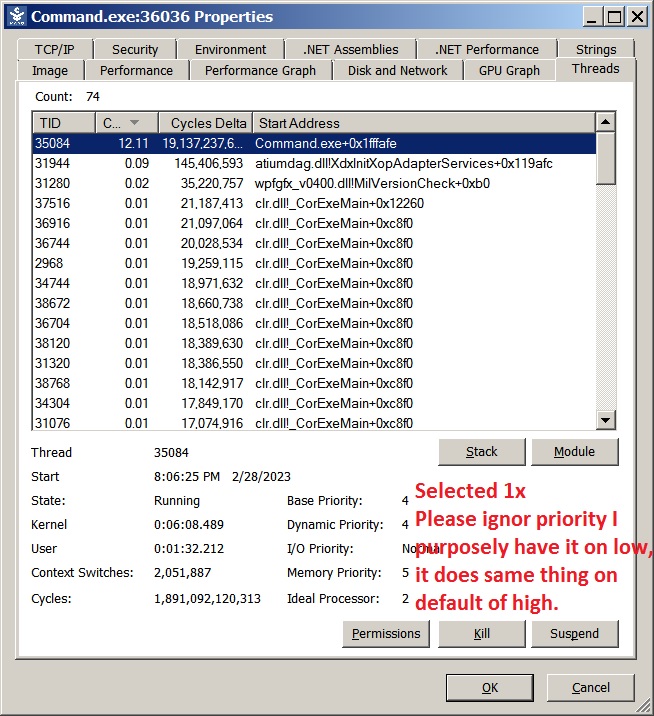
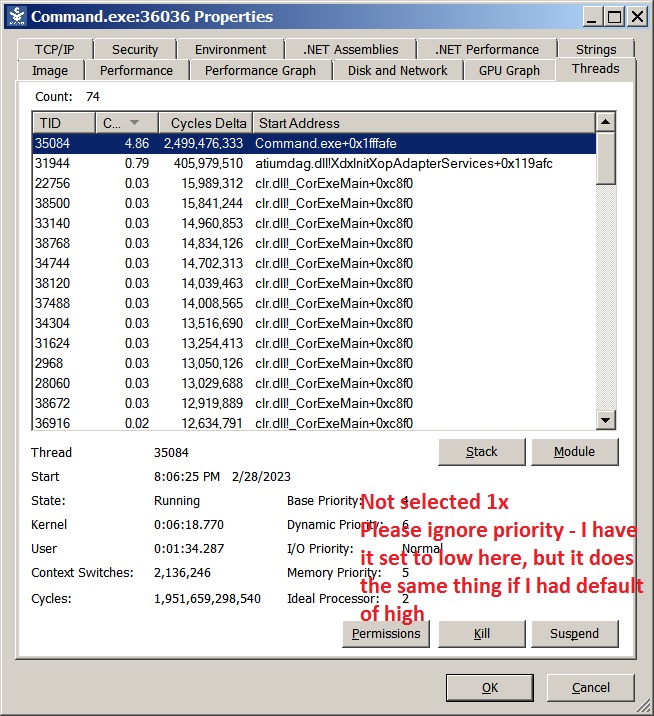
Can say it's primarily the main thread where the cpu time taken is increased.
(selected 1x)
(unselected 1x)
IDK if any of that helps. edited for added images and screen resolution
Last edited by KnightHawk75 on Wed Mar 01, 2023 2:15 am, edited 2 times in total.
-
KnightHawk75
- Posts: 1850
- Joined: Thu Nov 15, 2018 7:24 pm
Re: Performance issues after the War Planner patch
crap I forgot the dxdiags (32 and 64):
Would our command.ini's matter at all either?
Would our command.ini's matter at all either?
- Attachments
-
- KH_DxDiagx32.txt
- (22.59 KiB) Downloaded 23 times
-
- KH_DxDiagx64.txt
- (39.62 KiB) Downloaded 22 times
Re: Performance issues after the War Planner patch
I'm getting the lag when own units are selected as well. I just bought the game last Wednesday, a week ago. As with others, it's fine when paused. Doesn't matter how many or few units there are. Even with zero map view layers on, no range symbols, no datablocks, nothing; just the NTDS unit symbols. Not much RAM or CPU usage; nor GPU or VRAM. I have tried shutting down all extraneous processes and services to no avail.
I'm getting pretty used to pausing the game to give orders. LOL
System: (8ish yrs old, self built)
Win 7 64-bit Pro
CPU - AMD FX6300
RAM - 16 gigs DDR3 1333
GFX - AMD Radeon RX580 w/8 gigs VRAM
OS on 500 gig SSD
C:MO on separate 128 gig SSD
Dual monitors: One 22" 1080 and one 27" 1440
Audio: Focusrite Scarlett 2i4 2nd gen ASIO audio interface
PSU: 750W
I had scaling (in the OS) set to 125% but have set it back down to 100%.
DXDIAG
I'm getting pretty used to pausing the game to give orders. LOL
System: (8ish yrs old, self built)
Win 7 64-bit Pro
CPU - AMD FX6300
RAM - 16 gigs DDR3 1333
GFX - AMD Radeon RX580 w/8 gigs VRAM
OS on 500 gig SSD
C:MO on separate 128 gig SSD
Dual monitors: One 22" 1080 and one 27" 1440
Audio: Focusrite Scarlett 2i4 2nd gen ASIO audio interface
PSU: 750W
I had scaling (in the OS) set to 125% but have set it back down to 100%.
DXDIAG
- Attachments
-
- DxDiag.txt
- (46.77 KiB) Downloaded 19 times
Re: Performance issues after the War Planner patch
Is the common parameter Win 7?
-
KnightHawk75
- Posts: 1850
- Joined: Thu Nov 15, 2018 7:24 pm
Re: Performance issues after the War Planner patch
Doesn't seem it since OP has win 10, which I think rules that itself out, yourself I think reproduced the issue in the past (my older thread about it) in your own testing (granted to a lessor degree than some of us), and as I recall were on w10.
Re: Performance issues after the War Planner patch
Yeah, but that was a couple updates ago. JUst ran a benchmark on the same PC and they were within 1-2% of each other in time comparisons.
Re: Performance issues after the War Planner patch
I'm wondering if still being 32-bit (in 2023? o.O) might have something to do with it.
.... and people give ME crap for still running Win 7. At least it's 64-bit
.... and people give ME crap for still running Win 7. At least it's 64-bit
Re: Performance issues after the War Planner patch
If that was the case, the issue would manifest on everyone's installation, not on a handful of rigs.artao5 wrote: Sat Mar 04, 2023 10:29 am I'm wondering if still being 32-bit (in 2023? o.O) might have something to do with it.
Re: Performance issues after the War Planner patch
An astute observation, thanks. Building now a Win 7 x64 VM to see if I can reproduce it there.
Re: Performance issues after the War Planner patch
Running 32-bit on a 64-bit platform can sometimes do weird and inexplicable things. I have this problem with some music/audio plugins for my DAWs as well. Some people can get Fleet Command to run on 64-bit systems, some can't. <shrug> It's pretty annoying. A 32-bit spectral-panning audio effect that I used a LOT totally crashes my DAWs now when I try to use it.
Just a thought

Re: Performance issues after the War Planner patch
Not sure if its applicable, but I run a ton of 32 bit programs on win11/10 with no issues. I am very doubtful thats the issue. Especially considering that it wasn't a big issue in previous versions. I also think we should clarify if everyone posting is only having the slow down when a unit is selected. Or are some having the issue with general performance?