

there is no download link in the first post of this threadwelk wrote: Wed Mar 18, 2026 7:27 pm Napoleon command mod is now released
See first post of this thread
Napoleonic command mod
-
brotherofbuff
- Posts: 41
- Joined: Sat Jan 11, 2014 4:53 am
Re: Napoleonic command mod
Chris Irwin

Re: Napoleonic command mod
Don't worry for the link : it will come, I am working to upload the mod, it will be awailable at end of week.
The link will not be public because this mod (and all future mods that are planed for different times and thema, included WW2 operational and modern), will use graphisms coming from other PC game that are not abandonware (in particular for grounds/terrains, and units) : I will give the link by MP to interested users
Of course, the concerned games will be indicated in the readme with a link to discover them if players are interested by these games (and to buy them if they want), but I think it's better (for copyright aspects) to not use their graphisms in a public mod.
The link will not be public because this mod (and all future mods that are planed for different times and thema, included WW2 operational and modern), will use graphisms coming from other PC game that are not abandonware (in particular for grounds/terrains, and units) : I will give the link by MP to interested users
Of course, the concerned games will be indicated in the readme with a link to discover them if players are interested by these games (and to buy them if they want), but I think it's better (for copyright aspects) to not use their graphisms in a public mod.
Last edited by welk on Fri Mar 20, 2026 9:10 am, edited 2 times in total.
-
brotherofbuff
- Posts: 41
- Joined: Sat Jan 11, 2014 4:53 am
Re: Napoleonic command mod
well I got the game working but no graphics show up that are Napoleonic. I tried putting that localization text in both the new folder and vanilla folder. It wasnt clear on that. I put all the bit map and images in the new folder and the documents vanilla folder under campaign. Levels loads but no new graphics or art work.
Chris Irwin
Re: Napoleonic command mod
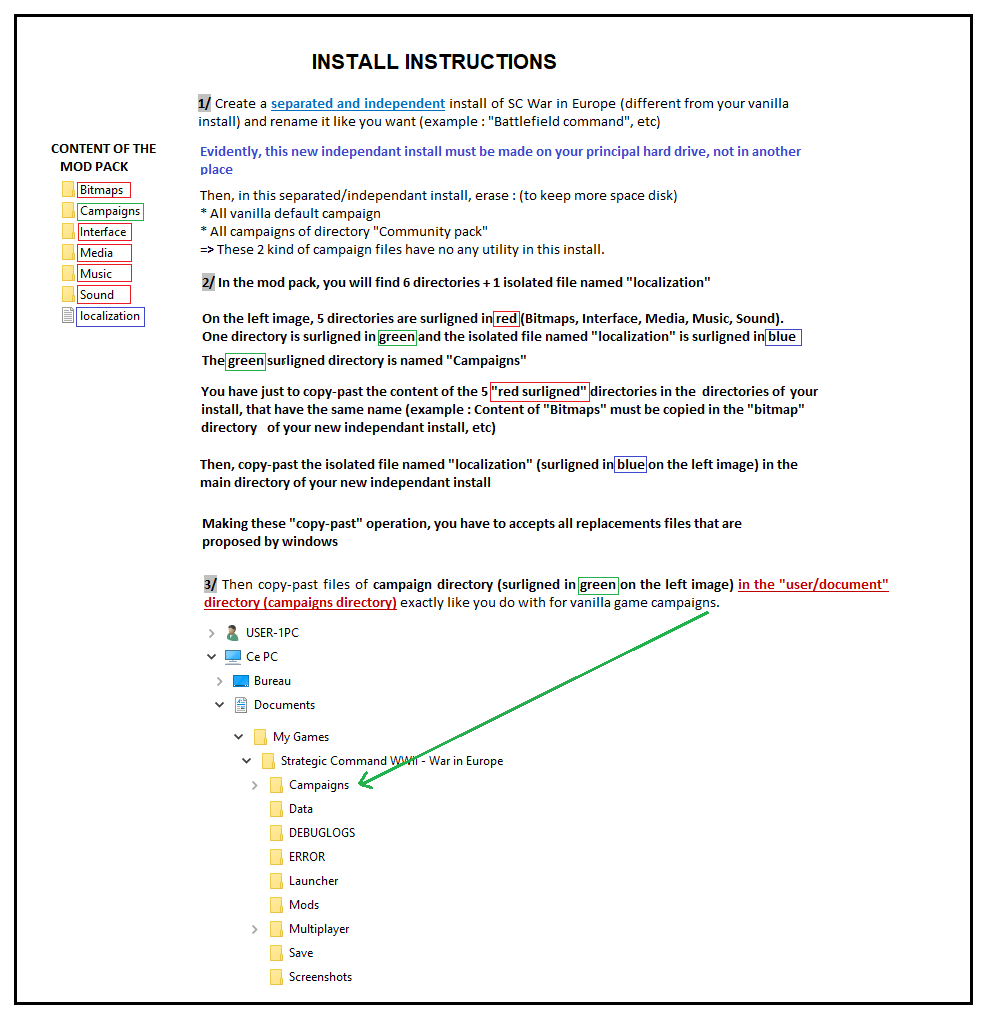
Here is a detailled image for install instructions : It should help to install the mod
- INSTALL__NSTRUCTIONS.png (70.99 KiB) Viewed 1652 times

Re: Napoleonic command mod
Nice project, how to install if we have steam version of the game ?
Re: Napoleonic command mod
No any ideas, I do not use steam.
I suggest you post an image or your directories, and I would perhaps be able to give some help
The principe is that :
1/ Content of directories that are marked in red on the install instruction image + localization file (marked in blue on the image) have to be copied in directories of same names in your new independant install (and localization file must be copied at the same place where is the vanilla localization file in your install)
2/ Content of directory "campaigns" (marked in green on image) must be copied at the same place you have your "user campaigns" files (in Matrix version, it's the "users" directory, for the steam version I don't know where it is)
I suggest you post an image or your directories, and I would perhaps be able to give some help
The principe is that :
1/ Content of directories that are marked in red on the install instruction image + localization file (marked in blue on the image) have to be copied in directories of same names in your new independant install (and localization file must be copied at the same place where is the vanilla localization file in your install)
2/ Content of directory "campaigns" (marked in green on image) must be copied at the same place you have your "user campaigns" files (in Matrix version, it's the "users" directory, for the steam version I don't know where it is)
-
BillRunacre

- Posts: 6923
- Joined: Mon Jul 22, 2013 2:57 pm
- Contact:
Re: Napoleonic command mod
In the same way. All files need to go here: %HOMEPATH%\Documents\My Games\Strategic Command WWII - War in Europe\CampaignsLynx57 wrote: Fri Mar 20, 2026 8:13 am Nice project, how to install if we have steam version of the game ?
Follow us on Twitter: https://twitter.com/FurySoftware
We're also on Facebook! https://www.facebook.com/FurySoftware/
We're also on Facebook! https://www.facebook.com/FurySoftware/
Re: Napoleonic command mod
1°/ To create a new independant install of SC WIE on your hard drive (as indicated in following instructions), you have just to copy-past your actual vanilla install, and after that, to rename it under the name of your choice (NAPOLEON or other name)
2°/ If you use shortcuts to lunch game and/or editor, do not use your "vanilla" shortcuts => Do not forget to create new appropriated shortcuts from the new independant install
If you are interested to use the mod, do not forget to consult regulary the first post of the thread : changes in versions of the mod (new link awailable in MP) and changes in readme will be displayed in this first post
2°/ If you use shortcuts to lunch game and/or editor, do not use your "vanilla" shortcuts => Do not forget to create new appropriated shortcuts from the new independant install
If you are interested to use the mod, do not forget to consult regulary the first post of the thread : changes in versions of the mod (new link awailable in MP) and changes in readme will be displayed in this first post
-
brotherofbuff
- Posts: 41
- Joined: Sat Jan 11, 2014 4:53 am
Re: Napoleonic command mod
I put every file to that campaign in the strategic command ww2 War in Europe document folder in many ways possible. I put the actual folder on there. I took every file out and put it on there. Still doesnt work for meBillRunacre wrote: Fri Mar 20, 2026 9:20 amIn the same way. All files need to go here: %HOMEPATH%\Documents\My Games\Strategic Command WWII - War in Europe\CampaignsLynx57 wrote: Fri Mar 20, 2026 8:13 am Nice project, how to install if we have steam version of the game ?
Chris Irwin
-
brotherofbuff
- Posts: 41
- Joined: Sat Jan 11, 2014 4:53 am
Re: Napoleonic command mod
K I got it working. I put the whole second install folder into the documents mod folder. I then went to settings in the game and enable that whole folder as a mod.
Chris Irwin
Re: Napoleonic command mod
Cool 
A precision about this mod : any user may use my work to create his own mod (napoleonic or not napoleonic, it has no any importance, no any special authorization is needed)
You have just to take care about used graphs, that come from games that are not abandonwares : do not forget to indicate a link to the web pages of these games to allow users to discover these games, and perhaps to buy them if they are interested (in a way, this "free publicity" will be the counterparty of using graphs in modding work)
A precision about this mod : any user may use my work to create his own mod (napoleonic or not napoleonic, it has no any importance, no any special authorization is needed)
You have just to take care about used graphs, that come from games that are not abandonwares : do not forget to indicate a link to the web pages of these games to allow users to discover these games, and perhaps to buy them if they are interested (in a way, this "free publicity" will be the counterparty of using graphs in modding work)
-
brotherofbuff
- Posts: 41
- Joined: Sat Jan 11, 2014 4:53 am
Re: Napoleonic command mod
I was able to get this mod working on steam by putting the second install folder ( I named Battlefield Command) into the documents mod folder. And when launching the game on settings, go to mods, add your second install folder name then restart the game.
- Attachments
-
- Screenshot (159).png (33.15 KiB) Viewed 1513 times
Chris Irwin
Re: Napoleonic command mod
Hello. I've created new counters for this mod inspired by Hexasim games. If you're interested, please find the files attached. Let me know what you think and feel free to send me your suggestions.
Re: Napoleonic command mod
Nice work
I suppose this is the model :


Technical points => A little error :
1/ Names of directories should be major_01 and major_02, not major_1 and major_2
These 2 directories must be copied in bitmaps directory of "Users" game/Campaign/bitmaps directory
2/ You have forgotten to modify also the campaign file (config)
Here is the correct campaign file (config)
This file mus be copied in the "users" game/campaign directory
it must be that:
#CUSTOM_BITMAPS= 1
#CUSTOM_INTERFACE= 1
#CUSTOM_SOUND= 0
#CUSTOM_MUSIC= 0
#CUSTOM_FONTS= 0
#CUSTOM_LOCALIZATION= 1
and not that
#CUSTOM_BITMAPS= 0
#CUSTOM_INTERFACE= 1
#CUSTOM_SOUND= 0
#CUSTOM_MUSIC= 0
#CUSTOM_FONTS= 0
#CUSTOM_LOCALIZATION= 1
If you want to create your own "battle napoleonic mod" and to build historical napolenic battles, no any problem with that, you may use my modding work as you want (you may also modify all parameters and settings, I may help if needed)
It would be interessant to try to recreate hexasim napoleonic wargame with SC2, it's possible, included the maps
https://www.hexasim.com/fr/3530-Waterlo ... es-II.html
https://www.hexasim.com/2564-Last-Eagle ... -Bras.html


Your counters system would allow to create other armies (Prussian, Austrian, Russian, etc) more quickly than my own counters, you would just have to change colors of your actual french and British counters
If help is needed for parameters work and map work, no problem : just ask me what informations you need
I think some "board" graphs would be better adapted than mine (they are made for 3D look and they have not the "classical board wargame" look) : you could ask for Sipres work, he created some very interresting "board napoleonic" graphs for terrains, forest, etc, and perhaps he could give to you authorization to use his graphs
https://forums.matrixgames.com/viewtopi ... 1#p5241641
The graphs would be perfect with your own work
I suppose this is the model :
Technical points => A little error :
1/ Names of directories should be major_01 and major_02, not major_1 and major_2
These 2 directories must be copied in bitmaps directory of "Users" game/Campaign/bitmaps directory
2/ You have forgotten to modify also the campaign file (config)
Here is the correct campaign file (config)
This file mus be copied in the "users" game/campaign directory
it must be that:
#CUSTOM_BITMAPS= 1
#CUSTOM_INTERFACE= 1
#CUSTOM_SOUND= 0
#CUSTOM_MUSIC= 0
#CUSTOM_FONTS= 0
#CUSTOM_LOCALIZATION= 1
and not that
#CUSTOM_BITMAPS= 0
#CUSTOM_INTERFACE= 1
#CUSTOM_SOUND= 0
#CUSTOM_MUSIC= 0
#CUSTOM_FONTS= 0
#CUSTOM_LOCALIZATION= 1
If you want to create your own "battle napoleonic mod" and to build historical napolenic battles, no any problem with that, you may use my modding work as you want (you may also modify all parameters and settings, I may help if needed)
It would be interessant to try to recreate hexasim napoleonic wargame with SC2, it's possible, included the maps
https://www.hexasim.com/fr/3530-Waterlo ... es-II.html
https://www.hexasim.com/2564-Last-Eagle ... -Bras.html
Your counters system would allow to create other armies (Prussian, Austrian, Russian, etc) more quickly than my own counters, you would just have to change colors of your actual french and British counters
If help is needed for parameters work and map work, no problem : just ask me what informations you need
I think some "board" graphs would be better adapted than mine (they are made for 3D look and they have not the "classical board wargame" look) : you could ask for Sipres work, he created some very interresting "board napoleonic" graphs for terrains, forest, etc, and perhaps he could give to you authorization to use his graphs
https://forums.matrixgames.com/viewtopi ... 1#p5241641
The graphs would be perfect with your own work
Last edited by welk on Tue Mar 31, 2026 8:26 pm, edited 7 times in total.
Re: Napoleonic command mod
I just modded your "mod in the mod" 
Now, the campaign file in included in your mod and users may choice in game between hexasim graphs and 3D graphs (with "style counters" command in interface menu (at start or during game) If you need "2D graphs" : see attached file
These graphs come from the public demo of a excellent Napoleonic PC wargame : "Waterloo 1815 - The Final Struggle" (WDS) Say me when downloaded, I will erase the attached graphs file
Of course, if you use these 2D graphs, you should keep your mod as private like I did for mine (private diffusion by MP) because these 2D graphs are not free
This free demo may be downloaded here :
https://wargameds.com/products/the-final-struggle

Now, the campaign file in included in your mod and users may choice in game between hexasim graphs and 3D graphs (with "style counters" command in interface menu (at start or during game) If you need "2D graphs" : see attached file
These graphs come from the public demo of a excellent Napoleonic PC wargame : "Waterloo 1815 - The Final Struggle" (WDS) Say me when downloaded, I will erase the attached graphs file
Of course, if you use these 2D graphs, you should keep your mod as private like I did for mine (private diffusion by MP) because these 2D graphs are not free
This free demo may be downloaded here :
https://wargameds.com/products/the-final-struggle
Re: Napoleonic command mod
Thanks Welk for your encouragement. But I don't have the skills of a modder. My involvement in this mod doesn't go any further.
Good luck with the rest.
Good luck with the rest.
Re: Napoleonic command mod
Ist der Mod so wie früher in SC2 und wo kann man den Mod herunterladen ?
Danke
Danke
Re: Napoleonic command mod
This mod is for SC War in Europe (= SC 3 ), not for SC 2
Re: Napoleonic command mod
Das weiß ich - ich wollte wissen, ob sich der Mod über ganz Europa erstreckt ( wie in SC2 ) oder nur eine Minikampagne ist ?
Wie kann ich an den Mod kommen ?
Danke
Wie kann ich an den Mod kommen ?
Danke
Re: Napoleonic command mod
Please, use english : I don't understand exactly what you ask for