ORIGINAL: warspite1
Steve
The forms are looking good and I think I understand what each is doing. Can you just confirm:
1. Do all ships (or even one ship) moving to a sea box need to be in a Task Force first - and then you move the task force - or is there a drag and drop facility?
2. Do I take it the computer will not "flip" units - and therefore the only way of knowing immediately if a unit is still available that turn will be to click the availability box? If so will this apply to Land and Air units too?
Are the Vichy units a different colour from the ordinary French units? If so that`s an excellent idea that the board game was (understandably) lacking.
Once units become disorganized, or are 'used' to Intercept naval units or Initiative naval combat, their status indicators are changed. Usually this means that the status indicator in the upper left corner of the unit becomes orange. This applies to all units.
When units are stacked, only the status indicators for the top unit are visible. I played around with trying to show them for the stack (most important on top) but that was way too confusing.
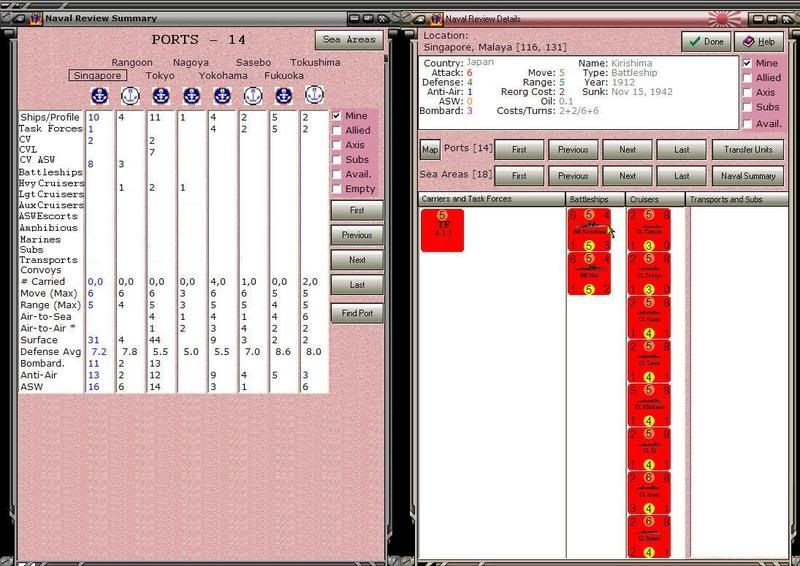
Most forms show the status indicators when they show the units, but that takes up space above and to the left of the unit. For the naval review details and task force details forms I am not showing status indicators. So in these rare instances, yes the unit data panel is where you will find the equivalent of the status indicators for the unit under the cursor.
Vichy units are a different color. For land units, that applies to the entire unit background, but for bitmapped air and naval units, only a horizontal stripe is colored to depict it is Vichy.
I am thinking seriously of having a temporary task force created whenever naval units are moved. To go with that I am thinking of creating a small TF form into which the player 'moves' units. My thinking is quite fuzzy about this at the present. CWIF (and MWIF currently) creates a moving stack and while you do not 'drag' the units to their destination hex as per standard Windows commands, the equivalent is done.
Air units are usually moved one at a time and there is no necessity of moving more than one at a time.
Land units need to be picked up as a stack for performing overruns, but that is pretty easy to allow for, and the mechanism CWIF (now MWFI) uses works fine.
But naval units are different, in that they always move as a group, even if there is only one unit in the 'group'. CWIF's mechanism is a little awkward. I'm thinking I might be able to come up with something better.
[Warning: the vagueness that follows reflects the same in my head.]
1 - Bring up a naval review details form for a port or sea area section box.
2 - Select units from same.
3 - Click on "move units" or 'drag' them off the NRD form.
4 - Move the units (i.e., cursor) to the destination hex, or the first sea area in the path of sea areas through which they are moving.
5 - 'Drop' the units in their final destination hex.
EDIT: Typos.