

WITP AE on 60" widescreen TV?
Moderators: wdolson, MOD_War-in-the-Pacific-Admirals-Edition

RE: WITP AE on 60" widescreen TV?
Just buy her something to keep her out of the office...it works, trust me. [:D]
Life is tough. The sooner you realize that, the easier it will be.
RE: WITP AE on 60" widescreen TV?
My monitor seems so small now [:(]
-
Pascal_slith

- Posts: 1657
- Joined: Wed Aug 20, 2003 2:39 am
- Location: In Arizona now!
RE: WITP AE on 60" widescreen TV?
Went to Costco today and stopped to look at the 70" screen, hesitated, then unfortunately looked at my wallet.... [:(]
So much WitP and so little time to play.... 


RE: WITP AE on 60" widescreen TV?
Oh yeah, I have not thought of that. It could be possible to use my camcorder cable...ORIGINAL: Xargun
ORIGINAL: inqistor
Most of modern TVs have standard monitor slot, you just put there cable, and can pin any PC. Wiring sound is somehow more complicated, but also doable.
I have permanently attached monitor cable in my TV, but the only game I have tried so far was MoO2 (and I think it have 800x600 resolution max).
Sound is easy - just use the headphone output and an adapter to convert it to 2 RCA plugs and away you go. That's what I do for an old laptop that we have hooked to the TV for Netflix.
Both this cord and the VGA ones should be available at places like Best Buy, Radio Shack, etc...
However, there is dedicated mini-jack slot, near RBG monitor slot, described as PC SOUND. I was not able to get it to work, but I actually used old cable, I have got from friend 20 years ago, for my C64, and I am not even sure this particular link even worked, as mini-jack is extra to monitor link. However, maybe I can use just one of those common 3 connectors? I am not sure it is possible to buy just single mini-jack mini-jack cable.
Frankly, I am not sure I have seen any Japanese officer with European Sabre, not Katana. Maybe in Cavalry?ORIGINAL: AW1Steve
ORIGINAL: witpqs
Nice sword. I presume that one is a decoy and another is within reach?
There are about a dozen or so hung in the dining , living and game room. Only one is actually still sharp. And only I know which one![:D] For you JFB's, that's a IJA officers dress staff sword. It may have been sharp once (but I doubt it!) but it ain't now! [:D]
Uuu, I like this composiion. Does she plays any traditional Japanese instrument? Harp may sounds like one of those. You are playing WITP, when she, in traditional Kimono, plays historical music - very thematic.A lap Harp. Like the piano next to it , it belongs to my spouse. I don't play any instrument. She plays several.[:)]
Hmm, circle seems kinda eliptical, so it is possible you have not set your PC to 16:9 ratio. And star seems kinda blocky, so maybe you are not using full HD resolution? I am not sure it is possible to change resolution in un-windowed mode, but those are simple switches in exe shortcut.He's another view with the map and ship data screen.


RE: WITP AE on 60" widescreen TV?
Just checked and an HDMI cable works like a charm - not sure if there is any difference between that and a VGA cable when it comes to the game but it does work [:D]
Check out our novel, Northern Fury: H-Hour!: http://northernfury.us/
And our blog: http://northernfury.us/blog/post2/
Twitter: @NorthernFury94 or Facebook https://www.facebook.com/northernfury/
And our blog: http://northernfury.us/blog/post2/
Twitter: @NorthernFury94 or Facebook https://www.facebook.com/northernfury/
RE: WITP AE on 60" widescreen TV?
Well, you should get sound with it, but I have read, that WINDOWS can have problems with some drivers, for sound over HDMI.ORIGINAL: Gunner98
Just checked and an HDMI cable works like a charm - not sure if there is any difference between that and a VGA cable when it comes to the game but it does work [:D]

RE: WITP AE on 60" widescreen TV?
Man and I thought it was sweet looking at WoW on a 60"!! I'm using a 23" WS and it's way better than the 21" I had. Right now I'm shopping for a 36" one only because I don't want it overpowering the 36" TV I have now and really make the GF MK VI unit go through the roof. Hmmm... I wonder if there will be a MK VIII unit in the future after THAT purchess?[:D][X(]
Army: A body of men assembled to rectify the mistakes of the diplomats. – Josephus Daniels
Avatar: 25th Infantry Division "Tropic Lighting"
Avatar: 25th Infantry Division "Tropic Lighting"
-
Buck Beach
- Posts: 1974
- Joined: Sun Jun 25, 2000 8:00 am
- Location: Upland,CA,USA
RE: WITP AE on 60" widescreen TV?
ORIGINAL: Xargun
ORIGINAL: inqistor
Most of modern TVs have standard monitor slot, you just put there cable, and can pin any PC. Wiring sound is somehow more complicated, but also doable.
I have permanently attached monitor cable in my TV, but the only game I have tried so far was MoO2 (and I think it have 800x600 resolution max).
Sound is easy - just use the headphone output and an adapter to convert it to 2 RCA plugs and away you go. That's what I do for an old laptop that we have hooked to the TV for Netflix.
Both this cord and the VGA ones should be available at places like Best Buy, Radio Shack, etc...
And now you have me thinking of running my turns on the big TV - not sure I can pry it away from my son though. And in a fight he (and his army of toy soldiers and action figures) always seem to beat me up...
Xargun
Just a be careful when buying a TV having this in mind. Many modern TVs do not have RCA connections, my 54in Panasonic for example. Pissed me off.
RE: WITP AE on 60" widescreen TV?
Is this where old gamers end up if they've been good?

RE: WITP AE on 60" widescreen TV?
DA*N, I want one.
A lap harp?
No there's a man who is confident in his masculinity!
-F-
"It is obvious that you have greatly over-estimated my regard for your opinion." - Me

-
Akos Gergely
- Posts: 734
- Joined: Thu Apr 08, 2004 1:22 pm
- Location: Hungary, Bp.
- Contact:
RE: WITP AE on 60" widescreen TV?
If you are amazed at that, what about Witp in 2560x1440 resolution  I've even tried eyefinity on 7680X1440 with 3 monitors but the game engine doesn'T handle that unfortunately...
So I'd say there is not much point in running on a 60" screen in full HD, you can do that perfectly on the much cheaper 32-40" ones. And the ultra high res monitors are even better choice.
Here is a screenshot for teaser for the ultra high res:
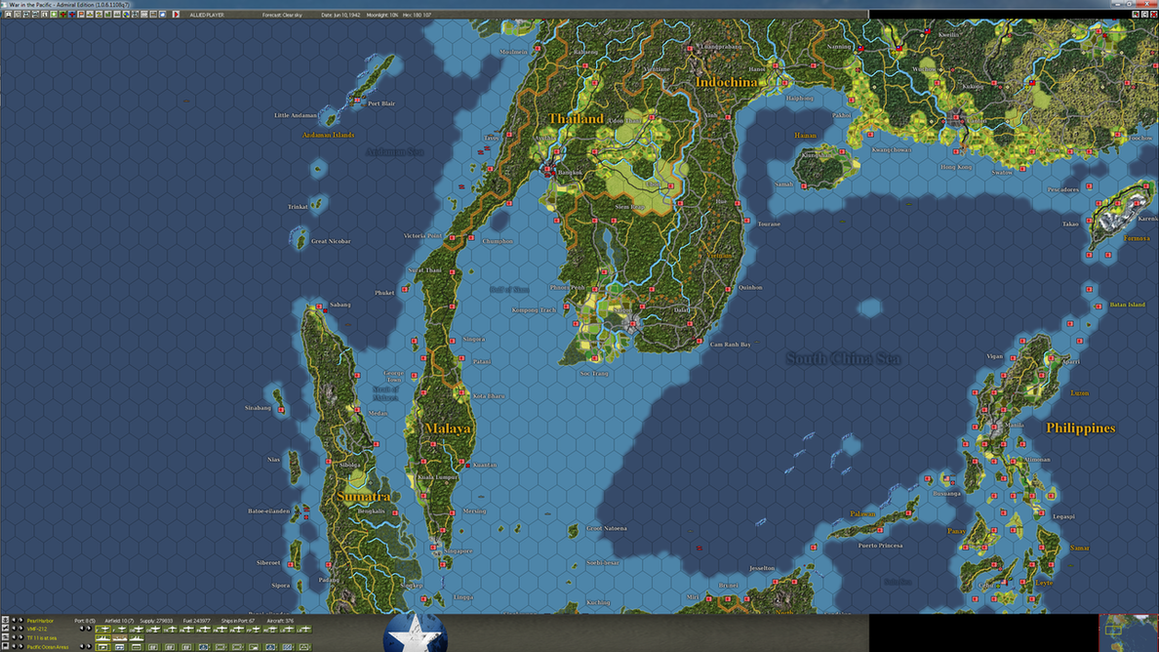
I've even tried eyefinity on 7680X1440 with 3 monitors but the game engine doesn'T handle that unfortunately...So I'd say there is not much point in running on a 60" screen in full HD, you can do that perfectly on the much cheaper 32-40" ones. And the ultra high res monitors are even better choice.
Here is a screenshot for teaser for the ultra high res:


RE: WITP AE on 60" widescreen TV?
There are currently two technologies for getting video signal from the computer to the monitor. The old VGA is analog. The computer converts the signal to analog, and an old CRT monitor would use it directly. LCD monitors use digital signals. Most have converters to handle VGA signals, but they take DVI cables (the connector with the weird key pin and it's usually white)which is their native way of taking video in.
HDMI is just a different way of packaging DVI that also has a channel for sound data too. Many video cards (and lap tops) come with HDMI connectors now which enable you to get sound from a computer to an HDMI capable monitor (including most modern TVs). I have a small desktop computer under our coffee table with an HDMI cable running to the TV. We use it to watch streaming video from the net. I could run AE on it, but usually the only time the TV is ever on, my SO wants to watch something. I rarely think of turning on the TV when I'm alone.
Plus I have dual 24 inch monitors in the family room with a work computer, so when I'm not working, I can play AE while she watches something on TV. Having it on a 60 inch TV is intriguing though...
Bill
HDMI is just a different way of packaging DVI that also has a channel for sound data too. Many video cards (and lap tops) come with HDMI connectors now which enable you to get sound from a computer to an HDMI capable monitor (including most modern TVs). I have a small desktop computer under our coffee table with an HDMI cable running to the TV. We use it to watch streaming video from the net. I could run AE on it, but usually the only time the TV is ever on, my SO wants to watch something. I rarely think of turning on the TV when I'm alone.
Plus I have dual 24 inch monitors in the family room with a work computer, so when I'm not working, I can play AE while she watches something on TV. Having it on a 60 inch TV is intriguing though...
Bill
WIS Development Team

RE: WITP AE on 60" widescreen TV?
Hmmmm. Interesting. I have a projector. This would work at wall size! Never thought of that. I need to go give it a try tonight.
"Success is the ability to go from one failure to another with no loss of enthusiasm." - Winston Churchill
RE: WITP AE on 60" widescreen TV?
ORIGINAL: csatahajos
If you are amazed at that, what about Witp in 2560x1440 resolution
So I'd say there is not much point in running on a 60" screen in full HD, you can do that perfectly on the much cheaper 32-40" ones. And the ultra high res monitors are even better choice.
Here is a screenshot for teaser for the ultra high res:
is the magnifying glass included?
-
Treetop64

- Posts: 933
- Joined: Tue Apr 12, 2005 4:20 am
- Location: 519 Redwood City - BASE (Hex 218, 70)
RE: WITP AE on 60" widescreen TV?
ORIGINAL: AW1Steve
As promised![:D]

Are all the screens stretched in the game on your TV, or just the menus? And can that be fixed?
Still, looks nice. I have to go to Radio Shack to get a dongle and try that from my laptop...
Nice lookin' place you got there, too.

-
USSAmerica

- Posts: 19211
- Joined: Mon Oct 28, 2002 4:32 am
- Location: Graham, NC, USA
- Contact:
RE: WITP AE on 60" widescreen TV?
Tree, it looks like Steve had the full screen option set for AE. That will stretch the game display for any screen that is not 4:3 ratio. If you set it to window mode and specify your TV's resolution (likely 1920x1080 for HD) the menus should display as a small part of the screen, and then the map will be displayed normally, with MUCH more of it available in the view. [8D]
Mike
"Good times will set you free" - Jimmy Buffett
"They need more rum punch" - Me

Artwork by The Amazing Dixie
"Good times will set you free" - Jimmy Buffett
"They need more rum punch" - Me
Artwork by The Amazing Dixie

RE: WITP AE on 60" widescreen TV?
Sure beats playin on a palm pilot.

RE: WITP AE on 60" widescreen TV?
Just to explain, the TV was set up as an experiment. The Game setting is for my laptop, and I hooked the TV up through the laptop. I do not , and never have played on the tv (I'm not THAT much of a geek, or that nearsighted!). [:D] And I'm sure that if I screwed around all day I could get it perfect. As I said, I only wanted to see IF I could do it. And I can't belive that you guys keep bringing back to life! [:D] Let it die! And get a life![:D] Sheesh guys! [:D]
-
Mike Solli

- Posts: 16736
- Joined: Wed Oct 18, 2000 8:00 am
- Location: the flight deck of the Zuikaku
RE: WITP AE on 60" widescreen TV?
ORIGINAL: AW1Steve
As promised![:D]
OMG!

Created by the amazing Dixie
RE: WITP AE on 60" widescreen TV?
I used a TV for a monitor for a while, just a 32" though so nothing monstrous. But it was nice.
I dunno if being used as a monitor did it in, or if it just wore out like normal but eventually the TV started getting these green lines running up through the center. A good third of the screen a little bit off center was covered in little green lines.
Had to go and buy a little 23" monitor. I miss my tv lol. Gotta say I'm mighty tempted to buy a big TV to use again for a monitor. (I am a geek [:D])
One of the things playing on a screen that big has emphasized to me is how much I wish the UI in witp was customizable. Being able to shrink or expand, and move around all the little menu's, subscreens and whatnot would be amazing. Or to open multiple windows at once in game, zounds that would rock. Something to hope for if there's ever a witp 2 [:D].
I dunno if being used as a monitor did it in, or if it just wore out like normal but eventually the TV started getting these green lines running up through the center. A good third of the screen a little bit off center was covered in little green lines.
Had to go and buy a little 23" monitor. I miss my tv lol. Gotta say I'm mighty tempted to buy a big TV to use again for a monitor. (I am a geek [:D])
One of the things playing on a screen that big has emphasized to me is how much I wish the UI in witp was customizable. Being able to shrink or expand, and move around all the little menu's, subscreens and whatnot would be amazing. Or to open multiple windows at once in game, zounds that would rock. Something to hope for if there's ever a witp 2 [:D].