WitPTracker AE News

This new stand alone release based on the legendary War in the Pacific from 2 by 3 Games adds significant improvements and changes to enhance game play, improve realism, and increase historical accuracy. With dozens of new features, new art, and engine improvements, War in the Pacific: Admiral's Edition brings you the most realistic and immersive WWII Pacific Theater wargame ever!

Moderators: wdolson, MOD_War-in-the-Pacific-Admirals-Edition

User avatar
n01487477
Posts: 4764
Joined: Tue Feb 21, 2006 12:00 am

RE: WitPTracker AE Release 1.2 Available

Post by n01487477 »

ORIGINAL: 1EyedJacks

ORIGINAL: n01487477
ORIGINAL: 1EyedJacks


C:\Users\Mike\Desktop\AE Tracker 1.2>java -Xms128m -Xmx256m -jar "WitPTracker.ja
r"
Initializing WitP Tracker AE database.
Exception in thread "main" java.lang.UnsatisfiedLinkError: C:\Users\Mike\Desktop
\AE Tracker 1.2\pwsdll.dll: Can't load IA 32-bit .dll on a AMD 64-bit platform
at java.lang.ClassLoader$NativeLibrary.load(Native Method)
at java.lang.ClassLoader.loadLibrary0(Unknown Source)
at java.lang.ClassLoader.loadLibrary(Unknown Source)
at java.lang.Runtime.loadLibrary0(Unknown Source)
at java.lang.System.loadLibrary(Unknown Source)
at JNIpws.JNIpws.<clinit>(JNIpws.java:19)
at witptracker.SaveFileReader.<init>(SaveFileReader.java:84)
at witptracker.Main.main(Main.java:123)

C:\Users\Mike\Desktop\AE Tracker 1.2>pause
Press any key to continue . . .
Mike,
welcome to AE Tracker[;)]
Probably best not to include your product key in the post [;)]
Is this Windows 7 or Vista 64 ?
Strange you have an AMD warning on a Intel system. Did you use the correct MS patch ? vcredist_x64.exe ?

Thanks for the welcome to AE Tracker. I'm prepping for the second patch and wanna get my favorite tool for this game installed. [;)]

Vista 64 - and yup vcredist_x64.exe. I have both the 32 bit and 64 bit Java as I use IE 32 sometimes. Would that be a problem?
Well, this version is a bit better than the original Tracker IMO, and getting better all the time ... anyway enough of thumping my chest.
Java shouldn't be a problem at the moment -- you're getting *.dll errors nothing to do with Java.
Uninstall the MS 64 bit C++ redistributable patch and reapply ...
I've even had some that have had to go back to the original redistributable and then patch up.
If this doesn't work, then uninstall again and try the 32 bit x86.

Still I've never seen the AMD error on an intel system, so I'm a little confused too. I know these things a pain in the rear, but different things help different 64 bit users... there seems not to be just one solution (mostly thanks to MS)

User avatar
1EyedJacks
Posts: 2304
Joined: Sun Mar 12, 2006 6:26 am
Location: Reno, NV

RE: WitPTracker AE Release 1.2 Available

Post by 1EyedJacks »

What bums me out is that I have Tracker working with my Nemo Mod... I'll try your suggestions and report back. TY.
TTFN,

Mike
User avatar
n01487477
Posts: 4764
Joined: Tue Feb 21, 2006 12:00 am

RE: WitPTracker AE Release 1.2 Available

Post by n01487477 »

ORIGINAL: 1EyedJacks

What bums me out is that I have Tracker working with my Nemo Mod... I'll try your suggestions and report back. TY.
Yeah, it is all to do with the *.dll that AE uses, witp never had this security feature, but it makes loading turns faster in Tracker.
I just went back through some notes and Kull had a similar problem which was fixed by using the 32 bit version ... crazy but true.

Good luck and Nemo has just sent me a turn, so I'm back in the action [:'(]
User avatar
1EyedJacks
Posts: 2304
Joined: Sun Mar 12, 2006 6:26 am
Location: Reno, NV

RE: WitPTracker AE Release 1.2 Available

Post by 1EyedJacks »

Hi Damian,

I'm beginning to think the problem is the AMD thing... I've tried bith 32 and 64 versions of C++ - no joy. If you have other ideas feel free to toss them my way <grin>. I'll see if I can find something on C++ confusing Intel w/AMD processors.

TTFN,

Mike
Nikel
Posts: 2752
Joined: Tue Mar 24, 2009 10:51 am

RE: WitPTracker AE Release 1.2 Available

Post by Nikel »

I have posted some desktop icons (japanese) that can be used in the WitPTracker shortcut, just in case somebody is interested [:'(]

tm.asp?m=2283878
User avatar
1EyedJacks
Posts: 2304
Joined: Sun Mar 12, 2006 6:26 am
Location: Reno, NV

RE: WitPTracker AE Release 1.2 Available

Post by 1EyedJacks »

ORIGINAL: 1EyedJacks

Hi Damian,

I'm beginning to think the problem is the AMD thing... I've tried bith 32 and 64 versions of C++ - no joy. If you have other ideas feel free to toss them my way <grin>. I'll see if I can find something on C++ confusing Intel w/AMD processors.


Just a quick update - I found a thread while searching the AMD error - I had to strip Java 64-bit and C++ 64-bit and reload Java 32 plus C++ 32. Also, for some reason the batch file for Tracker was unable to see Java in the x86 folder (Default installation location on Vista). A quick and dirty fix is to copy the Java.exe file into the tracker directory after installing Java 32 bit.

And thanks again to U & Floyd 4 Tracker - its a grand tool.


TTFN,

Mike
TTFN,

Mike
User avatar
n01487477
Posts: 4764
Joined: Tue Feb 21, 2006 12:00 am

RE: WitPTracker AE Release 1.2 Available

Post by n01487477 »

ORIGINAL: 1EyedJacks

Hi Damian,

I'm beginning to think the problem is the AMD thing... I've tried bith 32 and 64 versions of C++ - no joy. If you have other ideas feel free to toss them my way <grin>. I'll see if I can find something on C++ confusing Intel w/AMD processors.

Just a quick update - I found a thread while searching the AMD error - I had to strip Java 64-bit and C++ 64-bit and reload Java 32 plus C++ 32. Also, for some reason the batch file for Tracker was unable to see Java in the x86 folder (Default installation location on Vista). A quick and dirty fix is to copy the Java.exe file into the tracker directory after installing Java 32 bit.

And thanks again to U & Floyd 4 Tracker - its a grand tool.


TTFN,
Mike
The things you have to do to get something working[8|]... kudos [;)]

--Damian--
User avatar
bacchus
Posts: 35
Joined: Sat Jan 04, 2003 11:24 am
Location: South Carolina

RE: WitPTracker AE Release 1.2 Available

Post by bacchus »

[&o] I have been a member for 6 years (obviously a quiet one) and I have just now figured out what everyone has been posting about tracker. This program rocks. No more pencil and paper for me. Seriously, to the programers, thank you for your time. This is an unbeleivable aid to the game and now I may finally take the plunge and play the Japaneese side of the equation in a PBEM. Thank you
"Was it over when the Germans bombed Pearl Harbor" -Animal House
User avatar
n01487477
Posts: 4764
Joined: Tue Feb 21, 2006 12:00 am

RE: WitPTracker AE Release 1.2 Available

Post by n01487477 »

ORIGINAL: bacchus

[&o] I have been a member for 6 years (obviously a quiet one) and I have just now figured out what everyone has been posting about tracker. This program rocks. No more pencil and paper for me. Seriously, to the programers, thank you for your time. This is an unbeleivable aid to the game and now I may finally take the plunge and play the Japaneese side of the equation in a PBEM. Thank you
High praise (it must be...1 post a year for 6 years and we get the attention this year[;)]), thanks Bacchus ... I know Floyd and I have bigger plans to come [;)]
User avatar
Rapunzel
Posts: 141
Joined: Wed Apr 20, 2005 1:53 pm
Location: Germany

RE: WitPTracker AE Release 1.2 Available

Post by Rapunzel »

Very curious. I have the tracker installed on my win7 64 bit computer.

It worked once, the first time I installed the tracker. Now I can start the tracker, but if i try to load the current turn the tracker closes. I have the following error report:

#
# A fatal error has been detected by the Java Runtime Environment:
#
# EXCEPTION_ACCESS_VIOLATION (0xc0000005) at pc=0x6d901afd, pid=3360, tid=3736
#
# JRE version: 6.0_16-b01
# Java VM: Java HotSpot(TM) Client VM (14.2-b01 mixed mode, sharing windows-x86 )
# Problematic frame:
# V [jvm.dll+0x101afd]
#
# If you would like to submit a bug report, please visit:
# http://java.sun.com/webapps/bugreport/crash.jsp
#

Is there any help for me? ;)

Thx alot for your time.
floydg
Posts: 2071
Joined: Sat Jun 26, 2004 10:08 pm
Location: Middletown, NJ

RE: WitPTracker AE Release 1.2 Available

Post by floydg »

ORIGINAL: Rapunzel

Very curious. I have the tracker installed on my win7 64 bit computer.

It worked once, the first time I installed the tracker. Now I can start the tracker, but if i try to load the current turn the tracker closes. I have the following error report:

#
# A fatal error has been detected by the Java Runtime Environment:
#
# EXCEPTION_ACCESS_VIOLATION (0xc0000005) at pc=0x6d901afd, pid=3360, tid=3736
#
# JRE version: 6.0_16-b01
# Java VM: Java HotSpot(TM) Client VM (14.2-b01 mixed mode, sharing windows-x86 )
# Problematic frame:
# V [jvm.dll+0x101afd]
#
# If you would like to submit a bug report, please visit:
# http://java.sun.com/webapps/bugreport/crash.jsp
#

Is there any help for me? ;)

Thx alot for your time.

Reading in a new turn requires more memory than the default JVM uses.

I assume you're not running from the witptracker.bat file, which sets the needed memory allocation. If you go back a few pages in this thread, Damian outlined how to do this if you're running from the .jar file.
Delete the trackerdb.* files.
Copy the pwsdll.dll file from the game folder to the WitPTracker folder.
Try running the WitPTracker.bat again.
User avatar
Rapunzel
Posts: 141
Joined: Wed Apr 20, 2005 1:53 pm
Location: Germany

RE: WitPTracker AE Release 1.2 Available

Post by Rapunzel »

Thx for your help. The tracker works with the syswow64 - cmd.exe command. 12 gb 3 chanel ram and still memory problems :p
User avatar
KenchiSulla
Posts: 2963
Joined: Wed Oct 22, 2008 3:19 pm
Location: the Netherlands

RE: WitPTracker AE Release 1.2 Available

Post by KenchiSulla »

Just wanted to say, thanks for making this possible [8D]
AKA Cannonfodder

"It happened, therefore it can happen again: this is the core of what we have to say. It can happen, and it can happen everywhere.”
¯ Primo Levi, writer, holocaust survivor
floydg
Posts: 2071
Joined: Sat Jun 26, 2004 10:08 pm
Location: Middletown, NJ

RE: WitPTracker AE Release 1.2 Available

Post by floydg »

ORIGINAL: Rapunzel

Thx for your help. The tracker works with the syswow64 - cmd.exe command. 12 gb 3 chanel ram and still memory problems :p

It has to be how the JVM is picking up the memory setting options. I don't know how the cmd.exe works, but maybe it's not sending the needed parameters to Java.
Delete the trackerdb.* files.
Copy the pwsdll.dll file from the game folder to the WitPTracker folder.
Try running the WitPTracker.bat again.
floydg
Posts: 2071
Joined: Sat Jun 26, 2004 10:08 pm
Location: Middletown, NJ

RE: WitPTracker AE Release 1.2 Available

Post by floydg »

ORIGINAL: Cannonfodder

Just wanted to say, thanks for making this possible [8D]

You, and every one else, are most welcome.

We'll keep performing as long as you keep throwing us fish.
Delete the trackerdb.* files.
Copy the pwsdll.dll file from the game folder to the WitPTracker folder.
Try running the WitPTracker.bat again.
User avatar
bacchus
Posts: 35
Joined: Sat Jan 04, 2003 11:24 am
Location: South Carolina

RE: WitPTracker AE Release 1.2 Available

Post by bacchus »

Floydg,

If this has been asked before, please forgive the repeat. Is it possible track 2 seperate games at one time with the tracker program and if so how.

Thanks for all the hard work and for answering dumb questions[8|]
"Was it over when the Germans bombed Pearl Harbor" -Animal House
floydg
Posts: 2071
Joined: Sat Jun 26, 2004 10:08 pm
Location: Middletown, NJ

RE: WitPTracker AE Release 1.2 Available

Post by floydg »

ORIGINAL: bacchus

Floydg,

If this has been asked before, please forgive the repeat. Is it possible track 2 seperate games at one time with the tracker program and if so how.

Thanks for all the hard work and for answering dumb questions[8|]

You're most welcome.

You can track two separate games by creating separate folders for each one. At present, you'll need to make a complete installation (witptracker.jar, lib folder, pwsdll.dll, etc) and just set the witptracker.properties to different (appropriate) settings, but it'll work.

Floyd
Delete the trackerdb.* files.
Copy the pwsdll.dll file from the game folder to the WitPTracker folder.
Try running the WitPTracker.bat again.
User avatar
bacchus
Posts: 35
Joined: Sat Jan 04, 2003 11:24 am
Location: South Carolina

RE: WitPTracker AE Release 1.2 Available

Post by bacchus »

ORIGINAL: floydg

ORIGINAL: bacchus

Floydg,

If this has been asked before, please forgive the repeat. Is it possible track 2 seperate games at one time with the tracker program and if so how.

Thanks for all the hard work and for answering dumb questions[8|]

You're most welcome.

You can track two separate games by creating separate folders for each one. At present, you'll need to make a complete installation (witptracker.jar, lib folder, pwsdll.dll, etc) and just set the witptracker.properties to different (appropriate) settings, but it'll work.

Floyd


Ask a dumb question, get an easy solution. I really should have thought that one all the way through. The solution made too much sense for me to have figured it out. [:D]Thanks; it is working on both games.

Also, is FOW an issue in PBEM games. Will the tracker reveal more information than the game will with FOW on?

Bradford
"Was it over when the Germans bombed Pearl Harbor" -Animal House
floydg
Posts: 2071
Joined: Sat Jun 26, 2004 10:08 pm
Location: Middletown, NJ

RE: WitPTracker AE Release 1.2 Available

Post by floydg »

ORIGINAL: bacchus
ORIGINAL: floydg

ORIGINAL: bacchus

Floydg,

If this has been asked before, please forgive the repeat. Is it possible track 2 seperate games at one time with the tracker program and if so how.

Thanks for all the hard work and for answering dumb questions[8|]

You're most welcome.

You can track two separate games by creating separate folders for each one. At present, you'll need to make a complete installation (witptracker.jar, lib folder, pwsdll.dll, etc) and just set the witptracker.properties to different (appropriate) settings, but it'll work.

Floyd


Ask a dumb question, get an easy solution. I really should have thought that one all the way through. The solution made too much sense for me to have figured it out. [:D]Thanks; it is working on both games.

Also, is FOW an issue in PBEM games. Will the tracker reveal more information than the game will with FOW on?

Bradford

There are a few FOW issues at present. One is that the daily aircraft losses don't match up by plane model, but the total does match up. There is also some enemy sunk ship FOW I'm not 100% sure of. Otherwise, we strive not to show something the game doesn't.
Delete the trackerdb.* files.
Copy the pwsdll.dll file from the game folder to the WitPTracker folder.
Try running the WitPTracker.bat again.
User avatar
BigBadWolf
Posts: 584
Joined: Wed Aug 08, 2007 7:01 am
Location: Serbia

RE: WitPTracker AE Release 1.2 Available

Post by BigBadWolf »

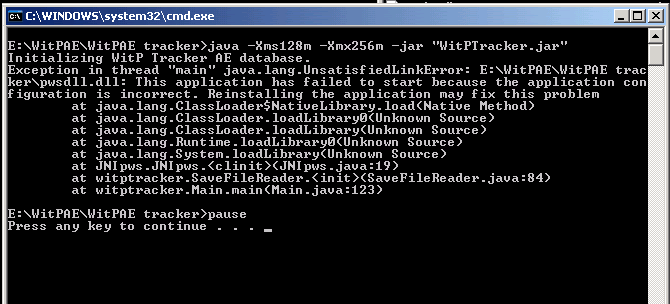
Look like I manage to mess this one too. After numerous reinstalls, I keep getting this

Image

Please, what am I doing wrong?
Image
Post Reply

Return to “War in the Pacific: Admiral's Edition”