

Editor Functions
Moderators: Joel Billings, Sabre21, bcgames
Editor Functions
What do I need to know about these functions when building a new WitE scenario from scratch? Which ones do I need to click on before/during/after I have built my scenario? Thx.

RE: Editor Functions
Most of them should be self explaining.
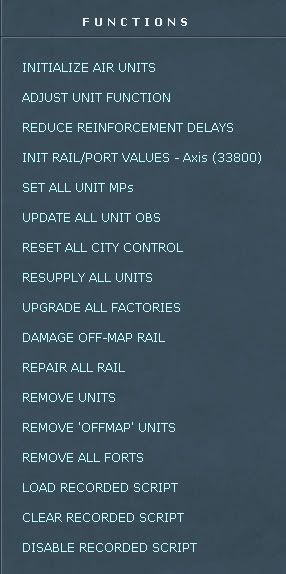
INITIALIZE AIR UNIT - rebuilds all air groups. Quite important function. It runs automatically on some occasions. The advise it to run it once you done any changes to the air groups (ex. imported new csv air group csv file)
ADJUST UNIT FUNCTION - this function does:
- set motorization flag for the appropriate units
- sets ground ranges for the ground elelemts
- resupplies German units and set their morale(!)
- builds supply and fuel dumps at HQs
- set hex terrain data based on city population size
In other words it is very specific function, which shouldn't be used too often.
REDUCE REINFORCEMENTS DELAYS - reduce delay for all delayed units by specified amount of turns
INIT RAIL/PORT VALUES - initializes port values of the water regions and rail capacity for the currently active player. Should run if you switch the starting player and/or change city with port/railyard values and/or ownership
SET ALL UNIT MPs - sets all MP for all on map units
UPDATE ALL UNIT OBS - will update all active unit's OB to match current set date.
RESET ALL CITY CONTROL - reset control of the cities based on the hex ownership. (must be an obsolete function)
RESUPPLY ALL UNITS - resupplies all unit. (I suggest to resupply units either from unit tab or from Commander's report)
UPGRADE ALL FACTORIES - upgrade and expand all factories based on the current set date
DAMAGE OFF-MAP RAIL - damage all rails out of active map area (in case of limited map scenario)
REPAIR ALL RAIL - repairs all rails
REMOVE ALL UNITS - removes all units from the map
REMOVE ALL FORTS - clears all forts
LOAD RECORDED SCRIPT - load AI script .dat file
CLEAR RECORDED SCRIPT - clears recorded AI moves
DISABLE RECORDED SCRIPT - make recorded script inactive
INITIALIZE AIR UNIT - rebuilds all air groups. Quite important function. It runs automatically on some occasions. The advise it to run it once you done any changes to the air groups (ex. imported new csv air group csv file)
ADJUST UNIT FUNCTION - this function does:
- set motorization flag for the appropriate units
- sets ground ranges for the ground elelemts
- resupplies German units and set their morale(!)
- builds supply and fuel dumps at HQs
- set hex terrain data based on city population size
In other words it is very specific function, which shouldn't be used too often.
REDUCE REINFORCEMENTS DELAYS - reduce delay for all delayed units by specified amount of turns
INIT RAIL/PORT VALUES - initializes port values of the water regions and rail capacity for the currently active player. Should run if you switch the starting player and/or change city with port/railyard values and/or ownership
SET ALL UNIT MPs - sets all MP for all on map units
UPDATE ALL UNIT OBS - will update all active unit's OB to match current set date.
RESET ALL CITY CONTROL - reset control of the cities based on the hex ownership. (must be an obsolete function)
RESUPPLY ALL UNITS - resupplies all unit. (I suggest to resupply units either from unit tab or from Commander's report)
UPGRADE ALL FACTORIES - upgrade and expand all factories based on the current set date
DAMAGE OFF-MAP RAIL - damage all rails out of active map area (in case of limited map scenario)
REPAIR ALL RAIL - repairs all rails
REMOVE ALL UNITS - removes all units from the map
REMOVE ALL FORTS - clears all forts
LOAD RECORDED SCRIPT - load AI script .dat file
CLEAR RECORDED SCRIPT - clears recorded AI moves
DISABLE RECORDED SCRIPT - make recorded script inactive
Pavel Zagzin
WITE/WITW/WITE-2/CS-2 Development
WITE/WITW/WITE-2/CS-2 Development
RE: Editor Functions
Thanks Pavel. This was very helpful.
The only thing I'm not clear on at this point is the AI script. Do I have to record AI moves? If, so how?
The only thing I'm not clear on at this point is the AI script. Do I have to record AI moves? If, so how?
RE: Editor Functions
Do I have to record AI moves? If, so how?
John, we are still testing them. Andy works on implementing them in some scenarios.
The way it works - you start the game and play H2H game and all moves are recorded. Then you can import recorded .dat file to your scenario. Next time AI will use your moves.
Pavel Zagzin
WITE/WITW/WITE-2/CS-2 Development
WITE/WITW/WITE-2/CS-2 Development
RE: Editor Functions
Ah-so! Very cool. Is this something I can do now with the current game engine? Or will this be implemented in a future build?
RE: Editor Functions
You can do it now. But I never tried it personally. Andy knows is better.
Pavel Zagzin
WITE/WITW/WITE-2/CS-2 Development
WITE/WITW/WITE-2/CS-2 Development
RE: Editor Functions
Sounds like fun actually. I'll give it a try.
RE: Editor Functions
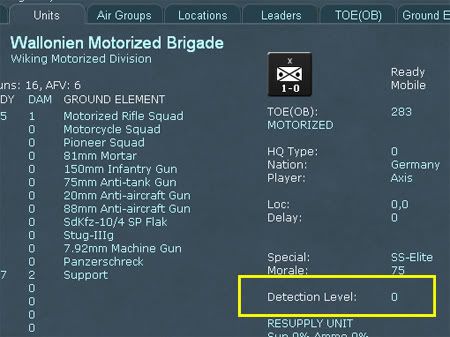
Setting Detection Levels. What should I put here? Is this a "roll-your-own-rule-of-thumb" thing or is the detection level populated by using an editor function?
RE: Editor Functions
I think currently game is setting them randomly on the start (but I can be wrong). There is a task to make a function to set DL to many units at once. Right now you can use CSV.
As for the setting itself - just use the general logic. Closer to the enemy should have higher - further lower. 0 will hide unit.
As for the setting itself - just use the general logic. Closer to the enemy should have higher - further lower. 0 will hide unit.
Pavel Zagzin
WITE/WITW/WITE-2/CS-2 Development
WITE/WITW/WITE-2/CS-2 Development
RE: Editor Functions
Thx Pavel. I can work with this.
-
Grouchy

- Posts: 1016
- Joined: Wed Sep 26, 2001 8:00 am
- Location: Nuenen, Noord-Brabant, Nederland
- Contact:
RE: Editor Functions
Command number. The german armies have them but i don't see them on the Rumanians. What excactly are they for?

- Attachments
-
- commandnumber.jpg (24.27 KiB) Viewed 1652 times

RE: Editor Functions
What excactly are they for?
Used by AI. Many are set from the code.
Pavel Zagzin
WITE/WITW/WITE-2/CS-2 Development
WITE/WITW/WITE-2/CS-2 Development
RE: Editor Functions
How do I change the echelon displayed on the unit icon from Company to Regiment?

I created a new OB called Kampfgruppe using the TOE(OB) tab; ID#600. I don't see a way to change the echelon of command in either the TOE(OB) or Units tab in the editor. How do I do it?
I created a new OB called Kampfgruppe using the TOE(OB) tab; ID#600. I don't see a way to change the echelon of command in either the TOE(OB) or Units tab in the editor. How do I do it?
-
Great_Ajax

- Posts: 4924
- Joined: Mon Oct 28, 2002 6:00 pm
- Location: Oklahoma, USA
RE: Editor Functions
You have to change the suffix of the unit in the TOE(OB) to include the word 'Regiment'.
Trey
Trey
ORIGINAL: bcgames
How do I change the echelon displayed on the unit icon from Company to Regiment?
I created a new OB called Kampfgruppe using the TOE(OB) tab; ID#600. I don't see a way to change the echelon of command in either the TOE(OB) or Units tab in the editor. How do I do it?
"You want mercy!? I'm chaotic neutral!"
WiTE Scenario Designer
WitW Scenario/Data Team Lead
WitE 2.0 Scenario Designer
WiTE Scenario Designer
WitW Scenario/Data Team Lead
WitE 2.0 Scenario Designer
RE: Editor Functions
Ah-HA! Works like a champ! Thanks Trey.

-
Great_Ajax
- Posts: 4924
- Joined: Mon Oct 28, 2002 6:00 pm
- Location: Oklahoma, USA
RE: Editor Functions
No problem. Just keep posting your questions. Me and Pavel need a new crop of disciples to spread the knowledge of the mysterious editor! Best of luck to ya.
Trey
Trey
"You want mercy!? I'm chaotic neutral!"
WiTE Scenario Designer
WitW Scenario/Data Team Lead
WitE 2.0 Scenario Designer
WiTE Scenario Designer
WitW Scenario/Data Team Lead
WitE 2.0 Scenario Designer
RE: Editor Functions
Thanks!
RE: Editor Functions
How do I make the scenario start up centered on the area of operation? Currently, my scenario starts up in the upper left hand corner of the game map (0,0). How do I get it to start-up at the blue box in the shown mini-map?

-
Great_Ajax
- Posts: 4924
- Joined: Mon Oct 28, 2002 6:00 pm
- Location: Oklahoma, USA
RE: Editor Functions
Heh. When you figure that out, let me know  I have suggested that the map only be allowed to scroll around the playable area of the map but it is low priority and difficult to implement.
Trey
I have suggested that the map only be allowed to scroll around the playable area of the map but it is low priority and difficult to implement.Trey
ORIGINAL: bcgames
How do I make the scenario start up centered on the area of operation? Currently, my scenario starts up in the upper left hand corner of the game map (0,0). How do I get it to start-up at the blue box in the shown mini-map?
"You want mercy!? I'm chaotic neutral!"
WiTE Scenario Designer
WitW Scenario/Data Team Lead
WitE 2.0 Scenario Designer
WiTE Scenario Designer
WitW Scenario/Data Team Lead
WitE 2.0 Scenario Designer